
Origins: Runes
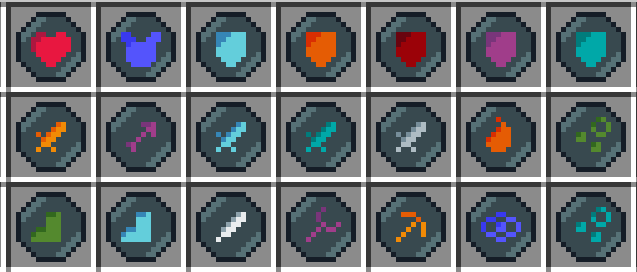
Adds 21 runes to find that grant stat boosts
Screenshots
About this Mod
Runes
Click the image below to be taken to
Runes is a datapack that adds 21 runes to find, ranging anywhere from health boost runes to respiration runes.
They come in 5 rarities, common to legendary, but not every rune is available on every rarity.
Runes can be found in many different places, so lets go over them all
Common runes can be dropped by hostile mobs, having a 1/15 chance
Uncommon and Rare runes can be found from chests, having a 1/4 chance to contain a rune, with the rare runes being rarer of course
Epic runes can be dropped by boss mobs (ender dragon, wither, elder guardian, warden) and has a 50% chance to drop.
Legendary runes are 1 time rewards for completing certain advancements, there are 4 advancements that count, but I'll let you figure out which ones those are.
Now that you know where to find runes, what do you do with them? Well you can equip them in your brand new runes menu of course.
The runes menu can be opened using the playerlist key (default: tab, sneak to view playerlist again), there you will find 7 rune slots, 2 offensive, 2 defensive, 2 supportive, and one accepting all runes.
Just put a rune in a corresponding rune slot to reap the benefits of the rune. Runes of the same type can stack (except for haste and night vision) to achieve even greater effects.
This is a new hidden layer so this will apply to all players.
While not explicitly required, it is highly recommended to use the runes resourcepack for better visual clarity.
Happy rune hunting!
Available Versions
How to Install Origins: Runes on Your Server
Order Server
Order a Minecraft Java server with at least 3 GB RAM (4 GB recommended).
Set datapack Loader
In the panel under "Egg", select the datapack loader and matching Minecraft version (1.20.1).
Install Mod
Open the mod browser in the dashboard and search for "Origins: Runes". Click "Install" – done! Alternatively, upload the .jar via SFTP to the /mods folder.
Compatibility
Mod Loaders
Minecraft Versions
1.20.1, 1.20
Server-side
✓ RequiredRecommended RAM
4 GB(min. 3 GB)Frequently Asked Questions
Origins: Runes server crashes on startup – what to do?
Most common cause: wrong datapack version or insufficient RAM. Check the server log (latest.log) for "OutOfMemoryError" or "Mixin" errors. With Mado Hosting: ensure at least 3 GB RAM is allocated and the loader matches the mod version (1.20.1). You can switch loaders with one click in the panel.
Is Origins: Runes compatible with datapack and fabric?
Origins: Runes officially supports datapack, fabric for Minecraft 1.20.1, 1.20. The Mado dashboard automatically detects incompatible loader combinations.
Server lagging with Origins: Runes – how to optimize performance?
Recommended RAM: 4 GB (per 8 players). Use /spark profiler to check if Origins: Runes consumes the most tick time. Common fixes: reduce server view-distance to 8-10, install "performant" or "starlight" as supplementary mods on Forge. With Mado Hosting, your server runs on NVMe SSDs with dedicated CPU cores for minimal latency.
Similar Mods




Rent Modded Server
Install Origins: Runes with just one click on your server.