
oSzoukaua's: Lucky Blocks
oSzoukaua's: Lucky blocks This is a datapack created by me, oSzoukaua, based on the original mod by the name "Lucky Blocks" This Datapack adds craftable Lucky blocks with varying Luck levels, and a lot of possible different "Events"
Screenshots


About this Mod
Description:
This is a datapack created by me, oSzoukaua, based on the original mod by the name "Lucky Blocks"
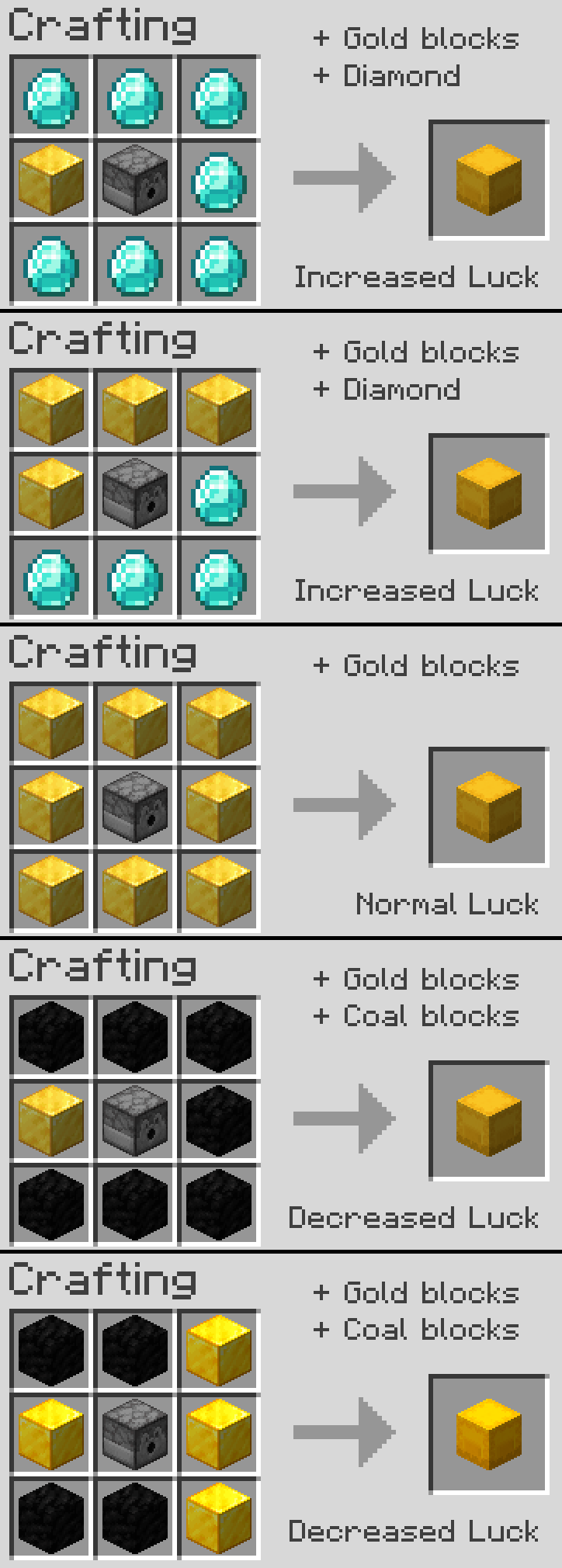
This Datapack adds craftable Lucky blocks, with varying Luck levels from [+100] - [-100]
They can be crafted by surrounding a dispenser with either gold blocks, for a 0 Luck block, or you can replace some gold blocks with either coal blocks, or singular diamonds to increase or decrease luck
Includes a lot of possible different "Events" for each level of luck
From amazingly awesome! to frustratingly annoying.
This Datapack also adds many other features such as Lucky beacons, when you place a Lucky Block ontop of a powered Beacon, and many others! that can be gotten through Events from the Lucky Blocks.
Notes:
This Datapack is currently using a system where a resource pack is not required or needed for convenience of use, but it still manages adds custom block "textures" This may change in the future.
I do not take any ownership or credit for the idea or original creation of the "Lucky Blocks" concept
This is by no means an optimized Datapack, as it is my first Datapack that I have created/worked on, and i have not worked with commands since Version "1.8.9" though I have put my best effort into making it run smoothly without hiccups!
Other:
You are free to use this pack in modpacks/youtube videos and many other forms of sharing
License: ATTRIBUTION-NONCOMMERCIAL-SHAREALIKE 4.0 INTERNATIONAL
If you would like me to port this to any other Minecraft version, i would be more than happy to do so, please contact me! my details are below.
If you do find any issues/have any recommendations, suggestions for optimizations, improvements, or new features to add, feel free to contact me!
Discord
@oSzoukaua

Technical details:
Available Versions
How to Install oSzoukaua's: Lucky Blocks on Your Server
Order Server
Order a Minecraft Java server with at least 4 GB RAM (6 GB recommended).
Set datapack Loader
In the panel under "Egg", select the datapack loader and matching Minecraft version (1.20.1).
Install Mod
Open the mod browser in the dashboard and search for "oSzoukaua's: Lucky Blocks". Click "Install" – done! Alternatively, upload the .jar via SFTP to the /mods folder.
Compatibility
Mod Loaders
Minecraft Versions
1.20.1, 1.20
Server-side
✓ RequiredRecommended RAM
6 GB(min. 4 GB)Frequently Asked Questions
oSzoukaua's: Lucky Blocks server crashes on startup – what to do?
Most common cause: wrong datapack version or insufficient RAM. Check the server log (latest.log) for "OutOfMemoryError" or "Mixin" errors. With Mado Hosting: ensure at least 4 GB RAM is allocated and the loader matches the mod version (1.20.1). You can switch loaders with one click in the panel.
Is oSzoukaua's: Lucky Blocks compatible with datapack and fabric and forge and quilt?
oSzoukaua's: Lucky Blocks officially supports datapack, fabric, forge, quilt for Minecraft 1.20.1, 1.20. Note: Forge and Fabric mods are NOT cross-compatible – pick one loader and stick with it. The Mado dashboard automatically detects incompatible loader combinations.
Server lagging with oSzoukaua's: Lucky Blocks – how to optimize performance?
Recommended RAM: 6 GB (per 5 players). Use /spark profiler to check if oSzoukaua's: Lucky Blocks consumes the most tick time. Common fixes: reduce server view-distance to 8-10, install "performant" or "starlight" as supplementary mods on Forge. With Mado Hosting, your server runs on NVMe SSDs with dedicated CPU cores for minimal latency.
Similar Mods





Rent Modded Server
Install oSzoukaua's: Lucky Blocks with just one click on your server.
Details
- License
- Creative Commons Attribution Non Commercial Share Alike 4.0 International
- Server-side
- Required