
Overheat
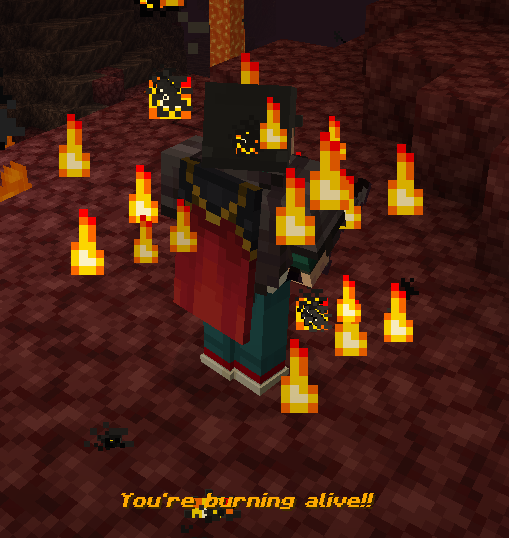
The Nether is heating up! Can you beat the heat? Or will you burn alive in this hellish environment?
Screenshots
About this Mod
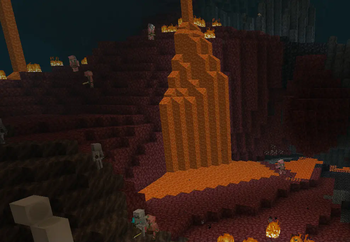
The Nether is a really hot place but have you always found it odd that you can just... walk around in the nether just fine and not worry about burning alive due to the extreme heat of being in literal HELL? Well with Overheat, that all changes!
You can contact me with feedback by messaging "dustfired" on Discord! State that you come from Modrinth or I will think you're a scammer!
This datapack/mod is NOT recommended for new players! This only serves to increase the difficulty of the game!
Inspired by Tough as Nails, this vanilla friendly datapack/mod makes the Nether a bit more of a dangerous place!
- A hidden meter will begin to build up the moment you enter the Nether with various warnings/audio cues as this meter increases. If the meter maxes out you will begin to rapidly take burning damage until you burn to death, leave the Nether, or decrease the meter!
"How do you decrease this meter and survive in the Nether?" you may ask?
- Limit your time in the Nether, bring water bottles/other potions, or just bring fire resistance potions for extended stays in the Nether! Drinking potions reduces your heat meter by a flat amount!
- Upon leaving the Nether your heat meter will rapidly decrease but it will take some time before it fully goes back to empty! Fire Protection and Frost Walker enchantments decrease the meter even faster!
- Fire Resistance potions stop the heat meter from ticking entirely and if your heat meter is partially filled, having Fire Resistance will decrease the meter by half the rate of what it would when you leave the Nether for the duration of the Fire Resistance effect. This overrides bonuses provided by Fire Resistance and Frost Walker enchantments and takes priority!
- It takes 5 minutes for your heat meter to fully max out when you enter the nether. Making sure you are given a fair amount of time should you first be entering the nether in a new world. Warnings will be displayed as the meter progresses along with audio cues.
- Fire Protection and Frost Walker enchantments are your friends here! Enchanting armor with those enchantments can slow down the rate at which the meter increases allowing for longer stays in the nether without Fire Resistance! They even can sometimes delay how quickly you burn to death if your meter is maxed!
- Being on fire or standing on magma blocks doubles the rate at which your heat meter raises! If you're on fire and standing on magma blocks both effects stack for triple the rate!
- Falling into lava without Fire Resistance will INSTANTLY max out the meter! This only applies if this occurs within the nether.
Planned Future Features:
- Negative effects will occur if your meter reaches certain thresholds (Not sure about this one)
Available Versions
How to Install Overheat on Your Server
Order Server
Order a Minecraft Java server with at least 3 GB RAM (4 GB recommended).
Set datapack Loader
In the panel under "Egg", select the datapack loader and matching Minecraft version (26.1.2).
Install Mod
Open the mod browser in the dashboard and search for "Overheat". Click "Install" – done! Alternatively, upload the .jar via SFTP to the /mods folder.
Compatibility
Mod Loaders
Minecraft Versions
26.1.2, 26.1.1, 26.1 (+8 more)
Server-side
✓ RequiredRecommended RAM
4 GB(min. 3 GB)Frequently Asked Questions
Overheat server crashes on startup – what to do?
Most common cause: wrong datapack version or insufficient RAM. Check the server log (latest.log) for "OutOfMemoryError" or "Mixin" errors. With Mado Hosting: ensure at least 3 GB RAM is allocated and the loader matches the mod version (26.1.2). You can switch loaders with one click in the panel.
Is Overheat compatible with datapack and fabric and forge and neoforge?
Overheat officially supports datapack, fabric, forge, neoforge for Minecraft 26.1.2, 26.1.1, 26.1. Note: Forge and Fabric mods are NOT cross-compatible – pick one loader and stick with it. The Mado dashboard automatically detects incompatible loader combinations.
Server lagging with Overheat – how to optimize performance?
Recommended RAM: 4 GB (per 8 players). Use /spark profiler to check if Overheat consumes the most tick time. Common fixes: reduce server view-distance to 8-10, install "performant" or "starlight" as supplementary mods on Forge. With Mado Hosting, your server runs on NVMe SSDs with dedicated CPU cores for minimal latency.
Similar Mods




Rent Modded Server
Install Overheat with just one click on your server.