
Overlay Wardrobe
This mod adds a catalog of toggleable skin overlays, allowing you to instantly customize your look.
Screenshots
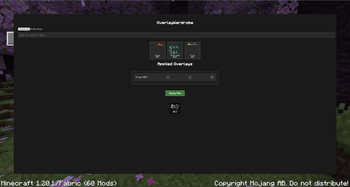
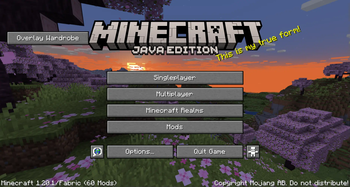
About this Mod
OverlayWardrobe Mod
The OverlayWardrobe mod is a fantastic addition for Minecraft Fabric, designed to give players unparalleled control over their in-game appearance. It introduces a seamless and intuitive way to customize your character's look without the need for complex file manipulations or external tools.
Version
1.20.1 done, 1.21.x planned
Key Features
The core of the OverlayWardrobe mod revolves around its user-friendly accessibility and instant customization:
- Main Menu Integration: Upon launching Minecraft, you'll find a new, dedicated button directly on the main menu. This ensures that accessing the mod's features is always quick and straightforward.
- Extensive Catalog: Clicking the button opens a comprehensive catalog filled with a variety of pre-added skin overlays. These overlays can range from different clothing styles and armor aesthetics to unique accessories, allowing for diverse personalization options.
- Easy Toggling: Within the catalog, you can easily toggle these overlays on or off. This means you can mix and match different elements, experiment with various combinations, and see how they look in real-time.
- Instant Skin Update: Once you've made your selections and are satisfied with your chosen overlays, the mod instantly updates your in-game skin. There's no need to restart your game or navigate through multiple menus; your new look is applied immediately.
Why Use OverlayWardrobe?
OverlayWardrobe is perfect for players who love to express themselves through their character's appearance. Whether you want to roleplay a specific character, match your outfit to your current in-game biome, or simply enjoy changing your style on a whim, this mod provides a convenient and powerful solution. It streamlines the process of skin customization, making it more accessible and enjoyable than ever before.
Available Versions
How to Install Overlay Wardrobe on Your Server
Order Server
Order a Minecraft Java server with at least 3 GB RAM (4 GB recommended).
Set fabric Loader
In the panel under "Egg", select the fabric loader and matching Minecraft version (1.20.1).
Install Mod
Open the mod browser in the dashboard and search for "Overlay Wardrobe". Click "Install" – done! Alternatively, upload the .jar via SFTP to the /mods folder.
Compatibility
Mod Loaders
Minecraft Versions
1.20.1
Server-side
✗ UnsupportedRecommended RAM
4 GB(min. 3 GB)Frequently Asked Questions
Overlay Wardrobe server crashes on startup – what to do?
Most common cause: wrong fabric version or insufficient RAM. Check the server log (latest.log) for "OutOfMemoryError" or "Mixin" errors. With Mado Hosting: ensure at least 3 GB RAM is allocated and the loader matches the mod version (1.20.1). You can switch loaders with one click in the panel.
Is Overlay Wardrobe compatible with fabric?
Overlay Wardrobe officially supports fabric for Minecraft 1.20.1. The Mado dashboard automatically detects incompatible loader combinations.
Server lagging with Overlay Wardrobe – how to optimize performance?
Recommended RAM: 4 GB (per 8 players). Use /spark profiler to check if Overlay Wardrobe consumes the most tick time. Common fixes: reduce server view-distance to 8-10, install "performant" or "starlight" as supplementary mods on Forge. With Mado Hosting, your server runs on NVMe SSDs with dedicated CPU cores for minimal latency.
Similar Mods






Rent Modded Server
Install Overlay Wardrobe with just one click on your server.