
Overtune
Overtune is a clean in-game music player for Minecraft. Browse, play, queue, and organize Minecraft’s soundtrack without leaving the game.
Screenshots
About this Mod
Overtune
A polished in-game music player for Minecraft.
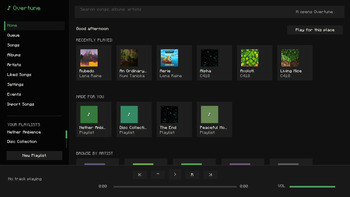
It gives you full control over the game’s soundtrack with a clean, dark, Spotify-inspired interface built directly into Minecraft.
Browse every built-in Minecraft music track by song, album, artist, playlist, or queue. Play tracks on demand, pause, skip, shuffle, repeat, adjust volume, like songs, and build your own playlists without leaving the game.
Overtune also supports imported songs. Drop your own audio files into the import folder, convert them in-game when needed, and add them to your library alongside Minecraft’s original music.
Features:
- Full in-game music player that looks like that one green platform
- Built-in Minecraft soundtrack library
- Songs, albums, artists, liked songs, playlists, and queue
- Import custom songs
- MP3, FLAC, WAV, M4A, AAC, Ogg Opus, and Ogg FLAC conversion support
- Ogg Vorbis direct playback
- Custom playlists with saved local config
- Now-playing toast notifications
- Independent music player volume
- Shuffle, repeat, pause, skip, and seek controls
- Event-based music for moments like rain, danger, boss fights, first Nether entry, first Elytra flight, credits, and more
- Custom song assignments for each event
- Vanilla music suppression so tracks do not overlap
- Keybind support
- Clean dark UI designed to feel natural inside Minecraft
Overtune turns Minecraft’s music into something you can actually control, customize, and experience on your own terms.
Got any ideas? Message @DdiceW on DC.
Available Versions
How to Install Overtune on Your Server
Order Server
Order a Minecraft Java server with at least 3 GB RAM (4 GB recommended).
Set fabric Loader
In the panel under "Egg", select the fabric loader and matching Minecraft version (26.1.2).
Install Mod
Open the mod browser in the dashboard and search for "Overtune". Click "Install" – done! Alternatively, upload the .jar via SFTP to the /mods folder.
Compatibility
Mod Loaders
Minecraft Versions
26.1.2
Server-side
✗ UnsupportedRecommended RAM
4 GB(min. 3 GB)Frequently Asked Questions
Overtune server crashes on startup – what to do?
Most common cause: wrong fabric version or insufficient RAM. Check the server log (latest.log) for "OutOfMemoryError" or "Mixin" errors. With Mado Hosting: ensure at least 3 GB RAM is allocated and the loader matches the mod version (26.1.2). You can switch loaders with one click in the panel.
Is Overtune compatible with fabric?
Overtune officially supports fabric for Minecraft 26.1.2. The Mado dashboard automatically detects incompatible loader combinations.
Server lagging with Overtune – how to optimize performance?
Recommended RAM: 4 GB (per 8 players). Use /spark profiler to check if Overtune consumes the most tick time. Common fixes: reduce server view-distance to 8-10, install "performant" or "starlight" as supplementary mods on Forge. With Mado Hosting, your server runs on NVMe SSDs with dedicated CPU cores for minimal latency.
Similar Mods




Rent Modded Server
Install Overtune with just one click on your server.