
Overwhelmed
Overhauling and adding new features to the Overworld's surface!
Screenshots
About this Mod



Overwhelmed is a Minecraft mod that focuses on enhancing the atmosphere and gameplay of Minecraft's Overworld surface. It achieves this by introducing new flora and fauna systems for ambience and adding new biomes to explore.

Features
- New flora system: Discover a wide variety of vibrant and immersive plant life, including colorful flowers, towering trees, and unique vegetation in different biomes.
- New fauna system: Encounter new animals and creatures in the game world, each with their own behaviors, sounds, and interactions.
- New biomes: Explore exciting and visually stunning biomes that offer unique terrain generation, environmental effects, and resources.
- Enhanced atmosphere: Immerse yourself in an enhanced Overworld experience with improved ambiance, realistic sounds, and visual effects.
- Improved gameplay: Enjoy a more dynamic and engaging gameplay experience with the addition of new features, such as interactive plants and wildlife.
Details:
Natural Blocks:
- Soil
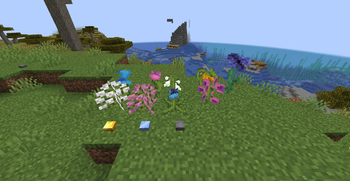
- Floff (Flower)
- Paine (Flower)
- Pink Lavatera (Flower)
- White Lavatera (Flower)
- Squirl (Flower)
- Ringot (Flower)
- Snowdrop (Flower)
- Bell Sunflower (Flower)
- Widow (Flower)
- Gold Bead
- Ice Cube
- Pebble
- Goo Block
Building Blocks:
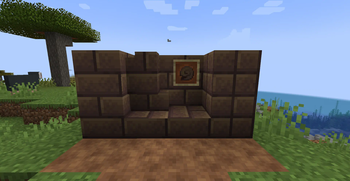
- Snail Shell Brick
- Snail Shell Brick Stairs
- Snail Shell Brick Slab
- Snail Shell Brick Wall
- Chiseled Snail Shell Bricks
Combat:
- Blowgun
- Paper Bullet
Food & Drinks:
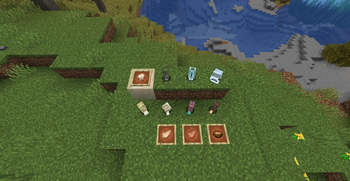
- Raw Snail
- Cooked Snail
- Snail Stew
Ingredients:
- Gooball
Spawn Eggs:
- Butterfly Spawn Egg
- Snail Spawn Egg
Mobs:
Butterflies:
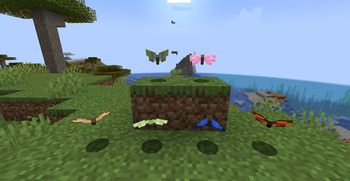
- Cabbage Butterfly
- Cherry Butterfly
- Liverwort Butterfly
- Monarch Butterfly
- Morpho Butterfly
- Sleepy Butterfly
Snails:
- Flat Snail
- Garden Snail
- Gary
- Glass Snail
- Limestone Snail
- Liverwort Snail
- Roman Snail
Installation
Fabric
- Make sure you have Fabric Loader installed. If not, you can download it here.
- Download the latest version of Fabric API from the CurseForge or Modrinth page.
- Download the latest version of Overwhelmed Fabric from the CurseForge page.
- Locate your Minecraft mods folder. This is usually located in
%APPDATA%/.minecraft/modson Windows or~/Library/Application Support/minecraft/modson macOS. - Copy the downloaded mod files into the mods folder.
- Launch Minecraft with the Fabric profile and enjoy the new features added by Overwhelmed!
License and Modpack Usage Terms
Overwhelmed is licensed under the MIT License.
What about modpacks? Can I use this mod for my modpack?
Absolutely! You can add this to your modpack and share it with your friends but you can't sell that modpack.
Contributing
Contributions to Overwhelmed are welcome! If you want to contribute to the project, please follow these steps:
- Fork the repository and clone it to your local machine.
- Make your desired changes or additions.
- Test your changes to ensure they work as expected.
- Create a new pull request, providing a detailed description of your changes and the rationale behind them.
Issues and Feedback
If you encounter any issues while using Overwhelmed or have any suggestions or feedback, please open an issue on the GitHub Issues page. Your feedback is highly appreciated, and it helps improve the mod for everyone.
Credits
Overwhelmed is developed by Endurteam
Available Versions
How to Install Overwhelmed on Your Server
Order Server
Order a Minecraft Java server with at least 4 GB RAM (6 GB recommended).
Set fabric Loader
In the panel under "Egg", select the fabric loader and matching Minecraft version (1.20.4).
Install Mod
Open the mod browser in the dashboard and search for "Overwhelmed". Click "Install" – done! Alternatively, upload the .jar via SFTP to the /mods folder.
Compatibility
Mod Loaders
Minecraft Versions
1.20.4
Server-side
✓ RequiredRecommended RAM
6 GB(min. 4 GB)Frequently Asked Questions
Overwhelmed server crashes on startup – what to do?
Most common cause: wrong fabric version or insufficient RAM. Check the server log (latest.log) for "OutOfMemoryError" or "Mixin" errors. With Mado Hosting: ensure at least 4 GB RAM is allocated and the loader matches the mod version (1.20.4). You can switch loaders with one click in the panel.
Is Overwhelmed compatible with fabric?
Overwhelmed officially supports fabric for Minecraft 1.20.4. The Mado dashboard automatically detects incompatible loader combinations.
Server lagging with Overwhelmed – how to optimize performance?
Recommended RAM: 6 GB (per 5 players). Use /spark profiler to check if Overwhelmed consumes the most tick time. Common fixes: reduce server view-distance to 8-10, install "performant" or "starlight" as supplementary mods on Forge. With Mado Hosting, your server runs on NVMe SSDs with dedicated CPU cores for minimal latency.
Similar Mods




Rent Modded Server
Install Overwhelmed with just one click on your server.