
Overworld Revived
A "vanilla-like" biome mod! Currently features Redwood Forests, Iris Fields, Maple Forests, and will feature biomes like Hot Springs, and more!
Screenshots
About this Mod
Current Features:
Redwood Forest Biome:
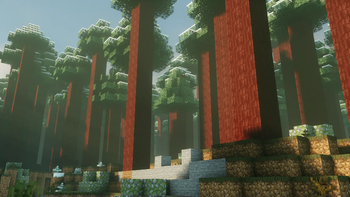
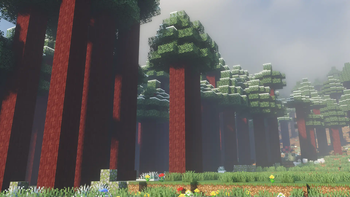
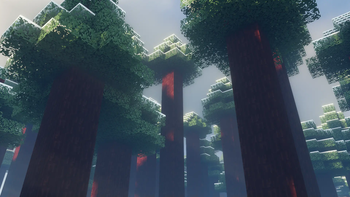
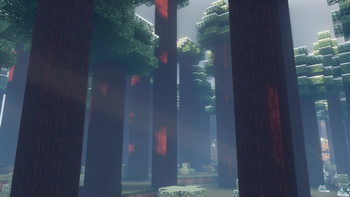
- Explore majestic groves of towering redwood trees, a stunning natural addition to any world. The redwood trees are enormous, with thick trunks and dense canopies, creating a rich and immersive forest environment. Use the unique Redwood building blocks to construct massive structures or add a touch of natural beauty to your builds.
Iris Fields:
- Wander through expansive fields dotted with vibrant blue and purple irises. These irises are not only beautiful but also add a unique aesthetic to your landscape. The fields are shaped similarly to planes, offering a broad, open space filled with these colorful flowers. Each iris flower brings a splash of color, making these fields a picturesque and serene biome to explore.
Maple Forest:
- The Maple Forest biome, featuring trees with striking red foliage.
Immersive environments. It seamlessly integrates with the vanilla game. Whether you're constructing grand structures, embarking on adventures, or simply enjoying the beauty of new landscapes, this mod has something to offer for every type of player. Dive into a world of giant redwoods, colorful iris fields, the vibrant maple forests!
- The Maple Forest biome, featuring trees with striking red foliage.
Planned Features:
Available Versions
How to Install Overworld Revived on Your Server
Order Server
Order a Minecraft Java server with at least 4 GB RAM (6 GB recommended).
Set forge Loader
In the panel under "Egg", select the forge loader and matching Minecraft version (1.20.1).
Install Mod
Open the mod browser in the dashboard and search for "Overworld Revived". Click "Install" – done! Alternatively, upload the .jar via SFTP to the /mods folder.
Compatibility
Mod Loaders
Minecraft Versions
1.20.1
Server-side
✓ RequiredRecommended RAM
6 GB(min. 4 GB)Frequently Asked Questions
Overworld Revived server crashes on startup – what to do?
Most common cause: wrong forge version or insufficient RAM. Check the server log (latest.log) for "OutOfMemoryError" or "Mixin" errors. With Mado Hosting: ensure at least 4 GB RAM is allocated and the loader matches the mod version (1.20.1). You can switch loaders with one click in the panel.
Is Overworld Revived compatible with forge?
Overworld Revived officially supports forge for Minecraft 1.20.1. The Mado dashboard automatically detects incompatible loader combinations.
Server lagging with Overworld Revived – how to optimize performance?
Recommended RAM: 6 GB (per 5 players). Use /spark profiler to check if Overworld Revived consumes the most tick time. Common fixes: reduce server view-distance to 8-10, install "performant" or "starlight" as supplementary mods on Forge. With Mado Hosting, your server runs on NVMe SSDs with dedicated CPU cores for minimal latency.
Similar Mods




Rent Modded Server
Install Overworld Revived with just one click on your server.