
Owls Mod
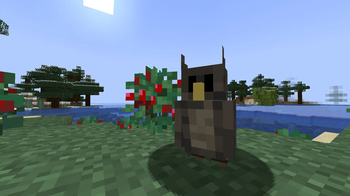
Add Owls to your Minecraft world, with unique potions and behavior!
Screenshots


About this Mod
This mod adds Owls. Unlike other owl mods, this mod is made to be vanilla-friendly while also adding lots of new things, such as the Owl Forest, and levitation potions.
When killed they drop Raw Owl, which can be smelted to get Cooked Owl. You can also get an Owl Feather which can be combined with an awkward potion in a brewing stand to get a potion of Owl, which gives you 3 minutes of levitation - make sure to bring milk! Additionally, owls will try to perch on dead bushes, which may break under the weight of the owl.
Side note: A download would be hugely appreceated, even if you aren't going to use the mod - it helps me a heap.
As for the update: I recreated the entire entity so it's no longer a retextured chicken, which is nice. I also added the Owl dimension, which you can make with nests in a nether portal shape and light with a Portal Igniter. The recipes are added below, but for now you can get them in creative with
/give @s owl:
then select it from the menu.
Here is a list of the recipes in this mod (Prone to updates):
Levitation Potion:

Portal Igniter:

Nest

Available Versions
How to Install Owls Mod on Your Server
Order Server
Order a Minecraft Java server with at least 3 GB RAM (4 GB recommended).
Set neoforge Loader
In the panel under "Egg", select the neoforge loader and matching Minecraft version (1.21.8).
Install Mod
Open the mod browser in the dashboard and search for "Owls Mod". Click "Install" – done! Alternatively, upload the .jar via SFTP to the /mods folder.
Compatibility
Mod Loaders
Minecraft Versions
1.21.8, 1.21.4
Server-side
✓ RequiredRecommended RAM
4 GB(min. 3 GB)Frequently Asked Questions
Owls Mod server crashes on startup – what to do?
Most common cause: wrong neoforge version or insufficient RAM. Check the server log (latest.log) for "OutOfMemoryError" or "Mixin" errors. With Mado Hosting: ensure at least 3 GB RAM is allocated and the loader matches the mod version (1.21.8). You can switch loaders with one click in the panel.
Is Owls Mod compatible with neoforge?
Owls Mod officially supports neoforge for Minecraft 1.21.8, 1.21.4. The Mado dashboard automatically detects incompatible loader combinations.
Server lagging with Owls Mod – how to optimize performance?
Recommended RAM: 4 GB (per 8 players). Use /spark profiler to check if Owls Mod consumes the most tick time. Common fixes: reduce server view-distance to 8-10, install "performant" or "starlight" as supplementary mods on Forge. With Mado Hosting, your server runs on NVMe SSDs with dedicated CPU cores for minimal latency.
Similar Mods



Rent Modded Server
Install Owls Mod with just one click on your server.