
PacketLogger
Client-side packet logger with a web-ui
Screenshots
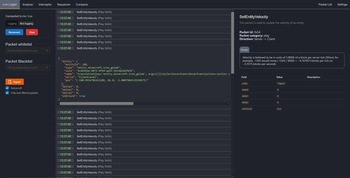
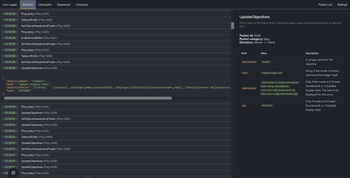
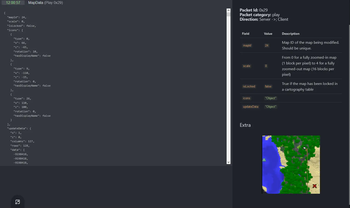
About this Mod
⚠️ Project no longer maintained (and what happens with the frontend)
Since I don't have the time to work on the frontend and the backend, I will discontinue this PacketLogger project. But don't worry, the frontend won't be for nothing.
Developing on both sides takes up a lot of time, especially if you want to implement cool new features on the frontend while the backend contains bugs that must be fixed as to aid users. It's been tough doing that at the same time and I do not wan't to do that anymore. I am mainly a web-developer and I want to continue this passion.
That's why I will stop developing the mod.
But: The frontend will be moved to wisp-forest/gadget. At least that is the current idea. It might take up some weeks before everything is set in place, so I highly encourage you to switch over to gadget if you need an alternative atm.
It has been a pleasent journey working on packetlogger. I learned much about minecraft modding in itself, minecraft packet structure and met wonderful people on the way. If you have some questions, hmu on Twitter or Discord
Fabric Packet Logger
I use this for development at thejocraft.net. Yes, the code may not be the best. If you want to improve it, do it and open a pull request.
Features
- Web-UI (Default Port 8080)
- Websocket Connection (Default Port 1337)
- InGame config
Supported Minecraft Versions
| Minecraft Version | Status | Notes |
|---|---|---|
| 1.19.3 | ⚠️ | A rather scuffed version, since 1.19.4 support existed before 1.19.3, so 1.19.3 was created out of 1.19.4 |
| 1.19.4 | ✔️ |
⚠️ = Packets implemented but not validated
✔️ = Supported
Linked repositories
- Web-UI: aridevelopment-de/fabric-packet-logger-frontend
- Metadata-blocked: aridevelopment-de/fabric-packet-logger-metadata
Commands
/packetloggeris the base command for all subcommands. You should be able to auto-complete them/packetlogger logging on/off- Toggles the logging state/packetlogger open- Opens the web-ui in your browser/packetlogger export- Exports the current stored data in a json format
Supported packets
Clientbound
Serverbound
As developing serializers for each packet takes a lot of time, not every packet is supported. I will add more packets
over time. If you want to help out, feel free to open a pull request.
Why do you not use Reflection to convert the packet data?
There are some reasons why I didn't use Reflection. Here are the main reasons:
- Reflection is slow
- I like live-streaming data instead of analyzing dumps
- My approach with reflection was horrible (see reflection-rewrite/dev branch)
- I may be able to do a lot more with custom serializers
- And I have my own juicy mappings
If you still prefer a reflection-based approach, check out wisp-forest/gadget
Websocket
By default, the web-ui connects to the websocket and receives the packet information via json data. You can also connect
to this websocket as well and receive the same data as the web-ui. I'd recommend
using insomnia or weasel on
firefox.
A protocol has been defined for the websocket. It uses data chunking and lazy loading of packet information to reduce
traffic. See protocol.md for more information.
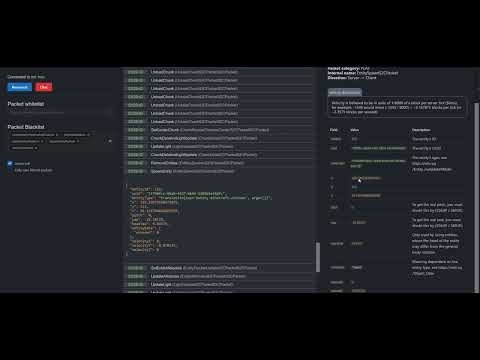
Previews
Video:
MapUpdateAdapter:

Available Versions
How to Install PacketLogger on Your Server
Order Server
Order a Minecraft Java server with at least 3 GB RAM (4 GB recommended).
Set fabric Loader
In the panel under "Egg", select the fabric loader and matching Minecraft version (1.19.4).
Install Mod
Open the mod browser in the dashboard and search for "PacketLogger". Click "Install" – done! Alternatively, upload the .jar via SFTP to the /mods folder.
Compatibility
Mod Loaders
Minecraft Versions
1.19.4, 1.19.3
Server-side
✗ UnsupportedRecommended RAM
4 GB(min. 3 GB)Frequently Asked Questions
PacketLogger server crashes on startup – what to do?
Most common cause: wrong fabric version or insufficient RAM. Check the server log (latest.log) for "OutOfMemoryError" or "Mixin" errors. With Mado Hosting: ensure at least 3 GB RAM is allocated and the loader matches the mod version (1.19.4). You can switch loaders with one click in the panel.
Is PacketLogger compatible with fabric?
PacketLogger officially supports fabric for Minecraft 1.19.4, 1.19.3. The Mado dashboard automatically detects incompatible loader combinations.
Server lagging with PacketLogger – how to optimize performance?
Recommended RAM: 4 GB (per 8 players). Use /spark profiler to check if PacketLogger consumes the most tick time. Common fixes: reduce server view-distance to 8-10, install "performant" or "starlight" as supplementary mods on Forge. With Mado Hosting, your server runs on NVMe SSDs with dedicated CPU cores for minimal latency.
Similar Mods






Rent Modded Server
Install PacketLogger with just one click on your server.