Pack Gate
A simple mod that checks for updates to your modpack.
Screenshots
About this Mod
Pack Gate
A simple modpack update alerter mod for Forge.
Introduction
Pack Gate was born out of the need for a simple modpack version checker that didn't have all kinds of fancy bells and whistles.
A simple mod that just does one thing: Checks for modpack updates.
This is NOT a server mod, it is client-sided only! It WILL crash servers.
How does it work?
Pack Gate works by calling out to a remotely-hosted file the modpack author created and compares the version in that file with the version specified in Pack Gate's config file.
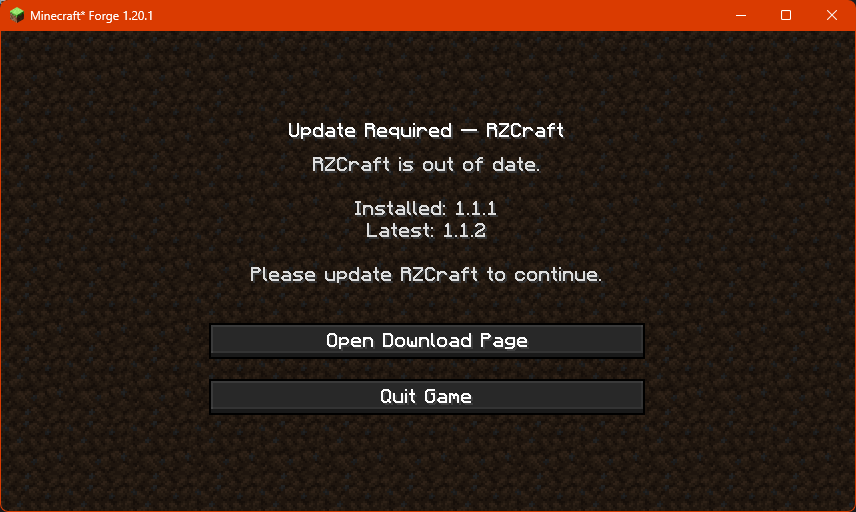
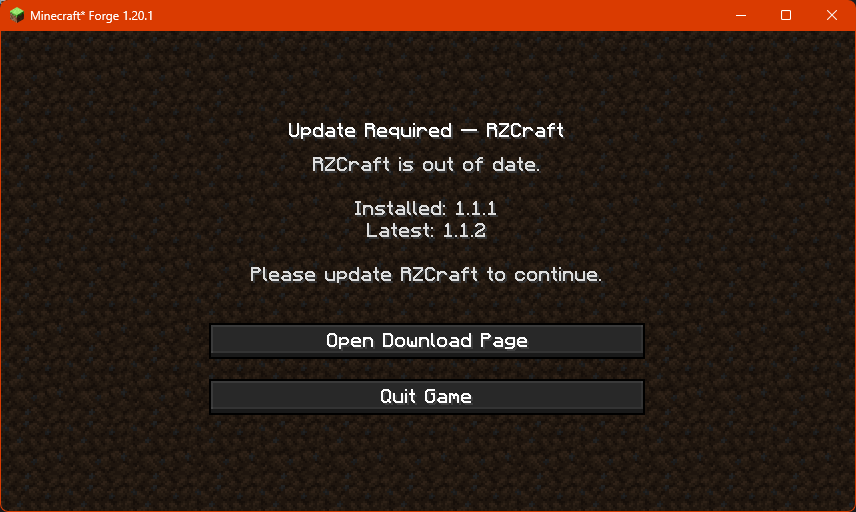
If Pack Gate finds that the remote version is higher than what's been provided in the config, it'll block access to the game and
present the user with this screen:
Configuring Pack Gate
In order to use Pack Gate for your own modpack, you will need to make changes to the mod's config file.
Pack Gate's config is located at config/packgate-client.toml.
What you'll see when you first open the config.
#PackGate client config. Leave fields empty to use built-in fallbacks.
[general]
	modpackName = ""
	modpackVersion = ""
	remoteURL = ""
	downloadURL = ""
	#Use 'auto' to detect; or force 'json' or 'text'.
	format = "auto"
Definitions
| Variable | Input | Required | Information |
|---|---|---|---|
modpackName |
String |
✅ | The friendly name of your modpack. Example: Create+ |
modpackVersion |
String |
✅ | The current version of your modpack. |
remoteURL |
String |
✅ | The web address for your version file. |
downloadURL |
String |
✅ | The web address where users can download the latest version of your modpack. |
format |
String |
✅ | Tells Pack Gate how to interpret your remote version file. auto is the default, it lets the mod interpret your remote file as plain text (txt) or as a JSON file. text forces Pack Gate to only interpret your remote file as a plain text file. json forces Pack Gate to only interpret your remote file as a JSON file. |
About the remote version file
In order to utilize Pack Gate with your modpack, you will need to have the ability to host a text file or JSON file online.
Example plain text file:
1.0.0
Example JSON file:
{
  "latest": "1.0.1",
  "downloadURL": "https://github.com/RavenholmZombie/RZCraft-Modpack/releases/latest"
}
It is important that wherever you host your remote version file has the ability to provide you with a direct URL.
This means that file sharing platforms like MediaFire or MEGA won't work.
A working URL would end with the file and its extension, for example:https://example.com/my_awesome_modpack_version.txt
Platforms like Google Drive and Dropbox can work, but you have to modify the URLs they provide in order to
get access to the direct, raw file.
If you can't host a file remotely on your own, consider sites like PasteBin or even GitHub.
As long as the URL points to the raw text or JSON, Pack Gate will accept it.
A working PasteBin URL like https://pastebin.com/raw/sNBDt7u5 would work.
Available Versions
How to Install Pack Gate on Your Server
Order Server
Order a Minecraft Java server with at least 3 GB RAM (4 GB recommended).
Set forge Loader
In the panel under "Egg", select the forge loader and matching Minecraft version (1.20.1).
Install Mod
Open the mod browser in the dashboard and search for "Pack Gate". Click "Install" – done! Alternatively, upload the .jar via SFTP to the /mods folder.
Compatibility
Mod Loaders
Minecraft Versions
1.20.1
Server-side
✗ UnsupportedRecommended RAM
4 GB(min. 3 GB)Frequently Asked Questions
Pack Gate server crashes on startup – what to do?
Most common cause: wrong forge version or insufficient RAM. Check the server log (latest.log) for "OutOfMemoryError" or "Mixin" errors. With Mado Hosting: ensure at least 3 GB RAM is allocated and the loader matches the mod version (1.20.1). You can switch loaders with one click in the panel.
Is Pack Gate compatible with forge?
Pack Gate officially supports forge for Minecraft 1.20.1. The Mado dashboard automatically detects incompatible loader combinations.
Server lagging with Pack Gate – how to optimize performance?
Recommended RAM: 4 GB (per 8 players). Use /spark profiler to check if Pack Gate consumes the most tick time. Common fixes: reduce server view-distance to 8-10, install "performant" or "starlight" as supplementary mods on Forge. With Mado Hosting, your server runs on NVMe SSDs with dedicated CPU cores for minimal latency.
Similar Mods






Rent Modded Server
Install Pack Gate with just one click on your server.