
Packhub
A amazing mod that lets you use the packs created by a awesome community!
Screenshots
About this Mod
PackHub is a Fabric client-side mod that:
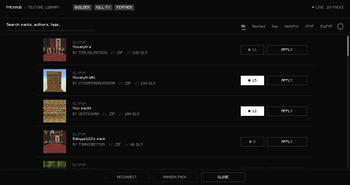
Opens an in‑game hub so you don’t browse the web to find texture packs — open it from the title menu, pause menu, or a configurable keybinding.
Lists community packs with search, filters, previews, starred favourites, download progress, multi-downloads, optional download verification.
Applies packs the normal Minecraft way — after download they show up alongside your other texture packs so you enable and order them yourself.
Pack Builder: pick vanilla items/blocks/particles, map texture names for the builder/export flow, peek your inventory while mapping, bundle a pack skeleton.
Pack Editor: change the shown pack title, tweak per-texture “replaces vanilla id” overrides, reload lists per category.
Feather tooling: browse local Feather profiles and import/export community Feather-style profiles when the backend supports them.
Cosmetic Kill FX: simple full-screen flashes tied to configurable effects, or disable entirely.
Server connection uses auto-discovery plus an override in Settings when you need full control.
Available Versions
How to Install Packhub on Your Server
Order Server
Order a Minecraft Java server with at least 3 GB RAM (4 GB recommended).
Set fabric Loader
In the panel under "Egg", select the fabric loader and matching Minecraft version (26.1.2).
Install Mod
Open the mod browser in the dashboard and search for "Packhub". Click "Install" – done! Alternatively, upload the .jar via SFTP to the /mods folder.
Compatibility
Mod Loaders
Minecraft Versions
26.1.2, 26.1.1, 26.1 (+22 more)
Server-side
✗ UnsupportedRecommended RAM
4 GB(min. 3 GB)Frequently Asked Questions
Packhub server crashes on startup – what to do?
Most common cause: wrong fabric version or insufficient RAM. Check the server log (latest.log) for "OutOfMemoryError" or "Mixin" errors. With Mado Hosting: ensure at least 3 GB RAM is allocated and the loader matches the mod version (26.1.2). You can switch loaders with one click in the panel.
Is Packhub compatible with fabric?
Packhub officially supports fabric for Minecraft 26.1.2, 26.1.1, 26.1. The Mado dashboard automatically detects incompatible loader combinations.
Server lagging with Packhub – how to optimize performance?
Recommended RAM: 4 GB (per 8 players). Use /spark profiler to check if Packhub consumes the most tick time. Common fixes: reduce server view-distance to 8-10, install "performant" or "starlight" as supplementary mods on Forge. With Mado Hosting, your server runs on NVMe SSDs with dedicated CPU cores for minimal latency.
Similar Mods






Rent Modded Server
Install Packhub with just one click on your server.