
Pakko
Client-sided mod for automated, convenient resource pack hosting for LAN worlds
Screenshots
About this Mod
Pakko
Client-sided mod for automated, convenient resource pack hosting for LAN worlds.
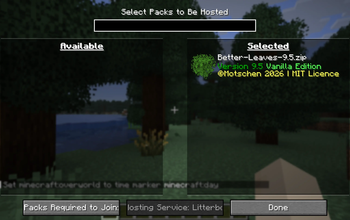
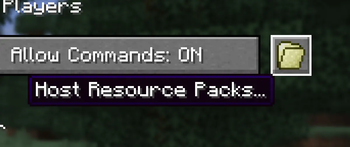
Select packs you want to host with a vanilla-friendly GUI, and publish within one click.
Currently the following services are available:
Some Motivations
I've been playing some maps with my friends via LAN lately, and many of them have built-in resource packs.
Since initially the packs are only loaded in the host's game, it's always been a real bummer, either requiring
everyone to download from a website or sharing the pack elsewhere.
This got me thinking, what if people can simply have their required packs hosted upon publishing the LAN world?
Since Minecraft itself supports server-managed resource packs, it might be possible to adapt this mechanism to
work with integrated servers beautifully.
I initially selected (and still use) Litterbox as the primary pack hosting service with built-in support as
it's totally free and has a delightfully lightweight public-facing API. Expect more options to come.
Configuration
Configurations are stored per world. Normally you can access most of the settings within the game with a
vanilla-ish pack selection GUI. Yet sometimes, if you want to alter some advanced settings (e.g. adding extra
directories in the resource packs for the mod to merge), the config file is located at<WORLD_FOLDER>/pakko.json. The field names are pretty self-explanatory.
Support
This mod is supported on Fabric and on Minecraft versions from 1.21 to 26.1.2. I might backport the mod if I
have time. (Neo)Forge won't be supported as the mod primarily targets vanilla scenarios, most of which are
niche when coupled with (Neo)Forge.
Available Versions
How to Install Pakko on Your Server
Order Server
Order a Minecraft Java server with at least 3 GB RAM (4 GB recommended).
Set fabric Loader
In the panel under "Egg", select the fabric loader and matching Minecraft version (26.1.2).
Install Mod
Open the mod browser in the dashboard and search for "Pakko". Click "Install" – done! Alternatively, upload the .jar via SFTP to the /mods folder.
Compatibility
Mod Loaders
Minecraft Versions
26.1.2, 26.1.1, 26.1 (+12 more)
Server-side
✗ UnsupportedRecommended RAM
4 GB(min. 3 GB)Frequently Asked Questions
Pakko server crashes on startup – what to do?
Most common cause: wrong fabric version or insufficient RAM. Check the server log (latest.log) for "OutOfMemoryError" or "Mixin" errors. With Mado Hosting: ensure at least 3 GB RAM is allocated and the loader matches the mod version (26.1.2). You can switch loaders with one click in the panel.
Is Pakko compatible with fabric and quilt?
Pakko officially supports fabric, quilt for Minecraft 26.1.2, 26.1.1, 26.1. The Mado dashboard automatically detects incompatible loader combinations.
Server lagging with Pakko – how to optimize performance?
Recommended RAM: 4 GB (per 8 players). Use /spark profiler to check if Pakko consumes the most tick time. Common fixes: reduce server view-distance to 8-10, install "performant" or "starlight" as supplementary mods on Forge. With Mado Hosting, your server runs on NVMe SSDs with dedicated CPU cores for minimal latency.
Similar Mods






Rent Modded Server
Install Pakko with just one click on your server.