
Panorama Creator
A simple client-side mod that allows you to easily capture and create custom main menu panoramas directly from the game.
Screenshots
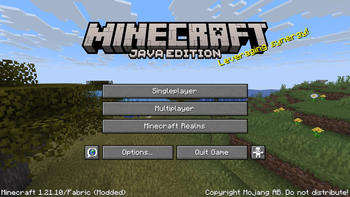
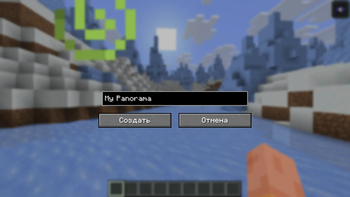
About this Mod
Panorama Creator
Panorama Creator is a lightweight, client-side Fabric mod that makes creating custom main menu panoramas incredibly easy! No more manual screenshotting, cropping, or dealing with complex folder structures — the mod does everything for you.
✨ Features
- One-Click Capture: Simply press a hotkey to instantly capture a perfect 360-degree panorama of your current surroundings.
- Custom Names: Give your panoramas custom names through an in-game GUI so you can easily organize multiple backgrounds.
- Automatic Resource Pack Generation: The mod automatically compiles the captured screenshots into a ready-to-use Minecraft resource pack.
- No Dependencies: This mod is fully standalone and does NOT require the Fabric API to work!
🎮 How to use
- Find a beautiful spot in your Minecraft world.
- Press
F1 + K(default keybind) to open the Panorama Creator menu. - Enter a custom name for your new panorama and click Create.
- The mod will quickly hide your GUI, adjust your FOV, take 6 precise screenshots, and generate a resource pack.
- Go to Options -> Resource Packs... and enable your newly created panorama pack.
- Return to the main menu and enjoy your custom background!
⚙️ Installation
Just drop the .jar file into your mods folder. You only need the standard Fabric Loader. (Fabric API is not required).
Note: Since this is a purely client-side mod, it works perfectly on multiplayer servers and realms!
Available Versions
How to Install Panorama Creator on Your Server
Order Server
Order a Minecraft Java server with at least 3 GB RAM (4 GB recommended).
Set fabric Loader
In the panel under "Egg", select the fabric loader and matching Minecraft version (1.21.11).
Install Mod
Open the mod browser in the dashboard and search for "Panorama Creator". Click "Install" – done! Alternatively, upload the .jar via SFTP to the /mods folder.
Compatibility
Mod Loaders
Minecraft Versions
1.21.11, 1.21.10
Server-side
✗ UnsupportedRecommended RAM
4 GB(min. 3 GB)Frequently Asked Questions
Panorama Creator server crashes on startup – what to do?
Most common cause: wrong fabric version or insufficient RAM. Check the server log (latest.log) for "OutOfMemoryError" or "Mixin" errors. With Mado Hosting: ensure at least 3 GB RAM is allocated and the loader matches the mod version (1.21.11). You can switch loaders with one click in the panel.
Is Panorama Creator compatible with fabric?
Panorama Creator officially supports fabric for Minecraft 1.21.11, 1.21.10. The Mado dashboard automatically detects incompatible loader combinations.
Server lagging with Panorama Creator – how to optimize performance?
Recommended RAM: 4 GB (per 8 players). Use /spark profiler to check if Panorama Creator consumes the most tick time. Common fixes: reduce server view-distance to 8-10, install "performant" or "starlight" as supplementary mods on Forge. With Mado Hosting, your server runs on NVMe SSDs with dedicated CPU cores for minimal latency.
Rent Modded Server
Install Panorama Creator with just one click on your server.