
Paradigm
A server side mod. Restart Scheduler, Groupchat, StaffChat, Custom Commands, Announcements, MOTD
Screenshots




About this Mod
Paradigm
Paradigm is a modular server administration and communication toolkit for Minecraft.
It combines announcements, chat tools, automation, and server management into one configurable system designed for modern modded servers.
Version: 2.1.0
Author: Avalanche7CZ
License: CC-BY-NC-ND-4.0
✨ What Paradigm Adds
Paradigm focuses on server communication, automation, and quality-of-life tools.
Server Announcements
- Scheduled announcements
- Chat / Actionbar / Title / Bossbar broadcasts
- Random message rotation
- Dynamic formatting with colors and components

Communication Tools
- Private messaging (
/msg,/tell,/w,/whisper) - Quick reply (
/reply,/r) - Mentions using
@PlayerName - Staff chat channel
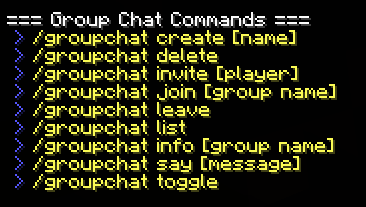
- Group chats
- Custom join & leave messages

Advanced Message Formatting
- Rich text components
- Hex colors (
&#RRGGBB) - Clickable links
- Hover events
- Command execution
- Placeholder support

Server List Customization
- Dynamic MOTD rotation
- Multiple MOTD profiles
- Custom server icons
- Random icon rotation
- In-game welcome MOTD

Server Automation
- Restart scheduler
- Restart warning broadcasts
- Countdown timers
- Custom commands

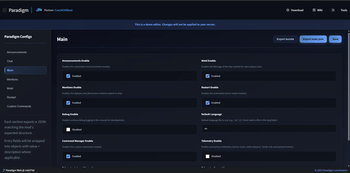
Web Configuration Editor
- Edit configs without restarting the server
- Live configuration updates
- Web-based UI

Commands Reference
Main Commands
/paradigm- Display main Paradigm help/paradigm help- Show help for Paradigm modules/paradigm help <module>- Show help for a specific module/paradigm reload <config>- Reload specific config (main, announcements, chat, motd, mention, restart, customcommands, all)/paradigm editor- Access web configuration editor/paradigm apply <code>- Apply web editor changes from code
Broadcast Commands
/paradigm broadcast <message>- Send chat broadcast/paradigm actionbar <message>- Send actionbar message/paradigm title <title || subtitle>- Send title/subtitle message/paradigm bossbar <interval> <color> <message>- Send bossbar message
Private Messages
/msg <player> <message>- Send a private message/tell <player> <message>- Alias for/msg/w <player> <message>- Alias for/msg/whisper <player> <message>- Alias for/msg/reply <message>- Reply to your last PM conversation/r <message>- Alias for/reply
Restart Management
/restart now- Schedule an immediate server restart/restart cancel- Cancel a scheduled restart
Staff Chat
/sc- Toggle staff chat mode/sc toggle- Toggle staff chat mode
Group Chat
/groupchat create <name>- Create a new group chat/groupchat join <name>- Join an existing group chat/groupchat leave- Leave current group chat
Mentions
/mention <player>- Mention a specific player
Web Editor
/paradigm editor trust- Trust a player for web editor access/paradigm editor untrust- Remove web editor trust/paradigm editor trusted- List trusted players
Permissions
Paradigm uses LuckPerms for permission management. Common permission nodes:
paradigm.mention.everyone     # Use @everyone in Mentions
paradigm.mention.player       # Mention individual players
paradigm.msg                  # Send private messages (/msg, /tell, /w, /whisper)
paradigm.reply                # Reply to private messages (/reply, /r)
paradigm.staff                # Access staff chat (/sc)
paradigm.restart.manage       # Manage server restarts
paradigm.broadcast            # Access /paradigm broadcast, actionbar, title, bossbar
paradigm.reload               # Reload configurations
paradigm.editor               # Access /paradigm editor and /paradigm apply
paradigm.groupchat            # Use group chat commands
License
This project is licensed under the CC-BY-NC-ND-4.0 license. See the LICENSE file for details.
- ✅ You can use this project
- ❌ You cannot modify it
- ❌ You cannot distribute it commercially
- ✅ You must give credit to the author
💬 Support & Community
Need help or want to suggest features?
Join the community:

❤️ Support Development
If you enjoy Paradigm and want to support development:

Credits
Paradigm is developed and maintained by Avalanche7CZ.
Available Versions
How to Install Paradigm on Your Server
Order Server
Order a Minecraft Java server with at least 3 GB RAM (4 GB recommended).
Set fabric Loader
In the panel under "Egg", select the fabric loader and matching Minecraft version (1.21.11).
Install Mod
Open the mod browser in the dashboard and search for "Paradigm". Click "Install" – done! Alternatively, upload the .jar via SFTP to the /mods folder.
Compatibility
Mod Loaders
Minecraft Versions
1.21.11, 1.21.8, 1.21.7 (+8 more)
Server-side
✓ RequiredRecommended RAM
4 GB(min. 3 GB)Frequently Asked Questions
Paradigm server crashes on startup – what to do?
Most common cause: wrong fabric version or insufficient RAM. Check the server log (latest.log) for "OutOfMemoryError" or "Mixin" errors. With Mado Hosting: ensure at least 3 GB RAM is allocated and the loader matches the mod version (1.21.11). You can switch loaders with one click in the panel.
Is Paradigm compatible with fabric and forge and neoforge?
Paradigm officially supports fabric, forge, neoforge for Minecraft 1.21.11, 1.21.8, 1.21.7. Note: Forge and Fabric mods are NOT cross-compatible – pick one loader and stick with it. The Mado dashboard automatically detects incompatible loader combinations.
Server lagging with Paradigm – how to optimize performance?
Recommended RAM: 4 GB (per 8 players). Use /spark profiler to check if Paradigm consumes the most tick time. Common fixes: reduce server view-distance to 8-10, install "performant" or "starlight" as supplementary mods on Forge. With Mado Hosting, your server runs on NVMe SSDs with dedicated CPU cores for minimal latency.
Similar Mods






Rent Modded Server
Install Paradigm with just one click on your server.
Details
- License
- Creative Commons Attribution Non Commercial No Derivatives 4.0 International
- Server-side
- Required