
Particoid (Unofficial)
Allows you to freely adjust the maximum particle count in Minecraft on the client side.
Screenshots
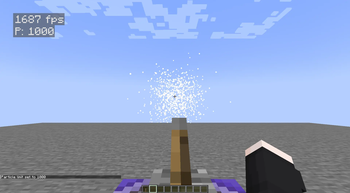


About this Mod
✨ Particoid
Take Control of Minecraft's Particle Effects! ✨
📜 Overview
Particoid is a lightweight, performance-focused mod that gives players full control over Minecraft's particle effects. You can set a custom maximum particle limit to reduce visual clutter and improve performance-especially useful for low-end PCs or situations with heavy particle usage.
⚡ Features
- 🎯 Adjustable Particle Limits: Set your own maximum particle count.
- 🔄 Dynamic Control: Change settings instantly without restarting the game.
- 🚀 Performance Boost: Reduce lag caused by excessive particles.
- 💡 Simple Commands: No configuration files required.
- 🤝 Mod-Friendly: Works well with most mods and modpacks.
💻 How It Works
📋 Commands
Reset to Default
/particoid default
Resets the particle limit to Minecraft’s default.
Set Maximum Particles
/particoid set <value>
Replace <value> with any number you prefer.
Example:
/particoid set 300
This limits particle effects to 300, helping reduce potential lag.
Get Current Setting
/particoid get
Shows the current maximum particle limit.
🎮 Why Use Particoid?
- Improve performance during particle-heavy situations
- Customize your game experience the way you like it
- Great for lightweight or performance-focused modpacks
- Extremely small and efficient - minimal resource usage
✅ Important Notes
- Compatibility: Works with most Minecraft mods
- Dependencies: None
- Supported Versions: Minecraft 1.20.1-1.21.4
- Loader Required: Fabric 0.16.12+
- Fabric Only: Not compatible with Forge or other loaders
📎 Official Information & License
- Modrinth: https://modrinth.com/mod/particoid
- Original Developer: Novaritia001
- Modrinth Profile: https://modrinth.com/user/Novaritia001
- GitHub: https://github.com/Novaritia
- Website: https://novaovalist.dev/
⚠️ This is an unofficial modified version of Particoid.
Original work © Novaritia001
Modifications © PPekKunGzDev, 2025
Available Versions
How to Install Particoid (Unofficial) on Your Server
Order Server
Order a Minecraft Java server with at least 3 GB RAM (4 GB recommended).
Set fabric Loader
In the panel under "Egg", select the fabric loader and matching Minecraft version (1.21.4).
Install Mod
Open the mod browser in the dashboard and search for "Particoid (Unofficial)". Click "Install" – done! Alternatively, upload the .jar via SFTP to the /mods folder.
Compatibility
Mod Loaders
Minecraft Versions
1.21.4, 1.21.3, 1.21.2 (+7 more)
Server-side
✗ UnsupportedRecommended RAM
4 GB(min. 3 GB)Frequently Asked Questions
Particoid (Unofficial) server crashes on startup – what to do?
Most common cause: wrong fabric version or insufficient RAM. Check the server log (latest.log) for "OutOfMemoryError" or "Mixin" errors. With Mado Hosting: ensure at least 3 GB RAM is allocated and the loader matches the mod version (1.21.4). You can switch loaders with one click in the panel.
Is Particoid (Unofficial) compatible with fabric?
Particoid (Unofficial) officially supports fabric for Minecraft 1.21.4, 1.21.3, 1.21.2. The Mado dashboard automatically detects incompatible loader combinations.
Server lagging with Particoid (Unofficial) – how to optimize performance?
Recommended RAM: 4 GB (per 8 players). Use /spark profiler to check if Particoid (Unofficial) consumes the most tick time. Common fixes: reduce server view-distance to 8-10, install "performant" or "starlight" as supplementary mods on Forge. With Mado Hosting, your server runs on NVMe SSDs with dedicated CPU cores for minimal latency.
Similar Mods






Rent Modded Server
Install Particoid (Unofficial) with just one click on your server.