
PartyBox
PartyBox is a Minecraft mod for music, playlists, and live event audio. Create immersive moments with custom songs, synced announcements, and simple playback controls for servers, roleplay, minigames, concerts, lobbies, and more.
Screenshots
About this Mod
PartyBox
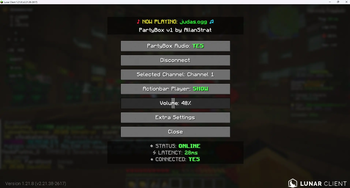
PartyBox is a client-side Fabric mod that enables live, server-controlled music and audio streaming in Minecraft.
It connects your Minecraft client to an external PartyBox backend, allowing players to tune into up to five independent live audio channels. Each channel can play different audio simultaneously, giving players full control over what they hear.
Private Access Notice
PartyBox is currently intended for private events.
Adding songs and controlling playback is restricted to approved users.
Access requests: DM @AllanStrat on Discord
Features
- Compatible with Lunar Client
- Compatible with DiosesMC modpack
- English and Spanish language support
- Live streamed audio from an external backend
- Five independent audio channels
- Client-side channel selector
- Optional "hear all channels" mode
- In-game volume control
- RGB "Now Playing" display
- Optional actionbar overlay
/partyboxcommands for authorized users- Token-based backend permissions
- Per-token channel restrictions
- Web dashboard for song management and playback monitoring
- Protected upload system for approved users
How It Works
PartyBox uses an external backend service to stream decoded PCM audio to Minecraft clients over WebSocket.
The backend plays .ogg files on one of five logical channels. Example:
partybox play judas.ogg 3
This plays judas.ogg on Channel 3 for players listening to that channel.
Player Controls
Players can:
- Select Channel 1–5
- Adjust volume
- Switch channels in real time
- Enable or disable the actionbar player
- Optionally hear all active channels simultaneously
Admin and Token Access
Playback and uploads are protected by backend tokens.
Tokens can be restricted by permissions and channel access. For example, a token may only allow playback on Channel 5, while an admin token can control all channels.
Supported Actions
- Play audio on a channel
- Stop channel playback
- Adjust channel volume
- Upload
.oggfiles via the web dashboard (if permitted)
Web Dashboard
PartyBox includes a lightweight web dashboard:
The dashboard provides:
- List of uploaded songs
- Current "Now Playing" status across channels
- Upload interface for authorized users
Song uploads require a valid authorized token.
Example Use Cases
- Server-wide music events
- Roleplay radio systems
- Theme park rides and attractions
- Staff announcement channels
- Minigame music and alerts
- Party hubs and social spaces
- Ambient zones or DJ-style live events
- Private event broadcasting
Compatibility
- Minecraft: Fabric
- Environment: Client-side mod
- Backend: External PartyBox server
- Audio Format:
.ogg - Channels: 5 independent channels
Notes
- PartyBox is not a voice chat replacement
- An external backend server is required
- Players only hear selected channels
- Admin controls and uploads are restricted by tokens
- Public access depends on server configuration
Summary
PartyBox brings live multi-channel audio streaming to Minecraft through a lightweight Fabric client and a dedicated backend server.
Whether running a roleplay station, live event, theme park ride, music room, minigame, or private party, PartyBox provides a simple and flexible way for players to tune in and experience synchronized audio.
Available Versions
How to Install PartyBox on Your Server
Order Server
Order a Minecraft Java server with at least 3 GB RAM (4 GB recommended).
Set fabric Loader
In the panel under "Egg", select the fabric loader and matching Minecraft version (1.21.11).
Install Mod
Open the mod browser in the dashboard and search for "PartyBox". Click "Install" – done! Alternatively, upload the .jar via SFTP to the /mods folder.
Compatibility
Mod Loaders
Minecraft Versions
1.21.11, 1.21.10, 1.21.9 (+2 more)
Server-side
✗ UnsupportedRecommended RAM
4 GB(min. 3 GB)Frequently Asked Questions
PartyBox server crashes on startup – what to do?
Most common cause: wrong fabric version or insufficient RAM. Check the server log (latest.log) for "OutOfMemoryError" or "Mixin" errors. With Mado Hosting: ensure at least 3 GB RAM is allocated and the loader matches the mod version (1.21.11). You can switch loaders with one click in the panel.
Is PartyBox compatible with fabric?
PartyBox officially supports fabric for Minecraft 1.21.11, 1.21.10, 1.21.9. The Mado dashboard automatically detects incompatible loader combinations.
Server lagging with PartyBox – how to optimize performance?
Recommended RAM: 4 GB (per 8 players). Use /spark profiler to check if PartyBox consumes the most tick time. Common fixes: reduce server view-distance to 8-10, install "performant" or "starlight" as supplementary mods on Forge. With Mado Hosting, your server runs on NVMe SSDs with dedicated CPU cores for minimal latency.
Similar Mods




Rent Modded Server
Install PartyBox with just one click on your server.