
Paxi Plus
An addon for Paxi, porting 1.21+ feature for loading packs from any folder and supporting built-in packs!
Screenshots


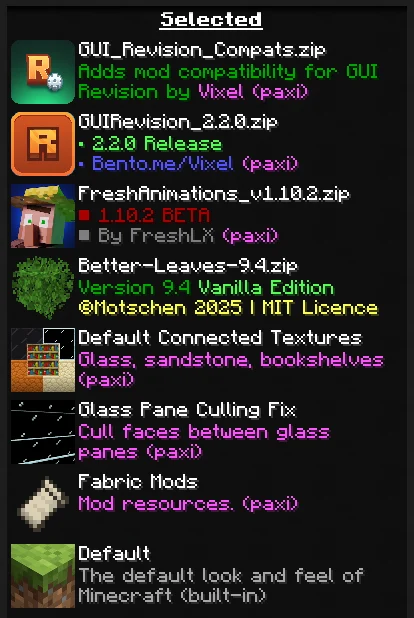
About this Mod


This is an addon for Paxi, serving six purposes:
- Backporting the 1.21+ Paxi feature for loading packs from any folder (See #33)
- Fixes a issue where developers are unable to get monetized due to Modrinth not recognizing the Paxi folder. If you use the resourcepacks folder it will embed them properly now.
- Making it possible to use Paxi for built-in resourcepacks and datapacks added by mods (See #27)
- Restricting Paxi from auto-loading packs in
config -> paxi -> resourcepacksanddatapacksif they're not listed inresourcepack_load_order.jsonordatapacks_load_order.jsonfor datapacks. - Letting Paxi generate datapack folder and JSON file on the start-up instead of after world generation
- Removes the unnecessary arrows on the packs that are loaded with Paxi to avoid confusion for modpack users
- Adding a
--user--flag which let's you define where the user packs should go, can be helpful if you want the normally loaded packs to go above Paxi ones or anywhere you want
How to use?
Unlike how old load order works, now you can specify directories in your instance's folder.
Also, for using the built-in pack support, you need the ID of the pack. You can either check the mod's source code, try to guess it, or use the Resource Pack Overrides mod and hold D on the resourcepack screen to see the IDs of all packs.
Paxi Load Order JSON Example:

In Game:

It is NOT required to load fabric and other built-in packs with Paxi, it's there as an optional feature.
Available Versions
How to Install Paxi Plus on Your Server
Order Server
Order a Minecraft Java server with at least 3 GB RAM (4 GB recommended).
Set fabric Loader
In the panel under "Egg", select the fabric loader and matching Minecraft version (1.20.1).
Install Mod
Open the mod browser in the dashboard and search for "Paxi Plus". Click "Install" – done! Alternatively, upload the .jar via SFTP to the /mods folder.
Compatibility
Mod Loaders
Minecraft Versions
1.20.1
Server-side
~ OptionalRecommended RAM
4 GB(min. 3 GB)Frequently Asked Questions
Paxi Plus server crashes on startup – what to do?
Most common cause: wrong fabric version or insufficient RAM. Check the server log (latest.log) for "OutOfMemoryError" or "Mixin" errors. With Mado Hosting: ensure at least 3 GB RAM is allocated and the loader matches the mod version (1.20.1). You can switch loaders with one click in the panel.
Is Paxi Plus compatible with fabric?
Paxi Plus officially supports fabric for Minecraft 1.20.1. The Mado dashboard automatically detects incompatible loader combinations.
Server lagging with Paxi Plus – how to optimize performance?
Recommended RAM: 4 GB (per 8 players). Use /spark profiler to check if Paxi Plus consumes the most tick time. Common fixes: reduce server view-distance to 8-10, install "performant" or "starlight" as supplementary mods on Forge. With Mado Hosting, your server runs on NVMe SSDs with dedicated CPU cores for minimal latency.
Similar Mods






Rent Modded Server
Install Paxi Plus with just one click on your server.