
Pebble's Backpack
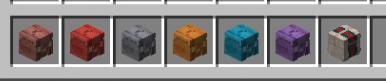
Fully server-sided shareable backpack mod made for Fabric! Create different tiers of backpacks including Leather, Copper, Iron, Gold, Diamond and Netherite!
Screenshots
About this Mod
I created this fairly simple server-sided backpack mod and thought maybe other servers might want to check it out! The mod is still in its early stages so if you run into any issue please let me know!

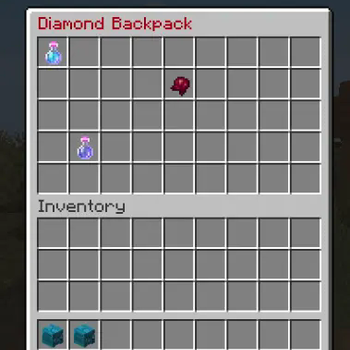
The backpack mod allows for users to store data on the go and use it at the same time as other people that has the backpack with the same ID.
Permission nodepebbles.admin: For all admin backpack commands. There are no commands for an average joe on the server, the backpacks are a physical item.
Commands:/padmin bp create TIER PLAYERNAME: Create a backpack for a specific player. Tiers includes: leather (3x3), copper (9x2), iron (9x3), gold (9x4), diamond (9x5), netherite (9x6)
Special thanks to Minecraft-heads for hosting these skins: https://minecraft-heads.com//padmin bp ID: View backpack with the specific ID/padmin bp get ID: Get a copy of the backpack that can be used together at the same time. Great for players who want to share their inventory
The backpack data is stored in /world/pebbles_backpacks.json
Current limitations:
- Cannot right click drag items around the backpack.
- Backpack owner names aren't stored properly yet (still accessible through backpack ID)
- Minor optimization still on the way
Available Versions
How to Install Pebble's Backpack on Your Server
Order Server
Order a Minecraft Java server with at least 3 GB RAM (4 GB recommended).
Set fabric Loader
In the panel under "Egg", select the fabric loader and matching Minecraft version (1.21.1).
Install Mod
Open the mod browser in the dashboard and search for "Pebble's Backpack". Click "Install" – done! Alternatively, upload the .jar via SFTP to the /mods folder.
Compatibility
Mod Loaders
Minecraft Versions
1.21.1, 1.20.1, 1.19.2
Server-side
✓ RequiredRecommended RAM
4 GB(min. 3 GB)Frequently Asked Questions
Pebble's Backpack server crashes on startup – what to do?
Most common cause: wrong fabric version or insufficient RAM. Check the server log (latest.log) for "OutOfMemoryError" or "Mixin" errors. With Mado Hosting: ensure at least 3 GB RAM is allocated and the loader matches the mod version (1.21.1). You can switch loaders with one click in the panel.
Is Pebble's Backpack compatible with fabric?
Pebble's Backpack officially supports fabric for Minecraft 1.21.1, 1.20.1, 1.19.2. The Mado dashboard automatically detects incompatible loader combinations.
Server lagging with Pebble's Backpack – how to optimize performance?
Recommended RAM: 4 GB (per 8 players). Use /spark profiler to check if Pebble's Backpack consumes the most tick time. Common fixes: reduce server view-distance to 8-10, install "performant" or "starlight" as supplementary mods on Forge. With Mado Hosting, your server runs on NVMe SSDs with dedicated CPU cores for minimal latency.
Similar Mods




Rent Modded Server
Install Pebble's Backpack with just one click on your server.