
Pebble's Chest Shop
Player chest shop for Fabric with Flan and Impactor support.
Screenshots
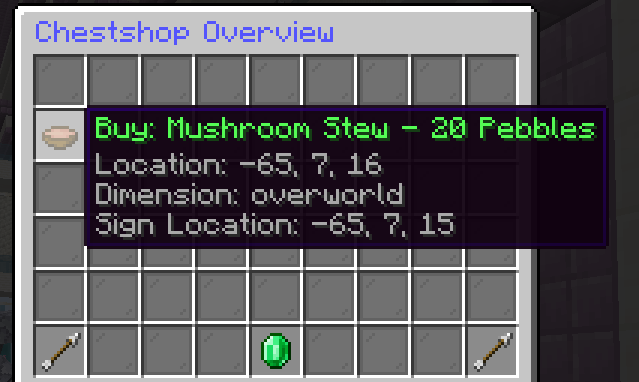
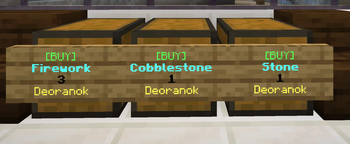
About this Mod
Pebble's Chest Shop

Make sure you have Fabric Language Kotlin installed!
This mod also requires Architectury
Config is generated in config/pebbles-chestshop/config.json, make sure to configure on the first run and restart! Supports Impactor Economy or Pebble's Economy.
Offers Flan support in terms of chest ownership and placement.
Permissions
- pebbles.chestshop.override: Override chest permission, allows you to destroy or open someone else's shop (OP can do this by default)
- pebbles.chestshop.reload: To reload shops and config from JSON using
/chestshop reload
Notes
- You can create a chest shop by right clicking a chest with paper or configured item.
- The shop type is from a customer's perspective! (BUY means your customers can buy from your shop, SELL means your customers can sell their items to your shop)
- In sell shop type, you must allocate a budget that so as to not drain your entire econ, you must already - have the amount to deposit when creating the sell shop.
- Destroying the sign or chest will remove the shop, any sell budget will be added to your claimable balance in
/chestshop - You can use
/chestshopto check all your shop locations, claim your sales and and see remaining budget - You must have flan open container permission in the area to create a shop
Acknowledgement
This mod was funded by Chriscendo of Cobblemon Delta
Available Versions
How to Install Pebble's Chest Shop on Your Server
Order Server
Order a Minecraft Java server with at least 3 GB RAM (4 GB recommended).
Set fabric Loader
In the panel under "Egg", select the fabric loader and matching Minecraft version (1.21.1).
Install Mod
Open the mod browser in the dashboard and search for "Pebble's Chest Shop". Click "Install" – done! Alternatively, upload the .jar via SFTP to the /mods folder.
Compatibility
Mod Loaders
Minecraft Versions
1.21.1, 1.20.1
Server-side
✓ RequiredRecommended RAM
4 GB(min. 3 GB)Frequently Asked Questions
Pebble's Chest Shop server crashes on startup – what to do?
Most common cause: wrong fabric version or insufficient RAM. Check the server log (latest.log) for "OutOfMemoryError" or "Mixin" errors. With Mado Hosting: ensure at least 3 GB RAM is allocated and the loader matches the mod version (1.21.1). You can switch loaders with one click in the panel.
Is Pebble's Chest Shop compatible with fabric?
Pebble's Chest Shop officially supports fabric for Minecraft 1.21.1, 1.20.1. The Mado dashboard automatically detects incompatible loader combinations.
Server lagging with Pebble's Chest Shop – how to optimize performance?
Recommended RAM: 4 GB (per 8 players). Use /spark profiler to check if Pebble's Chest Shop consumes the most tick time. Common fixes: reduce server view-distance to 8-10, install "performant" or "starlight" as supplementary mods on Forge. With Mado Hosting, your server runs on NVMe SSDs with dedicated CPU cores for minimal latency.
Similar Mods




![CobbleDollars [Cobblemon Addon]](https://cdn.modrinth.com/data/s7N7AsqL/684040a264fc1d7f9b856ec5d2da39767398c7ad.png)
Rent Modded Server
Install Pebble's Chest Shop with just one click on your server.