
Pebble's Cobblemon Spawn Events
Create custom legendary, event or normal Pokemon spawns with weighted probability and spawn intervals!
Screenshots

About this Mod
Pebble's Cobblemon Spawn Events
Pebble's Spawn Events mod for Fabric and Forge Minecraft version 1.20.1

Make sure you have Fabric Language Kotlin installed (or Kotlin For Forge)!
Architechtury API is also a requirement.
Create dynamic and configurable spawnevents that chooses random players and Pokemon from the pool based on assigned weights. The randomiser for player tries to deprioritise the 2 latest players if more than 2 players are online so you won't see the same events happening on the same players constantly.
Commands
/spawnevent: Opens the spawn events UI containing live event and all the event history/spawnevent reload: Requires OP (permission level >=2), reloads the spawn event configuration. Preferably a restart is safer as the event cycles and who knows what happens if you make huge changes :v
Important
Certain interactions such as that with CobbleClear might give unexpected result. It is best that the event Pokemon species gets whitelisted from being autocleared.
Configurations
On first launch, a config folder is generated in config/pebbles-spawnevents
config.json
{
  "enabled": true,
  "minPlayers": 1, // Minimum online players for event to trigger
  "spawnInterval": 1 //Spawn interval in minute between each event being rolled in
}
event-history/event-history-config.jsonAllows for custom label on how the event was ended on the display screen.
{
  "enabled": true,
  "capturedStatus": "<green>Captured",
  "killedStatus": "<red>Killed",
  "despawnedStatus": "<yellow>Despawned",
  "unknownStatus": "<gray>Unknown"
}
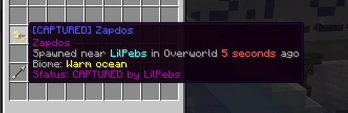
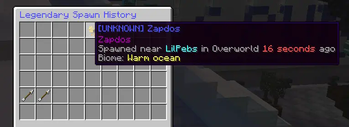
event-history/event-history-screen.jsonAllows for flexible screen customisation, you can also use a bitmap title for custom overlay. Look at screenshot for how the screen appears.
{
  "title": "<blue>Legendary Spawn History",
  "liveSpawnSlot": 4,
  "liveSpawnLores": [
    "{pokemon}",
    "<gray>Spawned near <aqua>{player_name.spawned}</aqua> in {dimension} <red>{time_passed}</red> ago",
    "<gray>Biome: <yellow>{biome}"
  ],
  "historySlots": [18,19,20,21,22,23,24,25,26,27,28,29,30,31,32,33,34,35],
  "historyLores": [
    "{pokemon}",
    "<gray>Spawned near <aqua>{player_name.spawned}</aqua> in {dimension} <red>{time_passed}</red> ago",
    "<gray>Biome: <yellow>{biome}",
    "Status: {status} by {player_name.acted}"
  ],
  "navForwardSlots": [
    37
  ],
  "navForwardStack": {
    "displayName": "<aqua>Next Page",
    "material": "minecraft:arrow",
    "amount": 1,
    "nbt": "",
    "lore": [
      "<yellow>Click to view next page"
    ]
  },
  "navBackSlots": [
    36
  ],
  "navBackStack": {
    "displayName": "<aqua>Previous Page",
    "material": "minecraft:arrow",
    "amount": 1,
    "nbt": "",
    "lore": [
      "<yellow>Click to view previous page"
    ]
  },
  "emptySlotStack": {
    "displayName": "<gray>",
    "material": "minecraft:gray_stained_glass_pane",
    "amount": 1,
    "nbt": "",
    "lore": [
      ""
    ]
  }
}
spawns/Contains all the spawn events. A Zapdos example is generated on first launch, feel free to copy the file and make as many different events as you want. The weight determines the chance. For example, if you have Zapdos (1 weight), Moltres (1 weight) and Articuno (2 weight), the odds for Zapdos spawning is 1/4 (25%), Moltress is 1/4 (25%) and Articuno is 1/2 (50%)
{
  "pokemonProperties": "zapdos lvl=50 special_attack_iv=31",
  "broadcast": {
    "spawn": "<blue>The mythical entity, <yellow>Zapdos</yellow>, has been spotted in <light_purple>{biome}!\n<gray>It will be available for the next <green>{duration}</green> minutes.</gray>\n\n<blue>Closest player: <aqua>{player_name.spawned}</aqua>",
    "despawn": "<blue>The mythical entity, <yellow>Zapdos</yellow>, has despawned.</blue>",
    "capture": "<blue>The mythical entity, <yellow>Zapdos</yellow>, has been captured by <aqua>{player_name.acted}</aqua>!</blue>",
    "kill": "<blue>The mythical entity, <yellow>Zapdos</yellow>, has been killed by <aqua>{player_name.acted}</aqua>!</blue>"
  },
  "spawnWeight": 1,
  "despawnTimerMinutes": 10,
  "sound": "minecraft:entity.lightning_bolt.thunder"
}
Supporter:
Osu of Cobblehaven helped fund this mod.
Available Versions
How to Install Pebble's Cobblemon Spawn Events on Your Server
Order Server
Order a Minecraft Java server with at least 3 GB RAM (4 GB recommended).
Set fabric Loader
In the panel under "Egg", select the fabric loader and matching Minecraft version (1.21.1).
Install Mod
Open the mod browser in the dashboard and search for "Pebble's Cobblemon Spawn Events". Click "Install" – done! Alternatively, upload the .jar via SFTP to the /mods folder.
Compatibility
Mod Loaders
Minecraft Versions
1.21.1, 1.20.1
Server-side
✓ RequiredRecommended RAM
4 GB(min. 3 GB)Frequently Asked Questions
Pebble's Cobblemon Spawn Events server crashes on startup – what to do?
Most common cause: wrong fabric version or insufficient RAM. Check the server log (latest.log) for "OutOfMemoryError" or "Mixin" errors. With Mado Hosting: ensure at least 3 GB RAM is allocated and the loader matches the mod version (1.21.1). You can switch loaders with one click in the panel.
Is Pebble's Cobblemon Spawn Events compatible with fabric and forge?
Pebble's Cobblemon Spawn Events officially supports fabric, forge for Minecraft 1.21.1, 1.20.1. Note: Forge and Fabric mods are NOT cross-compatible – pick one loader and stick with it. The Mado dashboard automatically detects incompatible loader combinations.
Server lagging with Pebble's Cobblemon Spawn Events – how to optimize performance?
Recommended RAM: 4 GB (per 8 players). Use /spark profiler to check if Pebble's Cobblemon Spawn Events consumes the most tick time. Common fixes: reduce server view-distance to 8-10, install "performant" or "starlight" as supplementary mods on Forge. With Mado Hosting, your server runs on NVMe SSDs with dedicated CPU cores for minimal latency.
Similar Mods




Rent Modded Server
Install Pebble's Cobblemon Spawn Events with just one click on your server.