
Penomior
LeveL System and make your own build and fight with your friend!
Screenshots
![Stat Screen Key[ i ] [0.6]](https://cdn.modrinth.com/data/rVphjheO/images/01734042e21743435a4f19464f98408893888e78_350.webp)

![desc [0.6.1]](https://cdn.modrinth.com/data/rVphjheO/images/2fc08aa31f12e5a14d638a8f7cdbd858eb5c8576.png)
![inventory tab [0.6.1]](https://cdn.modrinth.com/data/rVphjheO/images/2ff4d7a75ee480e8397864ede4aec2e1d8253ab1_350.webp)
![Multiplayer Support [0.6]](https://cdn.modrinth.com/data/rVphjheO/images/7dd266c837244e992a31ffde3de95222e87c2d8e_350.webp)
![Customize color [0.6]](https://cdn.modrinth.com/data/rVphjheO/images/8aef93dd703cf685cc329f10dac28a0798b7b303_350.webp)
About this Mod
MMO Like mod to play with frend
DISCONTINUE MOVING TO DOMINATUS

Stat System
Stat Overview: This system introduces 7 key stats, each contributing to different aspects of gameplay:
- Agility (AGI): Enhances attack speed and evasion.
- Dexterity (DEX): Improves accuracy and ranged attack speed.
- Intelligence (INT): Boosts magical attack power and resistance.
- Luck (LUK): Increases critical hit rate and enhances loot drops.
- Strength (STR): Increases melee attack power and critical chance.
- Vitality (VIT): Enhances HP and physical resistance.
Default Key for Stat Screen: Press
Ito open the stat screen.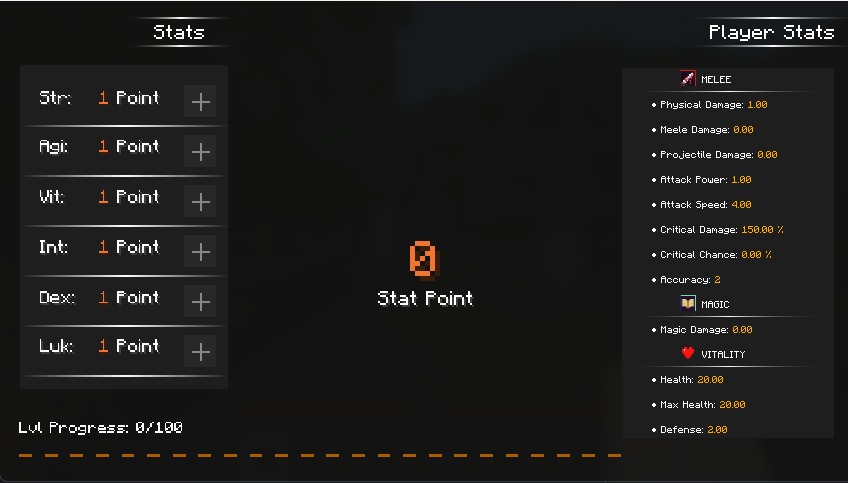
Damage System Update
- New Damage Calculation: Updated the damage calculation to be more accurate with full Netherite armor.
- Old Calculation: Effective armor and damage mitigation were capped.
- New Calculation: Improved calculation with no upper cap on effective armor.
- New Damage Modifiers:
- Magic Damage: Adjusted based on magic damage properties.
- Projectile Damage: Modified based on projectile-specific properties.
- Melee Damage: Calculated for melee attacks.
- Physical Damage: Updated for physical damage types.
- Back Attack Modifier: Applied if the attack is a back attack 150% Damag.
Refine System
- Refine Stones: These stones are dropped by monsters and are essential for enhancing your equipment.
- Repair Materials: Found in the Omnimuse Vault, these materials are used to repair and maintain your equipment's durability during the refinement process.
- Max Refine Level: The refinement level is currently capped at level 15.
Refine System Overview
The refine system in this mod is inspired by the enchantment system in Black Desert Online. Players can use Refine Stones to enhance their equipment, making it more powerful with each level. However, as the refinement level increases, the difficulty and potential risks also increase, similar to the BDO enchantment system. Players must carefully manage their resources and strategies to reach the maximum refine level of 15.
New Feature (W.I.P)
- Class
- Party System (currently plan)
- Accessory Feature
- New Monster
- New Weapon and Item
- Life Skill
- Other Mod Compatible
Mod Reccommned
- Jade
[Bug Report]
FAQ
Q: Can I port this mod to (X) loader?
A: No.
Q: Can you backport to version 1.x?
A: No. I mod this mod to play with my friend and no reason that good to port back,and I'll update to future version when I want, and I mod like hobby with very limited time
Q: Can you add this 'xxx' thing
A: No. This mod is only Crit Chance and Damage / maybe adjust some balance in the future or small tweak
if you want more thing don't download this mod go use another instead.
Q: Can I include this mod in to a modpack?
**A: Yes.**Go ahead,Please provide credit Modrinth project page.
Available Versions
How to Install Penomior on Your Server
Order Server
Order a Minecraft Java server with at least 3 GB RAM (4 GB recommended).
Set fabric Loader
In the panel under "Egg", select the fabric loader and matching Minecraft version (1.21).
Install Mod
Open the mod browser in the dashboard and search for "Penomior". Click "Install" – done! Alternatively, upload the .jar via SFTP to the /mods folder.
Compatibility
Mod Loaders
Minecraft Versions
1.21
Server-side
✓ RequiredRecommended RAM
4 GB(min. 3 GB)Frequently Asked Questions
Penomior server crashes on startup – what to do?
Most common cause: wrong fabric version or insufficient RAM. Check the server log (latest.log) for "OutOfMemoryError" or "Mixin" errors. With Mado Hosting: ensure at least 3 GB RAM is allocated and the loader matches the mod version (1.21). You can switch loaders with one click in the panel.
Is Penomior compatible with fabric and quilt?
Penomior officially supports fabric, quilt for Minecraft 1.21. The Mado dashboard automatically detects incompatible loader combinations.
Server lagging with Penomior – how to optimize performance?
Recommended RAM: 4 GB (per 8 players). Use /spark profiler to check if Penomior consumes the most tick time. Common fixes: reduce server view-distance to 8-10, install "performant" or "starlight" as supplementary mods on Forge. With Mado Hosting, your server runs on NVMe SSDs with dedicated CPU cores for minimal latency.
Similar Mods




Rent Modded Server
Install Penomior with just one click on your server.