
PerformanceHUD
Lightweight HUD showing FPS, RAM, Ping, and CPU in one customizable corner.
Screenshots
About this Mod

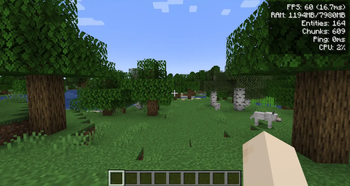
A lightweight client-side performance HUD that shows FPS, RAM, entities, loaded chunks, ping, and CPU usage in a single clean corner overlay. No screenshots cluttered with three different mods — one toggleable panel, one hotkey, done.
Client-side only. Do NOT install on the server (and you don't need to — vanilla servers work fine).
Singleplayer note: Works perfectly in singleplayer. Just drop it into your mods folder.
What it does:
- Renders a compact HUD in the top-right corner with up to 6 live metrics.
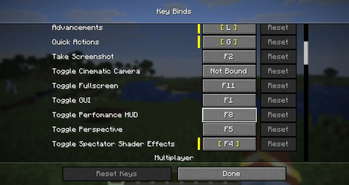
- Toggle the entire overlay with a single keybind (
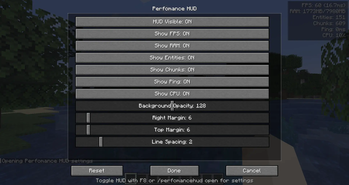
F8by default) — no menu digging mid-game. - Per-metric on/off switches, so you only see what you actually care about.
Please report any bugs, errors, or feature suggestions on Discord: https://discord.gg/4XUPywnEyE
Metrics shown:
- FPS — current frame rate with frame time in ms (e.g.
120 (8.3ms)). - RAM — used / max heap in MB.
- Entities — entity count in the loaded world.
- Chunks — currently loaded client chunks.
- Ping — your latency in ms when available; otherwise shows
-. - CPU — system CPU load percentage when available.
Configuration:
- In-game screen: Open with
/phud openor/performancehud open. On Forge/NeoForge, it is also available from the Mods menu. - Customization: Adjust background opacity, screen margins (X/Y), and line spacing in the config screen.
- File: All settings live in a single human-editable file at
config/performancehud.json. - Keybind: The default
F8toggle can be changed in the vanilla Controls menu.
Commands:
Use /performancehud or the short alias /phud.
/phud open— open the config screen/phud status— print current settings to chat/phud reload//phud reset— manage the config file/phud <setting> <value>— instantly toggle metrics or adjust visual settings directly via chat (e.g.,/phud showFps false,/phud xMargin 10,/phud textColor 16777215)
Compatibility:
- Safe alongside most other HUD, minimap, or performance mods. It draws a client-side overlay and does not modify world or server logic.
- Pure client-side. Modded and vanilla servers accept it without any handshake.
- Safe to remove at any time.
Localization:
Available in English, Russian, German, Spanish, French, Italian, Japanese, Korean, Brazilian Portuguese, and Simplified Chinese.
Available Versions
How to Install PerformanceHUD on Your Server
Order Server
Order a Minecraft Java server with at least 3 GB RAM (4 GB recommended).
Set fabric Loader
In the panel under "Egg", select the fabric loader and matching Minecraft version (26.1.2).
Install Mod
Open the mod browser in the dashboard and search for "PerformanceHUD". Click "Install" – done! Alternatively, upload the .jar via SFTP to the /mods folder.
Compatibility
Mod Loaders
Minecraft Versions
26.1.2, 26.1, 1.21.11 (+3 more)
Server-side
✗ UnsupportedRecommended RAM
4 GB(min. 3 GB)Frequently Asked Questions
PerformanceHUD server crashes on startup – what to do?
Most common cause: wrong fabric version or insufficient RAM. Check the server log (latest.log) for "OutOfMemoryError" or "Mixin" errors. With Mado Hosting: ensure at least 3 GB RAM is allocated and the loader matches the mod version (26.1.2). You can switch loaders with one click in the panel.
Is PerformanceHUD compatible with fabric and forge and neoforge?
PerformanceHUD officially supports fabric, forge, neoforge for Minecraft 26.1.2, 26.1, 1.21.11. Note: Forge and Fabric mods are NOT cross-compatible – pick one loader and stick with it. The Mado dashboard automatically detects incompatible loader combinations.
Server lagging with PerformanceHUD – how to optimize performance?
Recommended RAM: 4 GB (per 8 players). Use /spark profiler to check if PerformanceHUD consumes the most tick time. Common fixes: reduce server view-distance to 8-10, install "performant" or "starlight" as supplementary mods on Forge. With Mado Hosting, your server runs on NVMe SSDs with dedicated CPU cores for minimal latency.
Similar Mods






Rent Modded Server
Install PerformanceHUD with just one click on your server.