
Permits and Diplomas
This mod adds permits to your game which can be claimed by players to keep track of who produces what.
Screenshots

About this Mod

Permits and Diplomas
Have you ever wanted to manage who gets to produce and sell which items on your server?
Then look no further!
Permits and Diplomas (Diplomas are still WIP) provides an easy way to do just that.
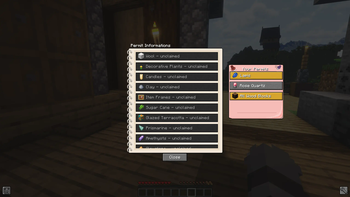
It offers a simple List where players can look at who is allowed to do what and who is already done with their stuff.
Draw a random Permit from an unopened letter, claim it and get to work.
And if you decide that you dont want it anymore, just unclaim it with [Shift] + [RMB].
Content
All Items can only be obtained via the creative Menu!
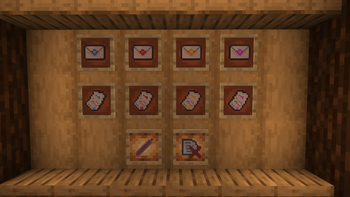
Permits -> The main content of this Mod. You can open Permit Envelopes of different Tiers to draw from a Pool of Titles from the config. The associated items with this Title can also be changed there.
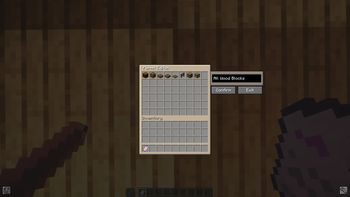
Permit Editor Item -> A simple creative Tool which lets you edit the Title and Content of a Permit in your offhand. Does not change the contents of the config
Data Delete Item -> This item lets you reset all the permit data in this save (not the other ones) in case anything goes wrong.
The survival Inventory has gotten a new Permit-Button. This window lets you see all the Permits, who they belong to and which ones are finished. You can also look at which items belong to which permit.
This mod does not keep track of item-counts! It is based on trust alone
Future Plans
- Diplomas -> Simple Items which display a custom text to a person
- Contracts -> A more complex Item which lets players write a Contract that both parties can sign. Once signed it will be sealed and cannot be changed. Like a book and quill, but with two signatures.
FAQ
- Where do I install this mod? - This mod needs to be on both Client- and Server Side!
- Does it work with other mods? - Yes! The config is just based on text and accepts every kind of item. If it cannot find your item it will simply skip it. Just make sure you get the correct Item-ID
Available Versions
How to Install Permits and Diplomas on Your Server
Order Server
Order a Minecraft Java server with at least 3 GB RAM (4 GB recommended).
Set forge Loader
In the panel under "Egg", select the forge loader and matching Minecraft version (1.20.1).
Install Mod
Open the mod browser in the dashboard and search for "Permits and Diplomas". Click "Install" – done! Alternatively, upload the .jar via SFTP to the /mods folder.
Compatibility
Mod Loaders
Minecraft Versions
1.20.1
Server-side
✓ RequiredRecommended RAM
4 GB(min. 3 GB)Frequently Asked Questions
Permits and Diplomas server crashes on startup – what to do?
Most common cause: wrong forge version or insufficient RAM. Check the server log (latest.log) for "OutOfMemoryError" or "Mixin" errors. With Mado Hosting: ensure at least 3 GB RAM is allocated and the loader matches the mod version (1.20.1). You can switch loaders with one click in the panel.
Is Permits and Diplomas compatible with forge?
Permits and Diplomas officially supports forge for Minecraft 1.20.1. The Mado dashboard automatically detects incompatible loader combinations.
Server lagging with Permits and Diplomas – how to optimize performance?
Recommended RAM: 4 GB (per 8 players). Use /spark profiler to check if Permits and Diplomas consumes the most tick time. Common fixes: reduce server view-distance to 8-10, install "performant" or "starlight" as supplementary mods on Forge. With Mado Hosting, your server runs on NVMe SSDs with dedicated CPU cores for minimal latency.
Similar Mods



![CobbleDollars [Cobblemon Addon]](https://cdn.modrinth.com/data/s7N7AsqL/684040a264fc1d7f9b856ec5d2da39767398c7ad.png)

Rent Modded Server
Install Permits and Diplomas with just one click on your server.