
Persistent Block Damage
Persistent Block Damage brings a Hytale-inspired mining system to Minecraft. Block damage remains visible and persists for a configurable amount of time, allowing you to continue mining exactly where you left off.
Screenshots
About this Mod
Persistent Block Damage - Hytale-Style Mining
Tired of block breaking progress resetting every time you stop mining?
Persistent Block Damage brings a Hytale-inspired mining system to Minecraft. Block damage remains visible and persists for a configurable amount of time, allowing you to continue mining exactly where you left off.
🎮 What Does It Do?
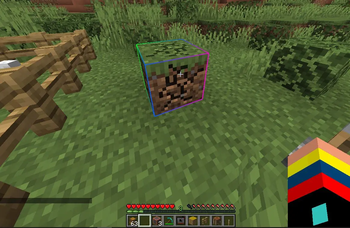
When you mine a block, its cracks remain visible even after you stop mining. If you return before the configured timeout expires, you continue from the exact same progress.
The total number of hits required to break a block never changes. Vanilla balance is fully preserved.
Vanilla:   ████████████ (12 consecutive hits or progress resets)
PBD:       ██████ pause ██████ = 12 hits ✨
✨ Features
- Configurable persistent block damage (1–300 seconds)
- Visible cracks remain after mining stops
- Optional smooth decay system
- Instant reset mode available
- Fully multiplayer compatible
- Server-authoritative synchronization
- Real-time admin commands
- Optimized for large servers
- No additional dependencies required
- Dedicated server support
🎯 How It Works
- Start mining a block
- The block accumulates damage and displays cracks
- Stop mining
- The cracks remain visible
- Return before the timeout expires
- Continue mining from the same progress
- If the timeout expires, the damage resets
⚙️ Configuration
The configuration file is automatically generated at:
config/persistentblockdamage-server.toml
Example:
[general]

# Seconds before damage begins to decay
blockDamagePersistenceSeconds = 10

# true = smooth decay
# false = instant reset
smoothDecay = true

# Ticks between decay steps
# 20 ticks = 1 second
decayIntervalTicks = 20

# Maximum tracked damaged blocks
maxTrackedBlocks = 10000

# Maximum crack render distance
renderDistance = 64
🛠️ Commands (OP Only)
| Command | Description |
|---|---|
/pdb |
Displays the current persistence time |
/pdb 30 |
Sets persistence to 30 seconds |
/pdb 60 |
Sets persistence to 1 minute |
/persistentblockdamage |
Displays full mod information |
/persistentblockdamage time <seconds> |
Changes persistence time |
/persistentblockdamage smooth |
Toggles smooth decay |
Examples:
/pdb 5
Cracks disappear after 5 seconds

/pdb 120
Cracks remain for 2 minutes

/pdb 300
Maximum persistence time (5 minutes)
📦 Installation
- Install NeoForge 21.1.233 or newer for Minecraft 1.21.1
- Download
PersistentBlockDamage-x.x.x.jar - Place the file inside your
modsfolder - Launch the game or server
The mod works immediately with default settings.
🌍 Dedicated Server Support
Persistent Block Damage is fully synchronized by the server.
If one player leaves a block at 50% progress:
- Other players will see the cracks
- Other players can continue mining it
- Progress is shared and synchronized automatically
Perfect for multiplayer survival servers.
🔧 Requirements
- Minecraft 1.21.1
- NeoForge 21.1.233+
- Dedicated Server or Singleplayer
- No additional mods required
❓ Frequently Asked Questions
Does this reduce the number of hits required to break blocks?
No.
The number of hits remains exactly the same as vanilla Minecraft. The mod only preserves progress between mining sessions.
Does it work with all tools?
Yes.
Mining speed is calculated normally using the currently equipped tool.
Does it affect performance?
No.
The system is optimized to handle thousands of damaged blocks with minimal overhead.
Is it compatible with other mining mods?
Generally yes.
Persistent Block Damage only extends Minecraft's existing block damage system and does not modify tools, blocks, or mining mechanics.
💡 Inspiration
This mod is inspired by the persistent mining system showcased in Hytale, bringing a more immersive and forgiving mining experience to Minecraft while preserving vanilla balance.
Created by DeLaRosaPlay
Available Versions
How to Install Persistent Block Damage on Your Server
Order Server
Order a Minecraft Java server with at least 3 GB RAM (4 GB recommended).
Set neoforge Loader
In the panel under "Egg", select the neoforge loader and matching Minecraft version (1.21.1).
Install Mod
Open the mod browser in the dashboard and search for "Persistent Block Damage". Click "Install" – done! Alternatively, upload the .jar via SFTP to the /mods folder.
Compatibility
Mod Loaders
Minecraft Versions
1.21.1
Server-side
✓ RequiredRecommended RAM
4 GB(min. 3 GB)Frequently Asked Questions
Persistent Block Damage server crashes on startup – what to do?
Most common cause: wrong neoforge version or insufficient RAM. Check the server log (latest.log) for "OutOfMemoryError" or "Mixin" errors. With Mado Hosting: ensure at least 3 GB RAM is allocated and the loader matches the mod version (1.21.1). You can switch loaders with one click in the panel.
Is Persistent Block Damage compatible with neoforge?
Persistent Block Damage officially supports neoforge for Minecraft 1.21.1. The Mado dashboard automatically detects incompatible loader combinations.
Server lagging with Persistent Block Damage – how to optimize performance?
Recommended RAM: 4 GB (per 8 players). Use /spark profiler to check if Persistent Block Damage consumes the most tick time. Common fixes: reduce server view-distance to 8-10, install "performant" or "starlight" as supplementary mods on Forge. With Mado Hosting, your server runs on NVMe SSDs with dedicated CPU cores for minimal latency.
Similar Mods




Rent Modded Server
Install Persistent Block Damage with just one click on your server.