
Peterwolf's Railroad One
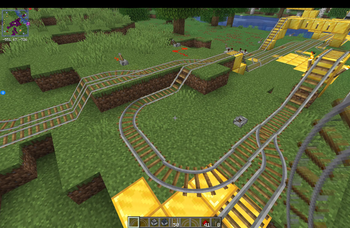
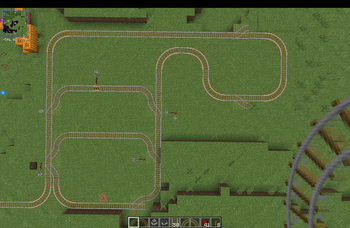
More realistic railways with smooth 2×2 & 3×3 curves and Y-shaped switches instead of vanilla T-junctions.
Screenshots
About this Mod
Peterwolf’s Railroad One
Minecraft railways have barely changed since the early days of the game. Sharp 90-degree turns and T-shaped junctions may work, but they rarely look like a real railway.
Peterwolf’s Railroad One improves vanilla rail building by adding smoother track geometry while keeping the simplicity of the original rail system.
Features
Smooth Rail Curves
Build realistic railway turns using dedicated curved track pieces:
- 2×2 rail curve
- 3×3 rail curve
Instead of forcing trains through a sharp one-block corner, tracks can now follow a wider and more natural path.
Realistic Y-Shaped Switch
Replace the vanilla T-junction with a railway-style turnout.
The switch uses a smooth Y-shaped design similar to real railroads, allowing trains to leave the main line and enter a siding without the unnatural appearance of vanilla intersections.
Redstone Control
Switches can be controlled using Redstone:
- No Redstone signal → train continues on the main line
- Powered → train is diverted to the siding
Simple, intuitive, and fully compatible with existing Redstone systems.
Vanilla-Friendly Design
Peterwolf’s Railroad One focuses on doing one thing well:
**
Making Minecraft railways look better without introducing complex mechanics, large multiblock systems, or industrial automation.**
If you want more realistic rail networks while keeping the lightweight feel of vanilla Minecraft, this mod is for you.
Perfect For
- Passenger railways
- Freight railways
- Mining rail networks
- Railway stations
- Realistic transport systems
- Survival and creative worlds
Build smoother tracks. Build better railways.
Available Versions
How to Install Peterwolf's Railroad One on Your Server
Order Server
Order a Minecraft Java server with at least 3 GB RAM (4 GB recommended).
Set fabric Loader
In the panel under "Egg", select the fabric loader and matching Minecraft version (26.2).
Install Mod
Open the mod browser in the dashboard and search for "Peterwolf's Railroad One". Click "Install" – done! Alternatively, upload the .jar via SFTP to the /mods folder.
Compatibility
Mod Loaders
Minecraft Versions
26.2
Server-side
✓ RequiredRecommended RAM
4 GB(min. 3 GB)Frequently Asked Questions
Peterwolf's Railroad One server crashes on startup – what to do?
Most common cause: wrong fabric version or insufficient RAM. Check the server log (latest.log) for "OutOfMemoryError" or "Mixin" errors. With Mado Hosting: ensure at least 3 GB RAM is allocated and the loader matches the mod version (26.2). You can switch loaders with one click in the panel.
Is Peterwolf's Railroad One compatible with fabric?
Peterwolf's Railroad One officially supports fabric for Minecraft 26.2. The Mado dashboard automatically detects incompatible loader combinations.
Server lagging with Peterwolf's Railroad One – how to optimize performance?
Recommended RAM: 4 GB (per 8 players). Use /spark profiler to check if Peterwolf's Railroad One consumes the most tick time. Common fixes: reduce server view-distance to 8-10, install "performant" or "starlight" as supplementary mods on Forge. With Mado Hosting, your server runs on NVMe SSDs with dedicated CPU cores for minimal latency.
Similar Mods


Rent Modded Server
Install Peterwolf's Railroad One with just one click on your server.