
Petrolium
Want Better Fuel Options in Minecraft? Here you go.
Screenshots


About this Mod

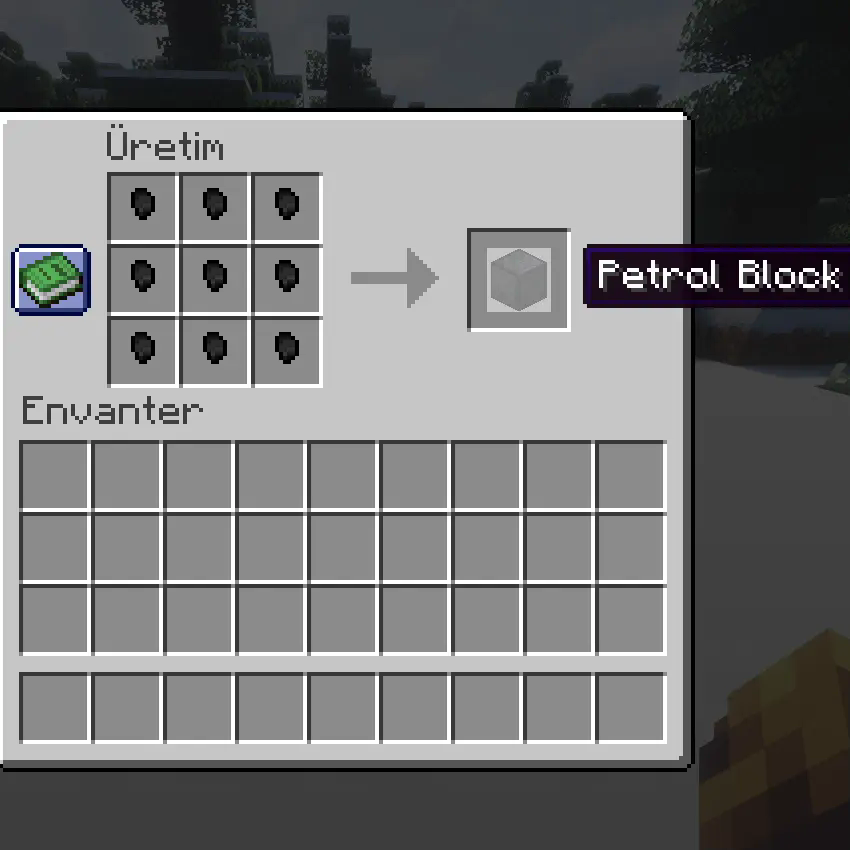

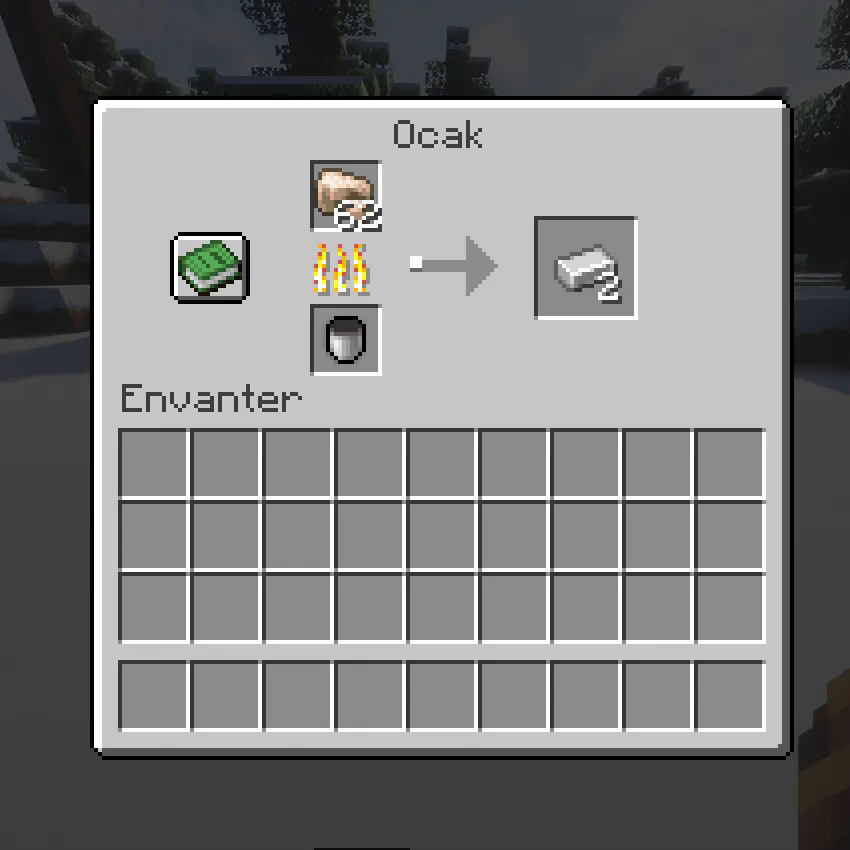
Petrol Mod - Features and Mechanics
Overview
The Petrol Mod introduces a new fuel system in Minecraft, allowing players to process bone blocks into petrol nuggets, which can then be crafted into petrol blocks. These petrol blocks, when combined with an empty bucket, create a petrol bucket that serves as a highly efficient fuel source for furnaces and other machines. Additionally, petrol blocks emit fire when placed, making them a unique fuel item that also enhances the aesthetic and utility of your Minecraft world.
Features
- Petrol Nugget
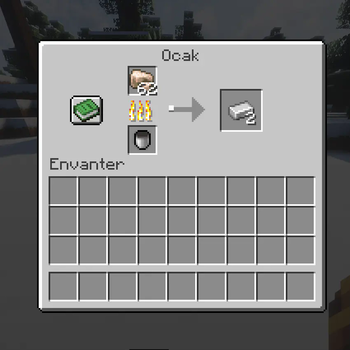
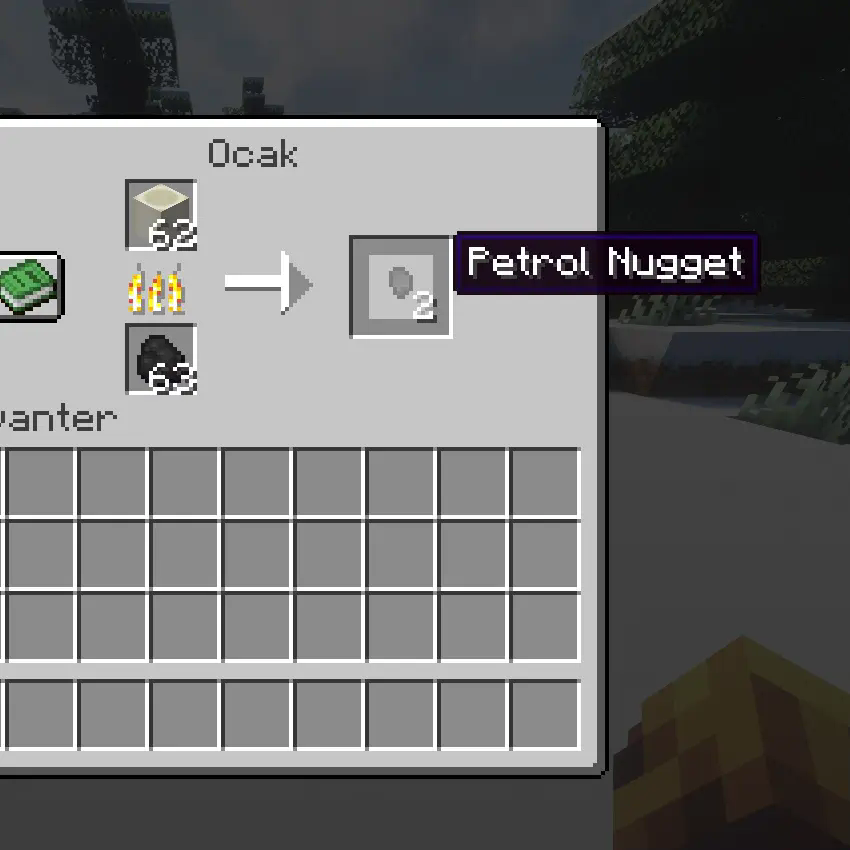
Obtaining: You can obtain Petrol Nuggets by smelting Bone Blocks in a furnace.
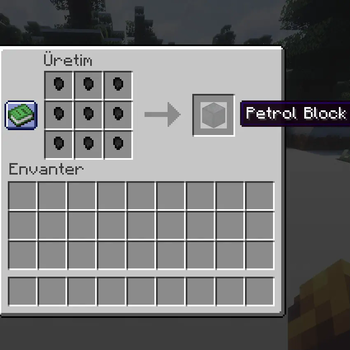
Crafting: 9 Petrol Nuggets can be crafted into a Petrol Block.
- Petrol Block
Obtaining: Petrol Blocks are crafted by combining 9 Petrol Nuggets in a crafting table.
Usage: These blocks act as a high-efficiency fuel source in furnaces and other machinery.
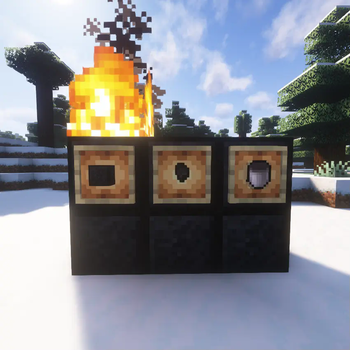
Fire Effect: When placed, Petrol Blocks automatically set fire to the block above them, providing a constant source of fire unless extinguished.
Crafting: The Petrol Block can be combined with an Empty Bucket to create a Petrol Bucket.
- Petrol Bucket
Obtaining: To obtain a Petrol Bucket, combine a Petrol Block with an Empty Bucket in the crafting table.
Fuel Efficiency: Petrol Buckets act as high-efficiency fuel for furnaces and can smelt 3000 ticks worth of items (equivalent to 150 items).
Fire: A Petrol Bucket can also be used to ignite fires in your Minecraft world.
- Smelting Process
Bone Block → Petrol Nugget: When smelting Bone Blocks in a furnace, you will receive Petrol Nuggets.
Petrol Nugget → Petrol Block: Combine 9 Petrol Nuggets to craft a Petrol Block in the crafting table.
Petrol Block + Empty Bucket → Petrol Bucket: Combine a Petrol Block with an Empty Bucket to create a Petrol Bucket.
- Sustainable Fire
Petrol Blocks and Fire: When placed, Petrol Blocks automatically set fire to the block above them. The fire will remain active indefinitely until manually extinguished. This provides a unique feature where players can create eternal flames simply by placing a Petrol Block.
How to Use the Mod
Smelting Bone Blocks: Place Bone Blocks in a furnace to create Petrol Nuggets.
Crafting Petrol Blocks: Combine 9 Petrol Nuggets to craft a Petrol Block.
Creating a Petrol Bucket: Combine a Petrol Block with an Empty Bucket in the crafting table to create a Petrol Bucket.
Using Petrol Blocks as Fuel: Place Petrol Blocks in a furnace to smelt items or use them as a source of eternal fire.
Fire from Petrol Blocks: Place a Petrol Block on the ground and it will set fire to the block above it, making it a perpetual source of fire in the game.
Crafting Recipes
Bone Block → Petrol Nugget: Smelt a Bone Block in a furnace to obtain Petrol Nuggets.
Petrol Nugget → Petrol Block: Craft 9 Petrol Nuggets into a Petrol Block in the crafting table.
Petrol Block + Empty Bucket → Petrol Bucket: Craft a Petrol Block with an Empty Bucket to create a Petrol Bucket.
Known Issues / Limitations
Petrol Blocks and Fire: While the fire from the Petrol Block is meant to stay indefinitely, it may still be extinguished by water, rain, or other mechanics within the game.
Recipe Compatibility: If you're using other mods that alter crafting or furnace recipes, compatibility issues might arise. Ensure that the mod is loaded correctly to avoid any conflicts.
Conclusion
The Petrol Mod introduces a new and immersive fuel system in Minecraft, with features such as smelting Bone Blocks into Petrol Nuggets, crafting them into Petrol Blocks, and using them for sustainable fire. Whether you're looking for a new fuel source or just want to add some interesting mechanics to your game, this mod adds a unique twist to the gameplay experience.
Available Versions
How to Install Petrolium on Your Server
Order Server
Order a Minecraft Java server with at least 3 GB RAM (4 GB recommended).
Set forge Loader
In the panel under "Egg", select the forge loader and matching Minecraft version (1.20.1).
Install Mod
Open the mod browser in the dashboard and search for "Petrolium". Click "Install" – done! Alternatively, upload the .jar via SFTP to the /mods folder.
Compatibility
Mod Loaders
Minecraft Versions
1.20.1
Server-side
✓ RequiredRecommended RAM
4 GB(min. 3 GB)Frequently Asked Questions
Petrolium server crashes on startup – what to do?
Most common cause: wrong forge version or insufficient RAM. Check the server log (latest.log) for "OutOfMemoryError" or "Mixin" errors. With Mado Hosting: ensure at least 3 GB RAM is allocated and the loader matches the mod version (1.20.1). You can switch loaders with one click in the panel.
Is Petrolium compatible with forge?
Petrolium officially supports forge for Minecraft 1.20.1. The Mado dashboard automatically detects incompatible loader combinations.
Server lagging with Petrolium – how to optimize performance?
Recommended RAM: 4 GB (per 8 players). Use /spark profiler to check if Petrolium consumes the most tick time. Common fixes: reduce server view-distance to 8-10, install "performant" or "starlight" as supplementary mods on Forge. With Mado Hosting, your server runs on NVMe SSDs with dedicated CPU cores for minimal latency.
Similar Mods




![CobbleDollars [Cobblemon Addon]](https://cdn.modrinth.com/data/s7N7AsqL/684040a264fc1d7f9b856ec5d2da39767398c7ad.png)
Rent Modded Server
Install Petrolium with just one click on your server.