
Petting - Tame any mob!
Pet mobs and have them become protective companions that follow you, offering support and assistance during your adventures.
Screenshots



About this Mod




Petting is a Minecraft mod that lets you tame virtually any mob in the game — hostile or passive, ordinary or boss. Tamed pets follow your commands, defend you in combat, carry your items, ride alongside you, and respawn at a dedicated bed when they die. Every behavior is deeply configurable, making the mod suitable for survival, adventure maps, and modpacks alike.
Features at a Glance
- Tame almost any mob, including Withers, Ender Dragons, and Wardens
- Full riding support for land, flying, and swimming mobs
- Per-pet inventory with armor slots, hand slots, and 14 item storage slots
- Four AI modes: Following, Sitting, Waiting, Wandering
- Combat modes: Aggressive, Defensive, Guard
- Pet Bed block for infinite respawning — pets teleport to their bed on death, even across dimensions
- Per-pet control mapping system with custom actions and conditions
- Passive immunities: no fall damage, fire, or lava damage for tamed pets
- Global whistle via Goat Horn to instantly recall all pets
- Category system for grouping pets and enforcing per-group limits
- Full server and modpack configuration via
petting-common.toml
Getting Started
Installation
- Download the latest release from CurseForge or Modrinth.
- Place the
.jarfile in yourmods/folder. - Launch the game. A default config file will be generated at
config/petting-common.toml.
Taming
Taming is how you acquire a pet. By default, right-click a mob while holding Golden Wheat (petting:golden_wheat) to attempt taming it. The item is consumed on every attempt. Heart particles appear on success; smoke particles appear on failure. The taming item is fully configurable via tamingItem.
When tamed, all three combat modes — Aggressive, Guard, and Defensive — are enabled by default. The pet is also automatically named "[YourName]'s [mob type]" with the name tag hidden above their head.
Holding Golden Wheat in either hand (main or offhand) causes nearby untamed animals within 12 blocks to follow you.
Success Factors
| Factor | Config Key | Description |
|---|---|---|
| Base chance | tameChance |
Default 33% per attempt |
| Weakness scaling | healthScalesTamingChance |
Lower HP increases success chance |
| Health threshold | tameHealthThreshold |
Mob must be missing a certain % of HP to be tameable |
| Kill requirement | requireKillToTame |
Must have killed at least one of that mob type first |
| Custom items | customTamingItems |
Assign specific taming items per mob (format: entity_id|item_id) |
| Whitelist | whitelistOnly, tamingWhitelist |
Only listed mobs can be tamed |
| Blacklist | blacklistEnabled, tamingBlacklist |
Listed mobs cannot be tamed (supports modid:* wildcards) |
| Cooldown | interactionCooldown |
Ticks between allowed taming attempts on the same mob (default: 20) |
Controls & Pet Management
Empty Hand (Default Mappings)
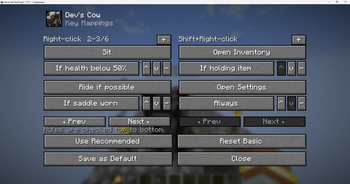
By default, the control system uses per-pet mappings. Fresh pets have these defaults:
| Input | Default Action |
|---|---|
| Right-Click | Toggle Sit on/off |
| Shift + Right-Click | Cycle follow/teleport distance presets (5/10 → 10/20 → 20/50 blocks) |
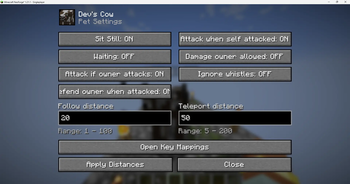
These are fully remappable per-pet or globally via the Pet Settings Screen (press P while looking at a pet, or bind
controls.petting.open_settingsin Controls).
Pet Settings Screen (P Key)
Press P while targeting your pet to open the settings GUI. From here you can:
- Toggle AI modes: Sitting, Waiting, Aggressive, Guard, Self-Defense, Ignore Whistle
- Set exact follow and teleport distances
- Open the Control Mappings sub-screen to customize right-click and shift+right-click actions
Control Mapping System
Each pet (and player default) supports a chain of ordered rules for right-click and shift+right-click. Rules follow the format ACTION|CONDITION and are evaluated top-to-bottom; the first matching rule is executed.
Available Actions
| Action | Description |
|---|---|
SIT |
Toggle Sitting on/off |
TOGGLE_WAIT |
Toggle Waiting on/off |
RIDE |
Mount the pet |
OPEN_INV |
Open the pet inventory |
CYCLE |
Cycle through distance presets (5/10 → 10/20 → 20/50) |
TOGGLE_FOLLOW_TELEPORT |
Swap the follow and teleport distance values |
OPEN_SETTINGS |
Open the Pet Settings screen |
RUN_COMMAND |
Run a server command (requires the owner to have permission for it) |
NONE |
Do nothing |
Available Conditions
| Condition | When it passes |
|---|---|
NONE |
Always |
SADDLE |
Pet has a saddle equipped |
SNEAK |
Owner is crouching |
HEALTH_LT_50 |
Pet is below 50% HP |
HOLD_ITEM |
Owner is holding any item |
Multiple rules can be chained with ;, e.g. RIDE\|SADDLE;SIT\|NONE (mount if saddled, otherwise toggle sit).
Interaction Tools
All tool item IDs are configurable in the [Tool Settings] section of petting-common.toml.
| Tool | Default Item | Function |
|---|---|---|
| Status Stick | minecraft:stick |
Right-Click: cycle AI mode (Following → Sitting → Waiting → Wandering). Shift+Right-Click: detailed status report in chat |
| Whistle | petting:follow_whistle |
Cycle follow distance through presets: 5 → 10 → 20 → 50 blocks |
| Orb | petting:teleport_orb |
Cycle teleport trigger distance through presets: 10 → 20 → 50 → 100 blocks |
| Clock | minecraft:clock |
Toggle whether this pet responds to the global Goat Horn whistle |
| Sword | any sword | Toggle Aggressive Mode — attacks what the owner attacks |
| Shield | minecraft:shield |
Toggle Defensive Mode — retaliates when attacked |
| Cookie | minecraft:cookie |
Toggle Guard Mode — attacks anything that hits the owner |
| Tether | petting:pet_tether |
Bind the pet to a configurable roam radius around its current position |
| Shears | minecraft:shears |
Crouch + Right-Click to release the pet back to the wild |
| Goat Horn | minecraft:goat_horn |
Right-click to teleport all owned pets to your location instantly |
Riding
Riding works across all movement types — land, flying, and swimming.
| Input | Action |
|---|---|
| Space | Jump (on land) / fly upward / swim upward |
| S | Move backward / fly downward / swim downward |
| Sprint (Ctrl) | 1.3x speed boost |
Flying and swimming mobs maintain their current altitude or depth when you stop moving. The pet's rotation is always synced with your view. Use the RIDE\|SADDLE control mapping to require a saddle before mounting.
AI Modes
Pets have four movement states:
| State | Behavior |
|---|---|
| Following | Walks toward the owner and teleports if too far away |
| Sitting | Stays in place; heals over time if sitHealEnabled is on |
| Waiting | Stays in place without healing regeneration |
| Wandering | Roams freely in the area |
Combat modes are independent of movement state:
| Mode | Toggle Tool | Behavior |
|---|---|---|
| Aggressive | any sword | Attacks whatever the owner attacks |
| Defensive | shield | Retaliates when the pet itself is attacked |
| Guard | cookie | Attacks anything that hits the owner |
Pet Inventory & Equipment
Open the pet inventory via the OPEN_INV control mapping action, or through the Pet Settings screen.
- Armor slots — equip helmets, chestplates, leggings, and boots
- Hand slots — equip swords or shields; pets physically hold and use them
- Storage — 14 item slots for carrying loot
- Equipment slots are auto-detected per mob type; extras can be forced via
extraEquippableMobs - Global stat bonuses are applied to all pets via
petBaseArmorandpetBaseArmorToughness
Pet Safety
Passive Immunities
All tamed pets are permanently immune to:
- Fall damage
- Fire and lava damage
Mutual Pacifism
Pets never attack other tamed pets, even from splash projectiles.
Sitting Regeneration
Pets regenerate health while in the Sitting state. Configurable via sitHealAmount and sitHealInterval.
Pet Beds
The Pet Bed block allows a pet to respawn indefinitely at a fixed location.
- Right-click a placed Pet Bed to enter Binding Mode.
- Right-click your pet to link it to the bed.
- If the pet dies, the death is cancelled — the pet teleports to its bed, fully healed, and sits.
Beds work across dimensions. The dimension is stored at binding time so pets can respawn even if they die in the Nether or End. Right-click the air while in Binding Mode to cancel.
Boss Pets
| Boss | Special Behavior |
|---|---|
| Wither | Side heads permanently suppressed; center head skull attacks cancelled when idle (no target) |
| Ender Dragon | Supports mounted combat; health bar hidden after taming |
| Warden | Anger levels towards owner and other pets are continuously cleared |
The hideTamedBossBars config option can hide boss health bars for any tamed boss.
Entity Conversion
When a tamed mob converts to a new entity type (e.g. Zombie to Drowned), all pet data carries over automatically:
- Owner UUID
- Custom name
- AI modes and follow / teleport distances
- Saddle and equipped items
- Pet Bed binding (including the stored dimension)
Advanced Systems
Pet Categories
Group mobs into named categories with shared per-player limits. Useful for modpacks and servers.
Format: SlotID|DisplayName|MobList|DefaultLimit
Example: 1|Undead|minecraft:zombie,minecraft:skeleton|5
Slot IDs 1–20 correspond to the petting:max_pets_category_X player attributes.
Custom Attributes
Gear and perk mods can grant players additional pet capacity using these player attributes:
petting:max_pets— increases the global pet limitpetting:max_pets_category_1throughpetting:max_pets_category_20— increases limits per category
Admin & Map-Maker Tools
Commands
/pet <target_mob> <target_player>
Instantly tames a mob and assigns it to a player. Requires operator permissions.
Pre-Tamed Mobs via NBT
Spawn a mob that is already tamed using a /summon command:
/summon minecraft:zombie ~ ~ ~ {Forgedata-blocked: {pettingtamed: 1b, ownerUUID: "YOUR-UUID-HERE"}}
Mobs spawned this way will have their hostile AI disabled and be bound to the specified owner. The RUN_COMMAND mapping action also allows owner-gated command execution from pet interactions.
Configuration Reference
All settings are in config/petting-common.toml.
General
| Key | Default | Description |
|---|---|---|
disableRespawnOnTame |
true |
Preserve original mob gear and NBT on tame instead of respawning |
interactionCooldown |
20 |
Ticks before the same mob can be taming-interacted with again |
enableParticles |
true |
Show heart particles on successful taming |
maxPetsPerPlayer |
-1 |
Base pet limit per player (-1 = unlimited; also a player attribute) |
enableGoatHornWhistle |
true |
Allow Goat Horn right-click to recall all pets |
whistleTeleportsTethered |
false |
Include tethered pets in the Goat Horn recall |
hideTamedBossBars |
true |
Hide health bars for tamed bosses |
commandFeedbackStyle |
ACTION_BAR |
How state changes are shown: ACTION_BAR, CHAT, or NONE |
Taming
| Key | Default | Description |
|---|---|---|
tameChance |
0.33 |
Base success rate per taming attempt |
healthScalesTamingChance |
false |
Lower mob HP increases success chance |
tameHealthThreshold |
0.0 |
Required missing health % before taming is allowed (0.0–1.0) |
requireKillToTame |
false |
Must have killed one of this mob type first |
allowGoldenWheat |
true |
Enable the universal Golden Wheat taming item |
whitelistOnly |
false |
Only mobs in tamingWhitelist can be tamed |
tamingWhitelist |
[] |
Allowed mob IDs |
blacklistEnabled |
true |
Enable the taming blacklist (default list is empty) |
tamingBlacklist |
[] |
Mob IDs to block (supports modid, modid:*, modid:prefix*) |
customTamingItems |
[] |
Custom taming items per mob (entity_id|item_id format) |
AI & Survival
| Key | Default | Description |
|---|---|---|
followDistance |
10.0 |
Distance (1–100) at which following behavior starts |
teleportDistance |
20.0 |
Distance (5–200) at which pet teleports to owner |
boundRoamRadius |
10.0 |
Roam radius (1–100 blocks) for tethered pets |
allowOwnerToHurtPets |
false |
Allow friendly fire |
preventPetToOwnerDamage |
true |
Prevent pets from damaging their owner |
sitHealEnabled |
true |
Regenerate health while sitting |
sitHealAmount |
1.0 |
Health per interval (in half-hearts) |
sitHealInterval |
40 |
Ticks between heals (20 = 1 second) |
Riding & Movement
| Key | Default | Description |
|---|---|---|
allowPetRiding |
true |
Master toggle for all riding |
mountRequireSaddle |
false |
Require a saddle to mount |
landRidingSpeedMultiplier |
1.0 |
Speed multiplier on land |
flyingRidingSpeedMultiplier |
1.0 |
Speed multiplier while flying |
swimmingRidingSpeedMultiplier |
1.0 |
Speed multiplier while swimming |
ridingWhitelistOnly |
false |
Only whitelisted mobs can be ridden |
ridingWhitelist |
[] |
Mob IDs allowed to be ridden |
ridingBlacklistEnabled |
false |
Enable riding blacklist |
ridingBlacklist |
[] |
Mob IDs that cannot be ridden |
manualFlyingMobs |
[] |
Force 3D flight for specific mob IDs |
manualSwimmingMobs |
[] |
Force 3D swimming for specific mob IDs |
allowPetAttackWhileRiding |
true |
Allow projectile attacks while riding Wither / Dragon |
Inventory & Stats
| Key | Default | Description |
|---|---|---|
petBaseArmor |
0.0 |
Global armor bonus for all tamed pets |
petBaseArmorToughness |
0.0 |
Global armor toughness bonus |
extraEquippableMobs |
[] |
Force equipment slots on specific mob IDs |
alwaysShowEquipmentSlots |
false |
Force armor and hand slots on all mobs |
inventoryWhitelistOnly |
false |
Only whitelisted mobs receive an inventory |
inventoryWhitelist |
[] |
Mob IDs allowed to have inventories |
inventoryBlacklistEnabled |
false |
Disable inventory for blacklisted IDs |
inventoryBlacklist |
[] |
Mob IDs blocked from having a pet inventory |
petPortraitRenderScale |
45.0 |
Portrait scale in the pet inventory screen |
Tool & Item Settings
All tool items are configurable. The config key maps to a registry ID (namespace:item_name).
| Key | Default | Controls |
|---|---|---|
tamingItem |
petting:golden_wheat |
Primary taming item |
statusTool |
minecraft:stick |
Status cycling and report |
aggressionTool |
minecraft:iron_sword |
Aggressive mode toggle (any sword works by default) |
defenseTool |
minecraft:shield |
Defensive mode toggle (any shield works by default) |
guardTool |
minecraft:cookie |
Guard mode toggle |
followDistTool |
petting:follow_whistle |
Follow distance cycling |
teleportDistTool |
petting:teleport_orb |
Teleport distance cycling |
whistleTool |
minecraft:clock |
Whistle response toggle |
tetherTool |
petting:pet_tether |
Area tethering |
releaseTool |
minecraft:shears |
Release to wild |
globalWhistleTool |
minecraft:goat_horn |
Global pet recall |
Interaction Toggles
| Key | Default | Description |
|---|---|---|
allowPerPetStatus |
true |
Enable Stick (status cycling) |
allowPerPetAggression |
true |
Enable Sword (aggressive mode) |
allowPerPetSelfDefense |
true |
Enable Shield (defensive mode) |
allowPerPetGuard |
true |
Enable Cookie (guard mode) |
allowPerPetFollowDist |
true |
Enable Whistle (follow distance) |
allowPerPetTeleportDist |
true |
Enable Orb (teleport distance) |
allowPerPetWhistleToggle |
true |
Enable Clock (whistle response toggle) |
allowPetTethering |
true |
Enable Tether (area bind) |
allowPetReleasing |
true |
Enable Shears (release to wild) |
License
Petting is licensed under the GNU Lesser General Public License v3.0. See LICENSE for details.
Available Versions
How to Install Petting - Tame any mob! on Your Server
Order Server
Order a Minecraft Java server with at least 3 GB RAM (4 GB recommended).
Set fabric Loader
In the panel under "Egg", select the fabric loader and matching Minecraft version (1.21.8).
Install Mod
Open the mod browser in the dashboard and search for "Petting - Tame any mob!". Click "Install" – done! Alternatively, upload the .jar via SFTP to the /mods folder.
Compatibility
Mod Loaders
Minecraft Versions
1.21.8, 1.21.4, 1.21.1 (+7 more)
Server-side
✓ RequiredRecommended RAM
4 GB(min. 3 GB)Frequently Asked Questions
Petting - Tame any mob! server crashes on startup – what to do?
Most common cause: wrong fabric version or insufficient RAM. Check the server log (latest.log) for "OutOfMemoryError" or "Mixin" errors. With Mado Hosting: ensure at least 3 GB RAM is allocated and the loader matches the mod version (1.21.8). You can switch loaders with one click in the panel.
Is Petting - Tame any mob! compatible with fabric and forge and neoforge?
Petting - Tame any mob! officially supports fabric, forge, neoforge for Minecraft 1.21.8, 1.21.4, 1.21.1. Note: Forge and Fabric mods are NOT cross-compatible – pick one loader and stick with it. The Mado dashboard automatically detects incompatible loader combinations.
Server lagging with Petting - Tame any mob! – how to optimize performance?
Recommended RAM: 4 GB (per 8 players). Use /spark profiler to check if Petting - Tame any mob! consumes the most tick time. Common fixes: reduce server view-distance to 8-10, install "performant" or "starlight" as supplementary mods on Forge. With Mado Hosting, your server runs on NVMe SSDs with dedicated CPU cores for minimal latency.
Similar Mods




Rent Modded Server
Install Petting - Tame any mob! with just one click on your server.