
Phasorite Networks
Phasorite Networks is a (WIP, Beta) modern mod for transferring energy wirelessly.
Screenshots
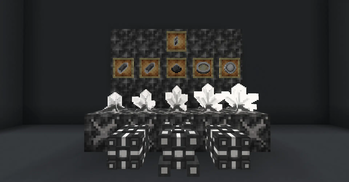
About this Mod







Table of Contents
About
Phasorite Networks is a modern (WIP, Alpha) mod for transferring energy wirelessly.
Networks
The base of Phasorite Networks are, well, networks!
Networks are fully customizable, with the ability to scale across various dimensions, you can manage and see the
throughput of energy across the network.
Using a network reduces the lag that a huge cable network could cause, also reducing the time for building the
infrastructure for the cables.
Component Screen
In the component screen (component being an Exporter or Importer) you can configure its properties, this being:
- Name
- Energy Limit Per Tick
- Priority
- Override Mode (It will always be prioritized first)
- Limitless Mode (Will ignore the set limit)

Networks Screen
Create and manage your and others networks

- Use a color picker to choose the color of your network!
- Set your network to a specific visibility!
- Private
- Public
- Public with Password (Only people with the password can join)

Extra Screens
When connected to a network you have access to extra "tabs"
- Statistics Tab: See the global statistic of energy going into/out the network
- Components Tab: See specifically what components are connected into your network and how much energy they are
importing/exporting into/from the network - Members Tab: See the players connected to your network

License


thanks Jm3 for the help in the textures
Issues
- Found an bug or have a suggestion?
Go to the issues page and
click new issue
Contribution
- To contribute to Phasorite Networks, fork and create
a Pull-Request - You might want to discuss with us in the Phasorite Networks Discord before making a
PR
Available Versions
How to Install Phasorite Networks on Your Server
Order Server
Order a Minecraft Java server with at least 3 GB RAM (4 GB recommended).
Set neoforge Loader
In the panel under "Egg", select the neoforge loader and matching Minecraft version (1.21.1).
Install Mod
Open the mod browser in the dashboard and search for "Phasorite Networks". Click "Install" – done! Alternatively, upload the .jar via SFTP to the /mods folder.
Compatibility
Mod Loaders
Minecraft Versions
1.21.1
Server-side
✓ RequiredRecommended RAM
4 GB(min. 3 GB)Frequently Asked Questions
Phasorite Networks server crashes on startup – what to do?
Most common cause: wrong neoforge version or insufficient RAM. Check the server log (latest.log) for "OutOfMemoryError" or "Mixin" errors. With Mado Hosting: ensure at least 3 GB RAM is allocated and the loader matches the mod version (1.21.1). You can switch loaders with one click in the panel.
Is Phasorite Networks compatible with neoforge?
Phasorite Networks officially supports neoforge for Minecraft 1.21.1. The Mado dashboard automatically detects incompatible loader combinations.
Server lagging with Phasorite Networks – how to optimize performance?
Recommended RAM: 4 GB (per 8 players). Use /spark profiler to check if Phasorite Networks consumes the most tick time. Common fixes: reduce server view-distance to 8-10, install "performant" or "starlight" as supplementary mods on Forge. With Mado Hosting, your server runs on NVMe SSDs with dedicated CPU cores for minimal latency.
Similar Mods





Rent Modded Server
Install Phasorite Networks with just one click on your server.