
PicesCup Develop Lib
The lib provides some convenient methods for developers.
Screenshots
About this Mod
PiscesCup Develop Library
Description
The lib provides some convenient methods for developers,
such as:
- Registering: registering items, blocks, item groups, and tags, and so on.
You can set the recipes and simple models when you register them. - Utils: Some useful utils, such as
Language.java, and so on - Data Generating: Provide factories for getting
DataProvider GUI: Creating a GUI (under developing)
The examples are in the
Examples Folder.
Install
Gradle
Add below code in the dependencies part of your build.gradle file:
dependencies {
    // Add this to the dependencies
    include(modImplementation("io.github.piscescup:pc_develop_lib:1.0.0"))
}
To update the version easily, you can use below way:
dependencies {
    include(
        modImplementation("io.github.piscescup:pc_develop_lib:${pc_dev_lib_version}")
    )
}
And then add the property (The name of the property is up to you) in the gradle.properties file:
pc_dev_lib_version=1.0.1
Maven
Add below code in the dependencies mark of your pom.xml file:
<dependency>
  <groupId>io.github.piscescup</groupId>
  <artifactId>pc_develop_lib</artifactId>
  <version>1.0.0</version>
</dependency>
To update the version easily, you can use below way:
<dependency>
  <groupId>io.github.piscescup</groupId>
  <artifactId>pc_develop_lib</artifactId>
  <version>${pc_dev_lib_version}</version>
</dependency>
And then add a property mark (The name of the property mark is up to you) in the properties mark of your pom.xml file:
<properties>
    <pc_dev_lib_version>1.0.1</pc_dev_lib_version>
</properties>
Usage
Registering
If you want to set translations, models, recipes, you should use the methodregisterAndBuild() first.
Otherwise, an IllegalArgumentException will be thrown.
Item
Portal: PCItemRegister
You can use the class PCItemRegister.java andPCBlockItemRegister.java to register items and block items.
Below are some examples:
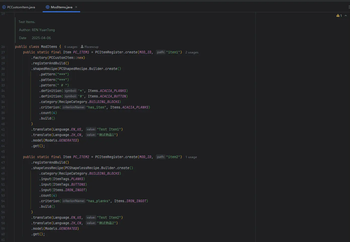
public static final Item ITEM1 = PCItemRegister.create(MOD_ID, "item1") // Creat the item with the given Identifier
    // Register and build
    .registerAndBuild()
    // Create the recipe for the item
    .shapedRecipe(PCShapedRecipe.Builder.create()
        .pattern("***")
        .pattern("***")
        .pattern(" # ")
        .definition('*', Items.ACACIA_PLANKS)
        .definition('#', Items.ACACIA_BUTTON)
        .category(RecipeCategory.BUILDING_BLOCKS)
        .criterion("has_item", Items.ACACIA_PLANKS)
        .count(4)
        .build()
    )
    // Add translations.
    .translate(Language.EN_US, "Test Item1")
    .translate(Language.ZH_CN, "测试物品1")
    // Set the model of the item.
    .model(Models.GENERATED)
    // Return the item to be registered.
    .get();

public static final Item ITEM2 = PCItemRegister.create(MOD_ID, "item2")
    .registerAndBuild()
    .shapelessRecipe(PCShapelessRecipe.Builder.create()
        .category(RecipeCategory.BUILDING_BLOCKS)
        .input(ItemTags.PLANKS)
        .input(ItemTags.BUTTONS)
        .input(Items.IRON_INGOT)
        .count(4)
        .criterion("has_planks", Items.IRON_INGOT)
        .build()
    )
    .translate(Language.EN_US, "Test Item2")
    .translate(Language.ZH_CN, "测试物品2")
    .model(Models.GENERATED)
    .get();

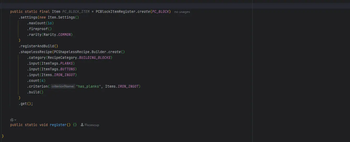
public static final Item BLOCK_ITEM = PCBlockItemRegister.create(BLOCK)
    .settings(new Item.Settings()
        .maxCount(16)
        .fireproof()
        .rarity(Rarity.COMMON)
    )
    .registerAndBuild()
    .shapelessRecipe(PCShapelessRecipe.Builder.create()
        .category(RecipeCategory.BUILDING_BLOCKS)
        .input(ItemTags.PLANKS)
        .input(ItemTags.BUTTONS)
        .input(Items.IRON_INGOT)
        .count(4)
        .criterion("has_planks", Items.IRON_INGOT)
        .build()
    )
    .get();
Blocks
Portal: PCBlockRegister
You can use the class PCBlockRegister.java to register blocks.
Below are some examples:
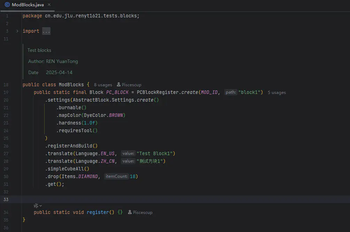
public static final Block BLOCK = PCBlockRegister.create(MOD_ID, "block1")
    .settings(AbstractBlock.Settings.create()
        .burnable()
        .mapColor(DyeColor.BROWN)
        .hardness(1.0f)
    )
    .registerAndBuild()
    .translate(Language.EN_US, "Test Block1")
    .translate(Language.ZH_CN, "测试方块1")
    .simpleCubeAll()
    .get();
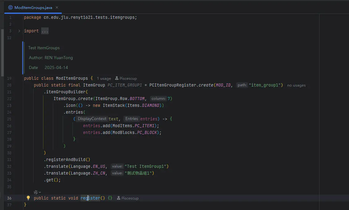
Item Groups
Portal: PCItemGroupRegister
You can use the class PCItemGroupRegister.java to register item groups.
Below are some examples:
public static final ItemGroup ITEM_GROUP1 = PCItemGroupRegister.create(MOD_ID, "item_group1")
    .itemGroupBuilder(ItemGroup.create(ItemGroup.Row.BOTTOM, 7)
        .icon(() -> new ItemStack(Items.DIAMOND))
        .entries(
            (text, entries) -> {
                entries.add(ModItems.ITEM1);
                entries.add(ModBlocks.BLOCK);
            }
        )
    )
    .registerAndBuild()
    .translate(Language.EN_US, "Test ItemGroup 1")
    .translate(Language.ZH_CN, "测试物品组1")
    .get();
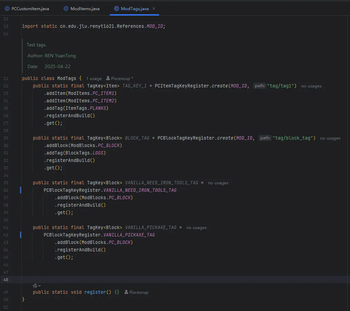
Tags
Portal: PCItemTagKeyRegister
The mod provides ways to register ItemTag and BlockTag
by using the class PCItemTagKeyRegister.java and PCBlockTagKeyRegister.java.
Before you use the method registerAndBuild(), you should use the method add() to add things at least once.
Below is an example for registering ItemTag:
public static final TagKey<Item> TAG_KEY_1 = PCItemTagKeyRegister.create(MOD_ID, "tag/tag1")
    .add(ModItems.ITEM1)
    .add(ModItems.ITEM2)
    .registerAndBuild()
    .get();
Below is an example for registering BlockTag:
public static final TagKey<Block> BLOCK_TAG = PCBlockTagKeyRegister.create(MOD_ID, "tag/block_tag")
    .add(ModBlocks.BLOCK)
    .registerAndBuild()
    .get();
Both PCItemTagKeyRegister and PCBlockTagKeyRegister provide a method createForVanilla(TagKey vanillaTagKey) for creating
a PCItemTagKeyRegister and PCBlockTagKeyRegister from a vanilla tag.
Below are some examples:
public static final TagKey<Block> VANILLA_NEED_IRON_TOOLS_TAG =
        PCBlockTagKeyRegister.createForVanilla(BlockTags.NEEDS_IRON_TOOL)
            .addBlock(ModBlocks.PC_BLOCK)
            .registerAndBuild()
            .get();

public static final TagKey<Block> VANILLA_PICKAXE_TAG =
    PCBlockTagKeyRegister.createForVanilla(BlockTags.PICKAXE_MINEABLE)
        .addBlock(ModBlocks.PC_BLOCK)
        .registerAndBuild()
        .get();
Recipes
Portal: PCShapedRecipe
& PCShapelessRecipe
The mod provides PCShapedRecipe.java and PCShapelessRecipe.java to set the recipes for the item.
Below are some usages:
- Create a shaped recipe by
PCShapedRecipe.java:public static final PCShapedRecipe SHAPED_RECIPE = PCShapedRecipe.Builder.create() .pattern("***") .pattern("***") .pattern(" # ") .definition('*', Items.ACACIA_PLANKS) .definition('#', Items.ACACIA_BUTTON) .category(RecipeCategory.BUILDING_BLOCKS) .criterion("has_item", Items.ACACIA_PLANKS) .count(4) .build(); - Create a shapeless recipe by
PCShapelessRecipe.java:public static final PCShapelessRecipe SHAPELESS_RECIPE = PCShapelessRecipe.Builder.create() .category(RecipeCategory.BUILDING_BLOCKS) .input(ItemTags.PLANKS) .input(ItemTags.BUTTONS) .input(Items.IRON_INGOT) .count(4) .criterion("has_planks", Items.IRON_INGOT) .build();
Model
The registers provide ways to set the model of the item.
For items:
You can use the method model(Model model)
in the class PCItemRegister.java to set the model of the item.
For blocks:
The mod only provide the method simpleCubeAll()
in the class PCBlockRegister.java to set the cube all model of the block.
Data Generation
The mod provides some DataProviderFactory to get the data providers.
Language Provider
Portal: PCLanguageProvider
& PCLanguageProviderFactory
The mod provides the class PCTranslationProviderFactory.java to get the translation provider.
Use the PCLanguageProviderFactory.java to get specific language provider:
languageProvider(Language lang): Get a list ofFabricDataGenerator.Pack.RegistryDependentFactory<DataProvider>
of the provider for the given language.languagesProvider(Language... langs)&languagesProvider(List<Language> langs): Get a list ofFabricDataGenerator.Pack.RegistryDependentFactory<DataProvider>
of the provider for the given languages.allLanguagesProvider(): Get a list ofFabricDataGenerator.Pack.RegistryDependentFactory<DataProvider>
of the provider for all languages.
Below are some examples:
import java.util.List;

public class PiscesCupDevelopLibDataGenerator
    implements DataGeneratorEntrypoint
{
    @Override
    public void onInitializeDataGenerator(FabricDataGenerator fabricDataGenerator) {
        FabricDataGenerator.Pack pack = fabricDataGenerator.createPack();

        PCLanguageProviderFactory.languagesProvider(Language.EN_US, Language.ZH_CN)
            .forEach(pack::addProvider);

        PCLanguageProviderFactory.allLanguagesProvider()
            .forEach(pack::addProvider);

        PCLanguageProviderFactory.languagesProvider(
            List.of(Language.EN_US, Language.ZH_CN)
        )
            .forEach(pack::addProvider);

    }
}
Model Provider
Portal: PCModelProvider
& PCModelProviderFactory
The mod provides the class PCModelProviderFactory.java to get the model provider.
Use the PCModelProviderFactory.java to get specific model provider:
modelProvider(): Get a list ofFabricDataGenerator.Pack.RegistryDependentFactory<DataProvider>
of the provider.
Below is an example:
public class PiscesCupDevelopLibDataGenerator
    implements DataGeneratorEntrypoint
{
    @Override
    public void onInitializeDataGenerator(FabricDataGenerator fabricDataGenerator) {
    	FabricDataGenerator.Pack pack = fabricDataGenerator.createPack();

    	PCModelProviderFactory.modelProvider()
    		.forEach(pack::addProvider);
    }
}
Recipe Provider
Portal: PCRecipeProvider
& PCRecipesProviderFactory
The mod provides the class PCRecipeProviderFactory.java to get the recipe provider.
Use the PCRecipeProviderFactory.java to get specific recipe provider:
recipesProvider(): Get a list ofFabricDataGenerator.Pack.RegistryDependentFactory<DataProvider>
of the provider.
Below is an example:
public class PiscesCupDevelopLibDataGenerator implements DataGeneratorEntrypoint {
    @Override
    public void onInitializeDataGenerator(FabricDataGenerator fabricDataGenerator) {
    	FabricDataGenerator.Pack pack = fabricDataGenerator.createPack();

    	PCRecipesProviderFactory.recipesProvider()
    		.forEach(pack::addProvider);
    }
}
Tag Provider
Portal: PCBlockTagProviderFactory
& PCTagProviderFactory
The mod provides an enum class: PCTagProviderFactory.java. Its fields are the tag providers.
The method factories() of the fields can return a list ofFabricDataGenerator.Pack.RegistryDependentFactory<DataProvider> of the provider.
And then you can use the method forEach() to add the provider to the pack.
The enum class also provides a static method allTagProviderFactories()
, which can return a List of FabricDataGenerator.Pack.RegistryDependentFactory<DataProvider>
for all the tag providers.
Below is the example of the fields:
public class PiscesCupDevelopLibDataGenerator implements DataGeneratorEntrypoint {
    @Override
    public void onInitializeDataGenerator(FabricDataGenerator fabricDataGenerator) {
    	FabricDataGenerator.Pack pack = fabricDataGenerator.createPack();

    	PCTagProviderFactory.ITEM_TAG_PROVIDER.getFactories()
    		.forEach(pack::addProvider);

    	PCTagProviderFactory.BLOCK_TAG_PROVIDER.getFactories()
    		.forEach(pack::addProvider);

    }
}
Below is an example of the static method allTagProviderFactories():
public class PiscesCupDevelopLibDataGenerator
    implements DataGeneratorEntrypoint
{
    @Override
    public void onInitializeDataGenerator(FabricDataGenerator fabricDataGenerator) {
    	FabricDataGenerator.Pack pack = fabricDataGenerator.createPack();

        PCTagProviderFactory.allTagProviderFactories()
            .forEach(pack::addProvider);
    }
}
Contact
If you have some bugs or suggestions, you can contact me by the following ways:
Available Versions
How to Install PicesCup Develop Lib on Your Server
Order Server
Order a Minecraft Java server with at least 3 GB RAM (4 GB recommended).
Set fabric Loader
In the panel under "Egg", select the fabric loader and matching Minecraft version (1.21.4).
Install Mod
Open the mod browser in the dashboard and search for "PicesCup Develop Lib". Click "Install" – done! Alternatively, upload the .jar via SFTP to the /mods folder.
Compatibility
Mod Loaders
Minecraft Versions
1.21.4
Server-side
✓ RequiredRecommended RAM
4 GB(min. 3 GB)Frequently Asked Questions
PicesCup Develop Lib server crashes on startup – what to do?
Most common cause: wrong fabric version or insufficient RAM. Check the server log (latest.log) for "OutOfMemoryError" or "Mixin" errors. With Mado Hosting: ensure at least 3 GB RAM is allocated and the loader matches the mod version (1.21.4). You can switch loaders with one click in the panel.
Is PicesCup Develop Lib compatible with fabric?
PicesCup Develop Lib officially supports fabric for Minecraft 1.21.4. The Mado dashboard automatically detects incompatible loader combinations.
Server lagging with PicesCup Develop Lib – how to optimize performance?
Recommended RAM: 4 GB (per 8 players). Use /spark profiler to check if PicesCup Develop Lib consumes the most tick time. Common fixes: reduce server view-distance to 8-10, install "performant" or "starlight" as supplementary mods on Forge. With Mado Hosting, your server runs on NVMe SSDs with dedicated CPU cores for minimal latency.
Similar Mods



Rent Modded Server
Install PicesCup Develop Lib with just one click on your server.