
Pickarang
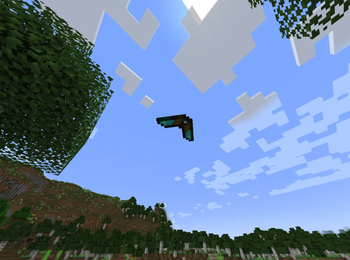
A standalone port of the Pickarang from Vazkii's Quark mod. Throw it like a boomerang to mine blocks at range – it picks up dropped items and returns everything to your inventory!
Screenshots
About this Mod
⛏️🪃 Pickarang
🔶 Standalone port — No Quark required!
A throwable boomerang-pickaxe that mines blocks at range, collects the drops, and returns to your hand!
🎯 What is Pickarang?
The Pickarang is a diamond-tier tool that combines a pickaxe with a boomerang. Right-click to throw it — it flies forward, breaks the first block it hits, picks up all nearby items, and returns everything straight to your inventory.
No more walking to every block you mine. Just throw, catch, repeat.
✨ Features
- 🪃 Throw & Return — Flies out, hits a block, and comes right back
- ⛏️ Mines Blocks — Breaks blocks just like a pickaxe would
- 📦 Collects Items — Picks up all dropped items on the way back
- ✨ Collects XP — Experience orbs are grabbed too
- 🔧 800 Durability — Built to last, repairable at an anvil
- ⚔️ 3 Attack Damage — Works as a melee weapon in a pinch
- 🎯 Returns to Original Slot — Always comes back exactly where it was
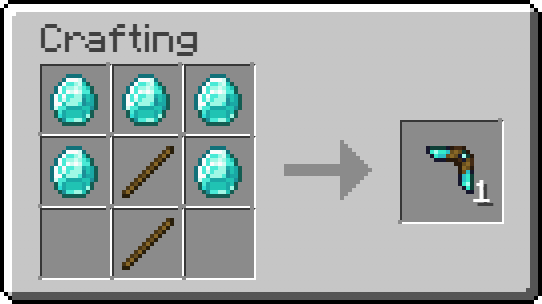
🛠️ Crafting Recipe

📋 Requirements for Fabric Version
| Dependency | Version |
|---|---|
| Minecraft | 1.21.8 |
| Fabric Loader | ≥ 0.16.1 |
| Fabric API | Required |
📋 Requirements for NeoForge Version
| Dependency | Version |
|---|---|
| Minecraft | 26.1.2 |
| NeoForge | ≥ 26.1.2.59-beta |
(That is the NeoForge version I tested, may work on more tho..)
📜 Credits & License
This mod is a standalone port inspired by the Pickarang feature from the Quark mod.
- Original concept & design — Vazkii / Violet Moon
- Pickarang port — nicomods
Licensed under CC BY-NC-SA 3.0, consistent with the original Quark license.
Throw smarter, not harder. 🪃
Available Versions
How to Install Pickarang on Your Server
Order Server
Order a Minecraft Java server with at least 3 GB RAM (4 GB recommended).
Set fabric Loader
In the panel under "Egg", select the fabric loader and matching Minecraft version (26.1.2).
Install Mod
Open the mod browser in the dashboard and search for "Pickarang". Click "Install" – done! Alternatively, upload the .jar via SFTP to the /mods folder.
Compatibility
Mod Loaders
Minecraft Versions
26.1.2, 1.21.8
Server-side
✓ RequiredRecommended RAM
4 GB(min. 3 GB)Frequently Asked Questions
Pickarang server crashes on startup – what to do?
Most common cause: wrong fabric version or insufficient RAM. Check the server log (latest.log) for "OutOfMemoryError" or "Mixin" errors. With Mado Hosting: ensure at least 3 GB RAM is allocated and the loader matches the mod version (26.1.2). You can switch loaders with one click in the panel.
Is Pickarang compatible with fabric and neoforge?
Pickarang officially supports fabric, neoforge for Minecraft 26.1.2, 1.21.8. The Mado dashboard automatically detects incompatible loader combinations.
Server lagging with Pickarang – how to optimize performance?
Recommended RAM: 4 GB (per 8 players). Use /spark profiler to check if Pickarang consumes the most tick time. Common fixes: reduce server view-distance to 8-10, install "performant" or "starlight" as supplementary mods on Forge. With Mado Hosting, your server runs on NVMe SSDs with dedicated CPU cores for minimal latency.
Similar Mods



![[TaCZ] Timeless and Classics Zero](https://cdn.modrinth.com/data/SzzJttH8/fd27766d2bb8390d284696b1dbd358f87e081439_96.webp)


Rent Modded Server
Install Pickarang with just one click on your server.
Details
- License
- Creative Commons Attribution Non Commercial Share Alike 3.0 Unported
- Server-side
- Required