
Picky Bags
Picky Bags : they pickup and sort items for you keeping the inventory clean. Also has a Lunchbox
Screenshots
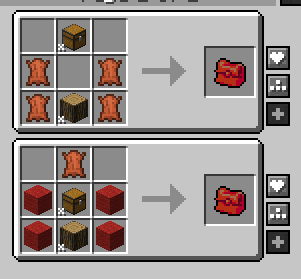
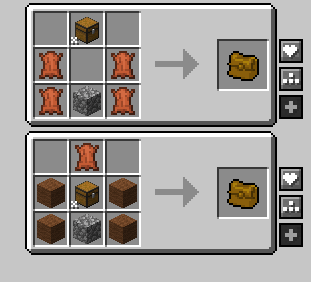
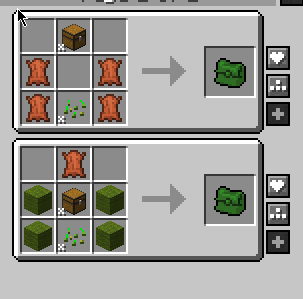
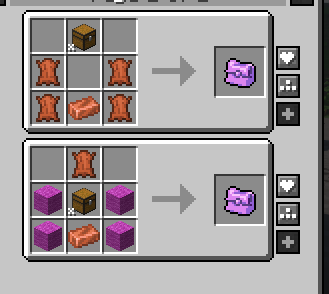
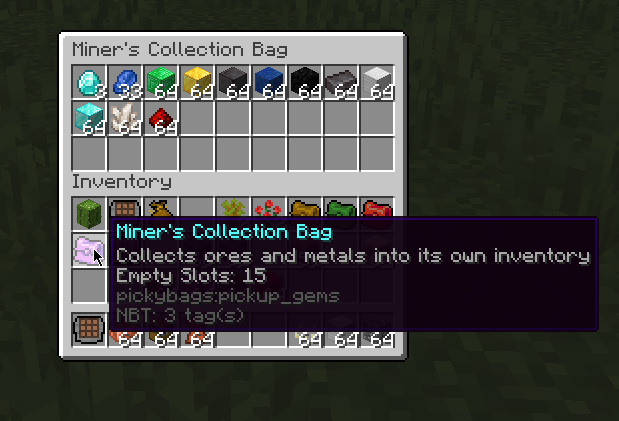
About this Mod
Tired of picking up stuff?
Have you ever wanted to carry around bags that pickup stuff FOR YOU
Whenever you pickup an item, if you are holding one of these magical bags, they get sorted into the bag based on what kind of item it is. Its like the bag pickup items for you.
Right-click the bag while in your inventory to open the bags
You can quick-insert items into the bags, assuming they match the item type
https://i.imgur.com/j4moFNT.gif
Forester's Collection Bag
Picks up wood, logs, saplings, tree related items
Data tag 'pickybags:wood_like'
Digger's Collection Bag
Picks up digging related material
Data tag 'pickybags:stone_like'
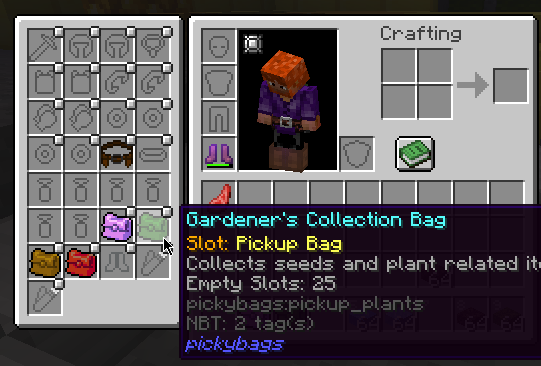
Gardener's Collection Bag
Picks up crops, seeds, and flowers
Data tag 'pickybags:plant_like'
Miner's Collection Bag
this one collects the gems, dusts, ingots, and ores you are collecting
Data tag 'pickybags:gem_like'
Lunchbox
Auto pickup any item that is edible (so no data tag used here)
you have to sneak-click (shift-click) to open this one, because normally it tries to EAT the contents
eating the bag while its closed eats the first item it finds in the bag
Also adds a few items that do not have the auto-pickup feature, but are still useful
Crafting Slab
- handheld item-only crafting 3x3 grid, supports all recipes. no need to place a table down
Item Bag
Simple handheld storage, holds a double-chests worth so more than regular bags, but no auto pickup or any fancy features.
to store all the excess junk
All controlled by data tags, so modpacks can edit this pickup list at willl, see https://github.com/Lothrazar/pickybags/tree/trunk/1.20/src/main/resources/data/pickybags/tags/items
Requires forge and FLIB
Available Versions
How to Install Picky Bags on Your Server
Order Server
Order a Minecraft Java server with at least 3 GB RAM (4 GB recommended).
Set forge Loader
In the panel under "Egg", select the forge loader and matching Minecraft version (1.20.1).
Install Mod
Open the mod browser in the dashboard and search for "Picky Bags". Click "Install" – done! Alternatively, upload the .jar via SFTP to the /mods folder.
Compatibility
Mod Loaders
Minecraft Versions
1.20.1
Server-side
✓ RequiredRecommended RAM
4 GB(min. 3 GB)Frequently Asked Questions
Picky Bags server crashes on startup – what to do?
Most common cause: wrong forge version or insufficient RAM. Check the server log (latest.log) for "OutOfMemoryError" or "Mixin" errors. With Mado Hosting: ensure at least 3 GB RAM is allocated and the loader matches the mod version (1.20.1). You can switch loaders with one click in the panel.
Is Picky Bags compatible with forge and neoforge?
Picky Bags officially supports forge, neoforge for Minecraft 1.20.1. The Mado dashboard automatically detects incompatible loader combinations.
Server lagging with Picky Bags – how to optimize performance?
Recommended RAM: 4 GB (per 8 players). Use /spark profiler to check if Picky Bags consumes the most tick time. Common fixes: reduce server view-distance to 8-10, install "performant" or "starlight" as supplementary mods on Forge. With Mado Hosting, your server runs on NVMe SSDs with dedicated CPU cores for minimal latency.
Similar Mods



![[TaCZ] Timeless and Classics Zero](https://cdn.modrinth.com/data/SzzJttH8/fd27766d2bb8390d284696b1dbd358f87e081439_96.webp)



Rent Modded Server
Install Picky Bags with just one click on your server.