
Picture Perfect
A better way to see, share and organise your pictures!
Screenshots
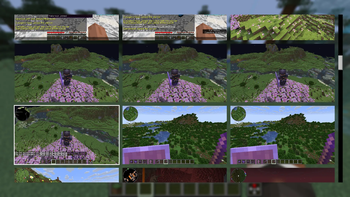
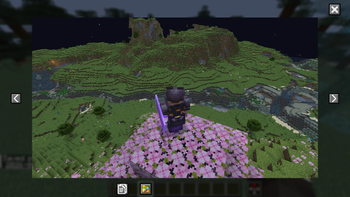
About this Mod
Picture Perfect
Do you want to see your pictures, but you don't like diving into the games files to see it?
In that case: I present to you, Picture Perfect: See, share and organise your pictures how you want it: The gallery is aimed to be highly customisable, so you can decide whether you want a feature or not
All current features:
- A picture list
- Seeing the pictures enlarged
- Copying to clipboard
- Renaming pictures
- Opening in the file explorer
- Metadata editor/viewer
- Settings:
- Amount of columns to display
- Distance between each picture (horizontal and vertical)
- Scroll speed multiplier
- Sorting method
Planned Features:
- Albums: A collection of images you can see together
- Deleting
Updates
This mod is currently in beta, so some features are missing or may be unstable, although the majority is added. Expect updates with bug patches and new features frequently. Bug reports can be posted here
Requires
- Cloth config
- Mod menu
Available Versions
How to Install Picture Perfect on Your Server
Order Server
Order a Minecraft Java server with at least 3 GB RAM (4 GB recommended).
Set fabric Loader
In the panel under "Egg", select the fabric loader and matching Minecraft version (26.2).
Install Mod
Open the mod browser in the dashboard and search for "Picture Perfect". Click "Install" – done! Alternatively, upload the .jar via SFTP to the /mods folder.
Compatibility
Mod Loaders
Minecraft Versions
26.2, 26.1.2, 26.1.1 (+2 more)
Server-side
✗ UnsupportedRecommended RAM
4 GB(min. 3 GB)Frequently Asked Questions
Picture Perfect server crashes on startup – what to do?
Most common cause: wrong fabric version or insufficient RAM. Check the server log (latest.log) for "OutOfMemoryError" or "Mixin" errors. With Mado Hosting: ensure at least 3 GB RAM is allocated and the loader matches the mod version (26.2). You can switch loaders with one click in the panel.
Is Picture Perfect compatible with fabric?
Picture Perfect officially supports fabric for Minecraft 26.2, 26.1.2, 26.1.1. The Mado dashboard automatically detects incompatible loader combinations.
Server lagging with Picture Perfect – how to optimize performance?
Recommended RAM: 4 GB (per 8 players). Use /spark profiler to check if Picture Perfect consumes the most tick time. Common fixes: reduce server view-distance to 8-10, install "performant" or "starlight" as supplementary mods on Forge. With Mado Hosting, your server runs on NVMe SSDs with dedicated CPU cores for minimal latency.
Similar Mods






Rent Modded Server
Install Picture Perfect with just one click on your server.
Details
- License
- Creative Commons Attribution Non Commercial 4.0 International
- Server-side
- Unsupported