
Piercing Paxels ⚒️
Dynamic Upgradable Multi-tools!
Screenshots
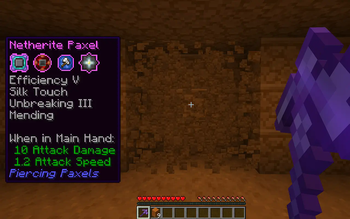
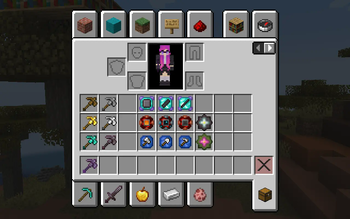
About this Mod
Want to host a server with Piercing Paxels? |
|---|
 |
| Rent your own Minecraft server here! |
Features
This mod adds a new selection of tools, Paxels, made with one of each normal tool. They have a lot of features such as:
- They can mine any blocks.
- They have the durability of all the tools used to make them combined.
- When they reach zero durability they don't break, instead they become unusable until repaired.
- They can have upgrades applied to enhance their abilities without needing enchantments:
- Ability Upgrades: Hold right click to break an area in front of you.
- Auto-Smelt (Smelt any block broken)
- Silence (Muffles sounds, including to Sculk creatures)
- Vacuum (Drops items directly into your inventory)
- Restoration (Repairs the paxel over time)
- Unbreakability (The paxel never takes durability damage)
- Usage Upgrade: Allows the paxel to act as a hoe, axe, or shovel.
Using The Mod
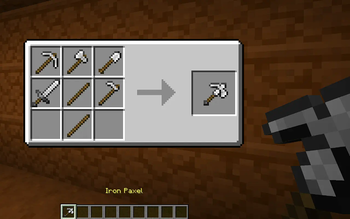
Crafting a Paxel
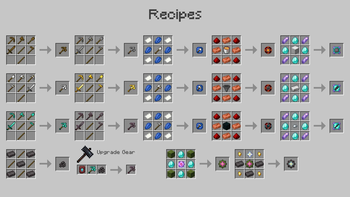
Paxels can be created using all 5 of any individual material.

Creating Upgrades
Various types of upgrades can be created using the following recipes.
They can be inserted into the paxel by opening its inventory with shift right-click, and put into it's particular upgrade slot

Using the Paxel
The paxel can be used like any other tool, and can break any block.
If you install an ability upgrade then you can also hold right click to break an area in front of you, in a different shape depending on the upgrade.

Available Versions
How to Install Piercing Paxels ⚒️ on Your Server
Order Server
Order a Minecraft Java server with at least 3 GB RAM (4 GB recommended).
Set fabric Loader
In the panel under "Egg", select the fabric loader and matching Minecraft version (1.20.1).
Install Mod
Open the mod browser in the dashboard and search for "Piercing Paxels ⚒️". Click "Install" – done! Alternatively, upload the .jar via SFTP to the /mods folder.
Compatibility
Mod Loaders
Minecraft Versions
1.20.1, 1.20, 1.19.2 (+5 more)
Server-side
✓ RequiredRecommended RAM
4 GB(min. 3 GB)Frequently Asked Questions
Piercing Paxels ⚒️ server crashes on startup – what to do?
Most common cause: wrong fabric version or insufficient RAM. Check the server log (latest.log) for "OutOfMemoryError" or "Mixin" errors. With Mado Hosting: ensure at least 3 GB RAM is allocated and the loader matches the mod version (1.20.1). You can switch loaders with one click in the panel.
Is Piercing Paxels ⚒️ compatible with fabric and forge and quilt?
Piercing Paxels ⚒️ officially supports fabric, forge, quilt for Minecraft 1.20.1, 1.20, 1.19.2. Note: Forge and Fabric mods are NOT cross-compatible – pick one loader and stick with it. The Mado dashboard automatically detects incompatible loader combinations.
Server lagging with Piercing Paxels ⚒️ – how to optimize performance?
Recommended RAM: 4 GB (per 8 players). Use /spark profiler to check if Piercing Paxels ⚒️ consumes the most tick time. Common fixes: reduce server view-distance to 8-10, install "performant" or "starlight" as supplementary mods on Forge. With Mado Hosting, your server runs on NVMe SSDs with dedicated CPU cores for minimal latency.
Similar Mods





Rent Modded Server
Install Piercing Paxels ⚒️ with just one click on your server.