
pigeon_potion
Pigeon Potion adds unique potion effects, advanced brewing recipes and deeper alchemy gameplay to Minecraft Forge 1.20.1.
About this Mod
Pigeon Potion
Pigeon Potion is a Minecraft Forge mod that expands Minecraft's brewing system with new potion effects, unique utility items,currently adds 6 custom potion effects and multiple new brewing paths for vanilla effects.
Features
New Potion Effects
Pigeon Potion expands Minecraft's brewing system by introducing new brewing paths, custom potion effects and alternative ways to obtain several vanilla effects.
Vanilla Effects Available Through New Brewing Recipes
The following vanilla effects can be obtained through additional brewing recipes added by this mod:
- Haste - Increases mining speed.
- Resistance - Reduces incoming damage.
- Mining Fatigue - Reduces mining speed.
- Wither - Damages entities over time.
- Luck - Improves luck-related outcomes.
- Bad Luck - The opposite of Luck.
Custom Effects Added by Pigeon Potion
- Reflection - Reflects a portion of incoming damage back to attackers.
- Armor - Provides additional armor and protection.
- Armor Break - Reduces armor effectiveness.
- Berserk - A high-risk combat effect that significantly improves offensive capabilities.
- Holy - A rare defensive effect obtained through special ingredients.
- Dodge - Provides a chance to avoid incoming damage.
Most potion effects support extended, enhanced, splash and lingering variants through the brewing system.
Advanced Brewing
Expand vanilla brewing with new ingredients, custom brewing chains and enhanced potion progression.
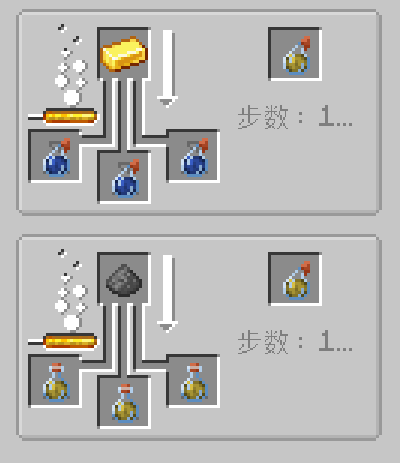
Example Recipe: Haste Potion
Haste Potion can be brewed from an Awkward Potion using a Gold Ingot.
It grants the Haste effect, increasing mining speed.
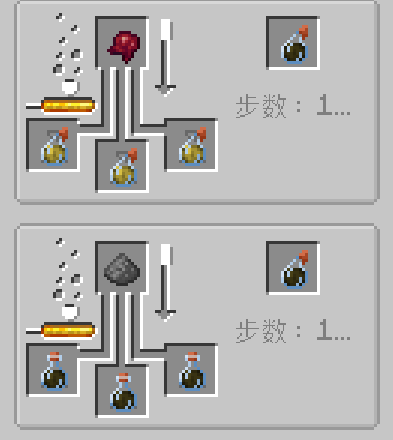
Example Recipe: Fatigue Potion
Fatigue Potion can be brewed from a Haste Potion using Nether Wart.
It applies Mining Fatigue, reducing mining speed.
Resistance Potion
Resistance Potions are brewed from Turtle Master Potions using Amethyst Shards.
Unlike Turtle Master Potions, Resistance Potions do not apply Slowness.
The duration of Resistance Potions is randomly generated within a configured range, making each brew slightly different.
Most custom potions support:
- Redstone Dust → Extended Duration
- Glowstone Dust → Stronger Effect
- Gunpowder → Splash Potion
- Dragon's Breath → Lingering Potion
All brewing recipes can be viewed directly through JEI.
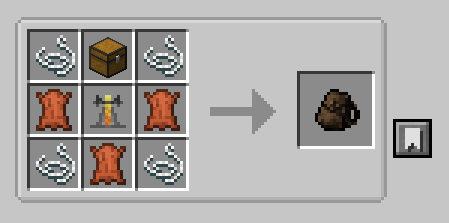
Potion Pouch
The Potion Pouch is a utility item designed for storing and quickly using splash potions.
Features
- Stores multiple splash potions.
- Right-click to throw the currently selected potion.
- Sneak + Right-click to open the pouch inventory.
- Hold Alt + Mouse Wheel to switch between stored potions.
Compatibility
- Minecraft 1.20.1
- Forge 47.4.10+
- JEI (Optional)
Environment:
- Client
- Server
Credits
Potion Pouch concept:
A friend of the project.
Potion Pouch texture:
Adapted from the Useful Backpacks mod.
Special thanks to everyone who helped test the mod during development.
Source Code
GitHub Repository
https://github.com/pigeon5887-web/pigeon_potion
Issue Tracker
https://github.com/pigeon5887-web/pigeon_potion/issues
License
GPL-3.0-or-later
Known Issues
Some custom brewing chains may display unknown brewing step counts in JEI.
Available Versions
How to Install pigeon_potion on Your Server
Order Server
Order a Minecraft Java server with at least 3 GB RAM (4 GB recommended).
Set forge Loader
In the panel under "Egg", select the forge loader and matching Minecraft version (1.20.1).
Install Mod
Open the mod browser in the dashboard and search for "pigeon_potion". Click "Install" – done! Alternatively, upload the .jar via SFTP to the /mods folder.
Compatibility
Mod Loaders
Minecraft Versions
1.20.1
Server-side
✓ RequiredRecommended RAM
4 GB(min. 3 GB)Frequently Asked Questions
pigeon_potion server crashes on startup – what to do?
Most common cause: wrong forge version or insufficient RAM. Check the server log (latest.log) for "OutOfMemoryError" or "Mixin" errors. With Mado Hosting: ensure at least 3 GB RAM is allocated and the loader matches the mod version (1.20.1). You can switch loaders with one click in the panel.
Is pigeon_potion compatible with forge?
pigeon_potion officially supports forge for Minecraft 1.20.1. The Mado dashboard automatically detects incompatible loader combinations.
Server lagging with pigeon_potion – how to optimize performance?
Recommended RAM: 4 GB (per 8 players). Use /spark profiler to check if pigeon_potion consumes the most tick time. Common fixes: reduce server view-distance to 8-10, install "performant" or "starlight" as supplementary mods on Forge. With Mado Hosting, your server runs on NVMe SSDs with dedicated CPU cores for minimal latency.
Rent Modded Server
Install pigeon_potion with just one click on your server.