
Piggyback
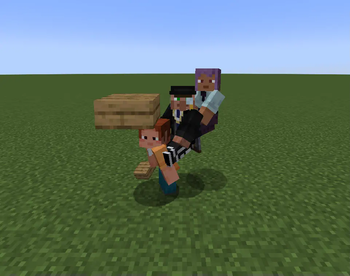
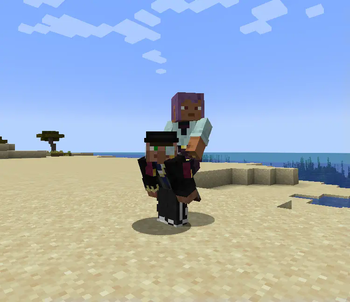
Allow player riding each other and replace the default player sitting mechanic with a piggyback-style ride. Carry your friends on your back for fun, teamwork, or pure chaos!
Screenshots

About this Mod




📑 Overview
Piggybacks is a fun and small mod that changes Minecraft's default sitting mechanic into a more natural piggyback-style ride. Instead of sitting on another player’s head, you now ride on their back, perfect for co-op adventures, silly roleplays, or chaotic situations!.
📦 Features
- Right-click a crouching player with an empty hand to hop on their back.
- Replaces the sitting position with a piggyback posture.
- Fully compatible with multiplayer.
- Supports player stacking (yes, you can build a human totem!).
- The rider can't turn around to look behind, similar to when riding a boat.
- Optional setting to slow down the carrier while they're carrying someone.
🎥 Showcases
- How to ride:
 - Player tower


⚙️ Configs
The mod can be config via:
- Config file locates in config/piggyback.toml
- In-game config menu
⚠️ Required mods
- Fabric API
- Faewulfs Lib
🔗 Compatibility
Piggybacks is designed to be compatible with other mods. If you encounter any issues, please report them on the
mod's issues tracker.
💖 Support
For support, feature requests, or bug reports, please visit the mod's GitHub issues page.
or join my Discord server: link
📜 License
You can use this mod in modpack as long as giving proper credits.
Available Versions
How to Install Piggyback on Your Server
Order Server
Order a Minecraft Java server with at least 3 GB RAM (4 GB recommended).
Set fabric Loader
In the panel under "Egg", select the fabric loader and matching Minecraft version (1.21.11).
Install Mod
Open the mod browser in the dashboard and search for "Piggyback". Click "Install" – done! Alternatively, upload the .jar via SFTP to the /mods folder.
Compatibility
Mod Loaders
Minecraft Versions
1.21.11, 1.21.10, 1.21.8 (+7 more)
Server-side
✓ RequiredRecommended RAM
4 GB(min. 3 GB)Frequently Asked Questions
Piggyback server crashes on startup – what to do?
Most common cause: wrong fabric version or insufficient RAM. Check the server log (latest.log) for "OutOfMemoryError" or "Mixin" errors. With Mado Hosting: ensure at least 3 GB RAM is allocated and the loader matches the mod version (1.21.11). You can switch loaders with one click in the panel.
Is Piggyback compatible with fabric and forge and neoforge and quilt?
Piggyback officially supports fabric, forge, neoforge, quilt for Minecraft 1.21.11, 1.21.10, 1.21.8. Note: Forge and Fabric mods are NOT cross-compatible – pick one loader and stick with it. The Mado dashboard automatically detects incompatible loader combinations.
Server lagging with Piggyback – how to optimize performance?
Recommended RAM: 4 GB (per 8 players). Use /spark profiler to check if Piggyback consumes the most tick time. Common fixes: reduce server view-distance to 8-10, install "performant" or "starlight" as supplementary mods on Forge. With Mado Hosting, your server runs on NVMe SSDs with dedicated CPU cores for minimal latency.
Similar Mods





Rent Modded Server
Install Piggyback with just one click on your server.
Details
- License
- Creative Commons Attribution Non Commercial Share Alike 4.0 International
- Server-side
- Required