
Screenshots
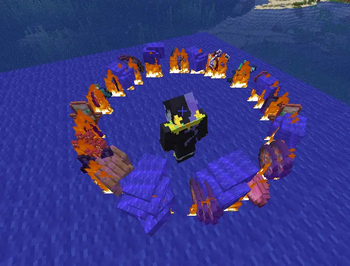
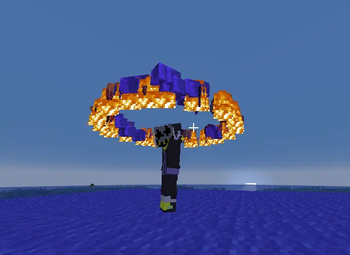
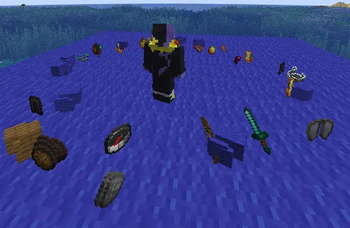
About this Mod
This mod is fully client-side and works on servers where it is not installed.
This mod allows you to throw your entire inventory away with just one button press
There are quite flexible settings for the throwing itself, and the visual effects of it
Throw out your inventory
--- Key Bindings ---
Scatter Drop — triggers the throw of all items from your inventory with selected visual effects.
Stop Animation — stops all visual effects (fire, enchant glint, floating, etc.).
--- Main Settings ---
1.Fire on Items — visual fire effect on thrown items.
2.Effect Duration — how many seconds visual effects last (force-stop with J).
3.Enchant Glint — thrown items shimmer as if enchanted.
4.Orbit Around Player — visual ring of thrown items around the player.
5.Items Float in Place — items float above the ground where they landed (if orbit is off).
6.Float Height — distance from player's feet at which items float.
7.Float Radius — radius of the orbit ring.
8.Spin Around Player — whether the orbit rotates.
9.Spin Speed — how fast the orbit(s) rotate.
10.Lock Orbit Height — orbit follows you but height stays fixed.
11.Lock Orbit Position — orbit stays at the spot where you activated the throw.
12.Scatter in Circle — throw in a circle or straight forward.
--- Pro Settings ---
1.Armor — throw equipped armor.
2.On Death (BETA) — throw on death (servers with respawn button); works with keepInventory.
3.Keep Fireworks & Blaze Rods — throw everything except fireworks and blaze rods.
4.Offhand — throw items held in the offhand.
5.Small Radius — off: throws 3-4 blocks away; on: throws 0.5-1 block.
6.When Last Player in Tab (BETA) — auto-throw when you kill the last player (Warning: may harm you outside minigames!).
7.When Only Teammates Remain (BETA) — auto-throw when no enemies remain in tab (Warning: use at your own risk!).
8.Only 2 Items/Tick (BETA) — for servers with strict anticheat. Does NOT guarantee ban safety — check with server admins first.
9.Orbit Rings — how many orbits (alternate clockwise / counter-clockwise).
10.Max Items per Ring — max item stacks per orbit.
11.Different Radius per Ring — use individual radius from settings 13-22.
12.Different Height per Ring — use individual height from settings 13-22.
13.Height and radius for each individual orbit (settings 13-22).
On some servers, this mod may be considered a cheat. Before using it, check if its features are on the list of banned functions. Or ask the administration
I do not plan to export to other versions or to Forge/NeoForge.
You need to install the fabric API and the Mod menu
The text in English will be at the bottom (scroll down)
Available Versions
How to Install Pinata on Your Server
Order Server
Order a Minecraft Java server with at least 3 GB RAM (4 GB recommended).
Set fabric Loader
In the panel under "Egg", select the fabric loader and matching Minecraft version (1.21.1).
Install Mod
Open the mod browser in the dashboard and search for "Pinata". Click "Install" – done! Alternatively, upload the .jar via SFTP to the /mods folder.
Compatibility
Mod Loaders
Minecraft Versions
1.21.1
Server-side
✗ UnsupportedRecommended RAM
4 GB(min. 3 GB)Frequently Asked Questions
Pinata server crashes on startup – what to do?
Most common cause: wrong fabric version or insufficient RAM. Check the server log (latest.log) for "OutOfMemoryError" or "Mixin" errors. With Mado Hosting: ensure at least 3 GB RAM is allocated and the loader matches the mod version (1.21.1). You can switch loaders with one click in the panel.
Is Pinata compatible with fabric?
Pinata officially supports fabric for Minecraft 1.21.1. The Mado dashboard automatically detects incompatible loader combinations.
Server lagging with Pinata – how to optimize performance?
Recommended RAM: 4 GB (per 8 players). Use /spark profiler to check if Pinata consumes the most tick time. Common fixes: reduce server view-distance to 8-10, install "performant" or "starlight" as supplementary mods on Forge. With Mado Hosting, your server runs on NVMe SSDs with dedicated CPU cores for minimal latency.
Similar Mods






Rent Modded Server
Install Pinata with just one click on your server.