
Ping It!
Adds a smart ping system for easier communication. You can now point at a location, mob or item
Screenshots
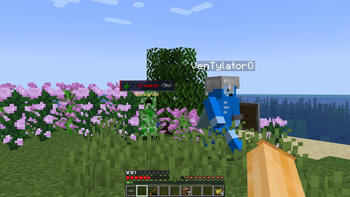
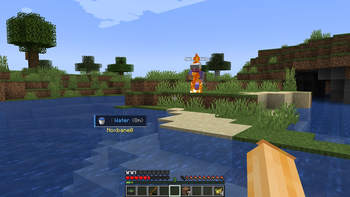
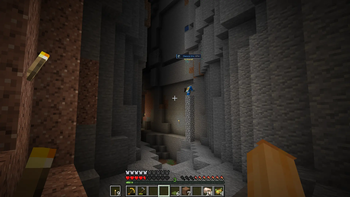
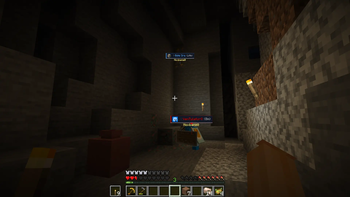
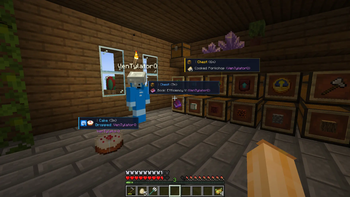
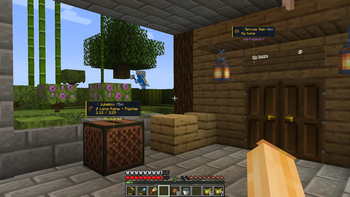
About this Mod

Ping It! is a utility mod that introduces a convenient pinging and marking system to Minecraft. It allows players on a server to easily point out locations, blocks, containers, items, and entities to each other without using chat or voice communication.
Key Features
Quick World Pings: Place markers on block coordinates, ores, mobs, and dropped items instantly by pressing the hotkey (default: V). Hostile mobs are highlighted as danger, and blocks like signs have their text displayed on the ping card. Pinging fluids is also supported.
Interactive Radial Menu: Hold down the hotkey (default: V) to open a wheel selection where you can select the ping type (Look, Alert, Danger) or choose from a customizable pool of quick chat phrases.
Container Inventory Pings: Press the hotkey (default: V) while hovering over slot items inside chests, hoppers, or your player inventory to cycle between different alert types (Look, Alert, Danger) and share the item details.
Smart Raycasting: Raycasts automatically ignore grass, flowers, and vines. You can configure the mod to ignore glass, torches, and barrier blocks.
Waypoint Routes (in beta): Connect multiple coordinates into a custom route to guide your team through cave systems or build areas. Press the route key (default: B) to start and publish routes.
Creative Teleportation: Creative and spectator mode players can middle-click an active ping on their screen to teleport safely to its location.
Top Compass HUD(our
flagmanfeature): A horizontal compass bar showing direction headings and nearby ping markers...Off-screen Indicators: Arrow, sonar, and distance indicators at screen edges for pings outside your field of view.
And Much More!
How to Use
- Press Key: Send a quick ping at your crosshair.
- Hold Key: Open the radial menu to select a specific ping type, customize labels, or choose a quick chat phrase.
- Press Key on Container Slot: Highlights the specific item in the chest or inventory slot.
Configuration
Almost every aspect of the mod is fully customizable to suit your gameplay preferences. The mod features a fully translated, comprehensive configuration screen, with presets, UI styles (including Vanilla-style (20/80) HUD), color adjustments, block outlines, fading options, and distance-based sound volume falloff.
This mod works fully client-side when playing on vanilla servers (only you will see your pings), but will synchronize with other players if installed on the server.
Credits
- Noxbane - Developer
- Kylon - Artist
Testers
- VenTylator
Available Versions
How to Install Ping It! on Your Server
Order Server
Order a Minecraft Java server with at least 3 GB RAM (4 GB recommended).
Set fabric Loader
In the panel under "Egg", select the fabric loader and matching Minecraft version (1.21.1).
Install Mod
Open the mod browser in the dashboard and search for "Ping It!". Click "Install" – done! Alternatively, upload the .jar via SFTP to the /mods folder.
Compatibility
Mod Loaders
Minecraft Versions
1.21.1, 1.20.1
Server-side
~ OptionalRecommended RAM
4 GB(min. 3 GB)Frequently Asked Questions
Ping It! server crashes on startup – what to do?
Most common cause: wrong fabric version or insufficient RAM. Check the server log (latest.log) for "OutOfMemoryError" or "Mixin" errors. With Mado Hosting: ensure at least 3 GB RAM is allocated and the loader matches the mod version (1.21.1). You can switch loaders with one click in the panel.
Is Ping It! compatible with fabric and forge and neoforge?
Ping It! officially supports fabric, forge, neoforge for Minecraft 1.21.1, 1.20.1. Note: Forge and Fabric mods are NOT cross-compatible – pick one loader and stick with it. The Mado dashboard automatically detects incompatible loader combinations.
Server lagging with Ping It! – how to optimize performance?
Recommended RAM: 4 GB (per 8 players). Use /spark profiler to check if Ping It! consumes the most tick time. Common fixes: reduce server view-distance to 8-10, install "performant" or "starlight" as supplementary mods on Forge. With Mado Hosting, your server runs on NVMe SSDs with dedicated CPU cores for minimal latency.
Similar Mods






Rent Modded Server
Install Ping It! with just one click on your server.