
PinkyPlayer
Music player right in your Minecraft!
Screenshots
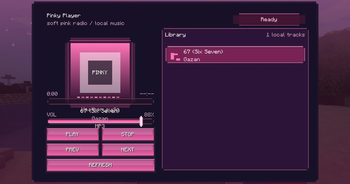
About this Mod
🎀 EN : 🎀
💗 Pinky 💗
Pinky is a stylish in-game music player mod for Minecraft that lets you listen to your own music directly inside the game 🎵
Drop your .mp3 or .flac files into the automatically created music folder and play them through a clean pink-themed interface without leaving Minecraft 💕
🌸 Features 🌸
- 🎶 Built-in music player GUI
- 💿 Supports
.mp3and.flac - 📁 Automatically creates a local
musicfolder - 🎧 Play your own songs directly in Minecraft
- 💖 Lightweight and simple to use
- 🎀 Custom pink aesthetic UI
- 📴 Works completely offline
💫 How To Use 💫
- Install the mod
- Launch Minecraft once
- Open the generated
musicfolder - Put your music files inside
- Open the Pinky player in-game and enjoy 🎶
🎼 Supported Formats 🎼
- MP3
- FLAC
💌 Notes 💌
- 💻 This mod is client-side
- 📂 Your music files are stored locally on your PC
- 🩷 Designed for Forge 1.20.1
Made for people who want their Minecraft sessions to feel more personal, cozy and atmospheric ✨
🎀 RU : 🎀
💗 Pinky 💗
Pinky — это музыкальный плеер прямо внутри Minecraft, который позволяет слушать свою музыку во время игры 🎵
Просто закинь .mp3 или .flac файлы в автоматически созданную папку music и наслаждайся музыкой через стильный розовый интерфейс, не сворачивая игру 💕
🌸 Возможности 🌸
- 🎶 Встроенный музыкальный плеер
- 💿 Поддержка
.mp3и.flac - 📁 Автоматическое создание папки
music - 🎧 Воспроизведение собственной музыки прямо в Minecraft
- 💖 Красивый розовый интерфейс
- 🎀 Простое и лёгкое использование
- 📴 Полностью оффлайн работа
💫 Как использовать 💫
- Установите мод
- Запустите Minecraft один раз
- Откройте созданную папку
music - Переместите туда свои музыкальные файлы
- Откройте плеер Pinky в игре и наслаждайтесь музыкой 🎶
🎼 Поддерживаемые форматы 🎼
- MP3
- FLAC
💌 Дополнительно 💌
- 💻 Мод работает только на клиенте
- 📂 Музыка хранится локально на вашем ПК
- 🩷 Разработано для Forge 1.20.1
Pinky создан для тех, кто хочет сделать свои Minecraft-сессии более атмосферными, уютными и вайбовыми ✨
Available Versions
How to Install PinkyPlayer on Your Server
Order Server
Order a Minecraft Java server with at least 3 GB RAM (4 GB recommended).
Set forge Loader
In the panel under "Egg", select the forge loader and matching Minecraft version (1.20.1).
Install Mod
Open the mod browser in the dashboard and search for "PinkyPlayer". Click "Install" – done! Alternatively, upload the .jar via SFTP to the /mods folder.
Compatibility
Mod Loaders
Minecraft Versions
1.20.1
Server-side
✗ UnsupportedRecommended RAM
4 GB(min. 3 GB)Frequently Asked Questions
PinkyPlayer server crashes on startup – what to do?
Most common cause: wrong forge version or insufficient RAM. Check the server log (latest.log) for "OutOfMemoryError" or "Mixin" errors. With Mado Hosting: ensure at least 3 GB RAM is allocated and the loader matches the mod version (1.20.1). You can switch loaders with one click in the panel.
Is PinkyPlayer compatible with forge?
PinkyPlayer officially supports forge for Minecraft 1.20.1. The Mado dashboard automatically detects incompatible loader combinations.
Server lagging with PinkyPlayer – how to optimize performance?
Recommended RAM: 4 GB (per 8 players). Use /spark profiler to check if PinkyPlayer consumes the most tick time. Common fixes: reduce server view-distance to 8-10, install "performant" or "starlight" as supplementary mods on Forge. With Mado Hosting, your server runs on NVMe SSDs with dedicated CPU cores for minimal latency.
Rent Modded Server
Install PinkyPlayer with just one click on your server.