
PixelmonLevelcustom
This mod adds / allows you to change your level of the pixelmon with it
Screenshots
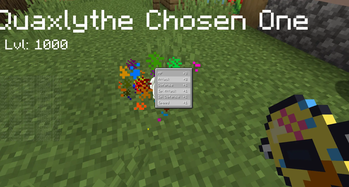
About this Mod
Unlimited Pixelmon Progression — No Level Cap
Take full control of your Pixelmon journey with this powerful utility mod that removes all level cap restrictions, freeing your Pokémon to grow beyond the standard limits and reach their true potential.
No More Level Cap
Tired of hitting a wall in your Pixelmon progression? This mod completely removes the default level cap, allowing your Pixelmon to grow as far as your dedication takes them. Whether you're grinding through dungeons, competing in intense battles, or simply exploring a vast modded world, your Pixelmon will never stop leveling up. Push your team to their absolute limits and discover just how powerful they can truly become with nothing holding them back.
Built for Every Type of Player
Whether you're a casual explorer or a hardcore competitive trainer, this mod enhances your experience without disrupting the core Pixelmon gameplay you love. Simply install, load your world, and watch as the ceiling disappears entirely — your Pixelmon are now free to grow without restriction.
Perfect For:
Seamless & Lightweight
No complicated setup. No conflicting mechanics. Just a clean, seamless integration that removes the level cap and gets out of your way so you can focus on what matters — training the most powerful Pixelmon team imaginable.
No caps. No limits. Just pure, uninterrupted Pixelmon progression.
Available Versions
How to Install PixelmonLevelcustom on Your Server
Order Server
Order a Minecraft Java server with at least 3 GB RAM (4 GB recommended).
Set forge Loader
In the panel under "Egg", select the forge loader and matching Minecraft version (1.20.1).
Install Mod
Open the mod browser in the dashboard and search for "PixelmonLevelcustom". Click "Install" – done! Alternatively, upload the .jar via SFTP to the /mods folder.
Compatibility
Mod Loaders
Minecraft Versions
1.20.1
Server-side
✓ RequiredRecommended RAM
4 GB(min. 3 GB)Frequently Asked Questions
PixelmonLevelcustom server crashes on startup – what to do?
Most common cause: wrong forge version or insufficient RAM. Check the server log (latest.log) for "OutOfMemoryError" or "Mixin" errors. With Mado Hosting: ensure at least 3 GB RAM is allocated and the loader matches the mod version (1.20.1). You can switch loaders with one click in the panel.
Is PixelmonLevelcustom compatible with forge?
PixelmonLevelcustom officially supports forge for Minecraft 1.20.1. The Mado dashboard automatically detects incompatible loader combinations.
Server lagging with PixelmonLevelcustom – how to optimize performance?
Recommended RAM: 4 GB (per 8 players). Use /spark profiler to check if PixelmonLevelcustom consumes the most tick time. Common fixes: reduce server view-distance to 8-10, install "performant" or "starlight" as supplementary mods on Forge. With Mado Hosting, your server runs on NVMe SSDs with dedicated CPU cores for minimal latency.
Rent Modded Server
Install PixelmonLevelcustom with just one click on your server.