
Pixlplus Bag
A Pixelmon addon that adds a bag and multiple QoL features
Screenshots

About this Mod
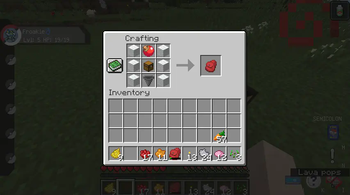
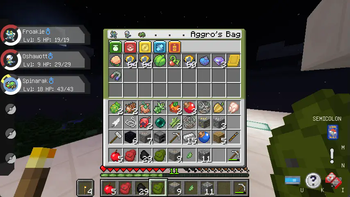
This Pixelmon addon includes a bag item with the aim of greatly improving the normal gameplay experience through various QoL additions:
- A dyeable bag that can currently hold up to 135 stacks of items
- Can be equipped to chest slot for functional and cosmetic purposes
- Able to be right clicked to open bag menu or main/offhand
- Auto pickup of any dropped item into a bag if items of the same type are stored in the equipped bag
- Potions, revives and full heals can be applied from the bag menu by right clicking the Pokémon's icon and then right clicking the item(not completely tested)
- Multiple bag categories to swap from miscellaneous items to balls, TMs, battle items, and medicine
- Bag inventory can be used in battle, but only one bag at a time (order of priority is equipped bag>mainhand>offhand>hotbar>main inventory)
This mod is currently very early in development so it's highly recommended to back up any world that you use this mod in (please report any issues you encounter along with the log file)
Available Versions
How to Install Pixlplus Bag on Your Server
Order Server
Order a Minecraft Java server with at least 3 GB RAM (4 GB recommended).
Set forge Loader
In the panel under "Egg", select the forge loader and matching Minecraft version (1.12.2).
Install Mod
Open the mod browser in the dashboard and search for "Pixlplus Bag". Click "Install" – done! Alternatively, upload the .jar via SFTP to the /mods folder.
Compatibility
Mod Loaders
Minecraft Versions
1.12.2
Server-side
✓ RequiredRecommended RAM
4 GB(min. 3 GB)Frequently Asked Questions
Pixlplus Bag server crashes on startup – what to do?
Most common cause: wrong forge version or insufficient RAM. Check the server log (latest.log) for "OutOfMemoryError" or "Mixin" errors. With Mado Hosting: ensure at least 3 GB RAM is allocated and the loader matches the mod version (1.12.2). You can switch loaders with one click in the panel.
Is Pixlplus Bag compatible with forge?
Pixlplus Bag officially supports forge for Minecraft 1.12.2. The Mado dashboard automatically detects incompatible loader combinations.
Server lagging with Pixlplus Bag – how to optimize performance?
Recommended RAM: 4 GB (per 8 players). Use /spark profiler to check if Pixlplus Bag consumes the most tick time. Common fixes: reduce server view-distance to 8-10, install "performant" or "starlight" as supplementary mods on Forge. With Mado Hosting, your server runs on NVMe SSDs with dedicated CPU cores for minimal latency.
Similar Mods




Rent Modded Server
Install Pixlplus Bag with just one click on your server.