
Pl3xMarkers
A massive collection of markers for Pl3xMap. Including support for mods like Shopkeepers and Open Parties & Claims
Screenshots
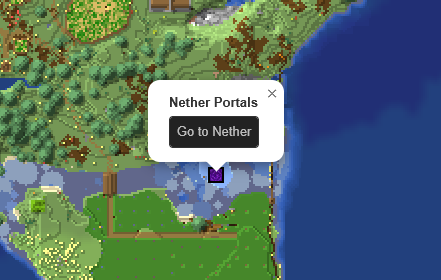

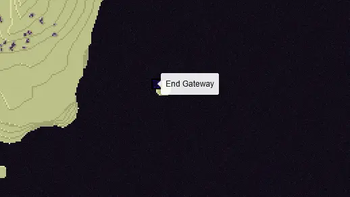


About this Mod

Added markers
- Open Parties and Claims claimed chunks
- Shopkeepers shops
- Player made areas
- Nether Portals
- End Portals
- End Gateways
- Lightning strikes
- Beacons
- Signs
All without the need for any commands and all fully configurable
How to -
Make an area
- Get a lodestone and a banner (all the same color) for all corners of your area.
- Give all banners the name of your area in an anvil.
- Place a lodestone with one of the banners on top on every corner.
- Admire your area on the web map.
- An area can have a max distance of 512 blocks between its furthest points.
- The names on the banners need to be an exact match.
- The placement order does not matter, the points will be connected automatically.
- You can add or remove points as you wish, the area will adept.
- For the best results, use at least 4 points.
Add a portal marker
- Go through a portal.
- Admire your portal on the web map.
Add a beacon marker
- Place a beacon.
- Activate the beacon.
- Admire your b
eacon on the web map.
Add a sign marker
- Place a sign on top of a lodestone.
- Write some text on your sign.
- Admire your sign on the web map.
FAQ
Q: The layers are not showing up on my web map, what do I do?
A: You most likely use custom names for your worlds. Make sure they use the correct suffix structure: {worldname}, {worldname}_nether, {worldname}_the_end
Q: Why are some points not showing up?
A: Areas are made out of the outermost points. If you have points inside the area they will not be used. Or the points are too far apart from the center.
Q: Can I customize area labels?
A: Yes! Area names support basic HTML tags such as <b>, <i>, <u>, <br>, and <span style="color: #RRGGBB;"> {text} </span>.
Q: Why is my area a small triangle?
A: You either have too few points (minimum 3) or your points are too far apart.
Q: How to reload the config?
A: Pl3xMarkers listens to Pl3xMap's reload, so you can reload using /pl3xmap reload
Demo
The Pl3xMarkers mod started out as Helix Markers, for my server; Helix Survival
You can check its webmap at https://map.hexasis.eu/
Available Versions
How to Install Pl3xMarkers on Your Server
Order Server
Order a Minecraft Java server with at least 3 GB RAM (4 GB recommended).
Set fabric Loader
In the panel under "Egg", select the fabric loader and matching Minecraft version (26.1.2).
Install Mod
Open the mod browser in the dashboard and search for "Pl3xMarkers". Click "Install" – done! Alternatively, upload the .jar via SFTP to the /mods folder.
Compatibility
Mod Loaders
Minecraft Versions
26.1.2, 1.21.11, 1.21.10 (+2 more)
Server-side
✓ RequiredRecommended RAM
4 GB(min. 3 GB)Frequently Asked Questions
Pl3xMarkers server crashes on startup – what to do?
Most common cause: wrong fabric version or insufficient RAM. Check the server log (latest.log) for "OutOfMemoryError" or "Mixin" errors. With Mado Hosting: ensure at least 3 GB RAM is allocated and the loader matches the mod version (26.1.2). You can switch loaders with one click in the panel.
Is Pl3xMarkers compatible with fabric and folia and paper and purpur and quilt?
Pl3xMarkers officially supports fabric, folia, paper, purpur, quilt for Minecraft 26.1.2, 1.21.11, 1.21.10. The Mado dashboard automatically detects incompatible loader combinations.
Server lagging with Pl3xMarkers – how to optimize performance?
Recommended RAM: 4 GB (per 8 players). Use /spark profiler to check if Pl3xMarkers consumes the most tick time. Common fixes: reduce server view-distance to 8-10, install "performant" or "starlight" as supplementary mods on Forge. With Mado Hosting, your server runs on NVMe SSDs with dedicated CPU cores for minimal latency.
Similar Mods




Rent Modded Server
Install Pl3xMarkers with just one click on your server.