
PlaceholderMaker
A minecraft mod with which you can make unlimited placeholders on modded mc servers, using the placeholders api and much more!
Screenshots
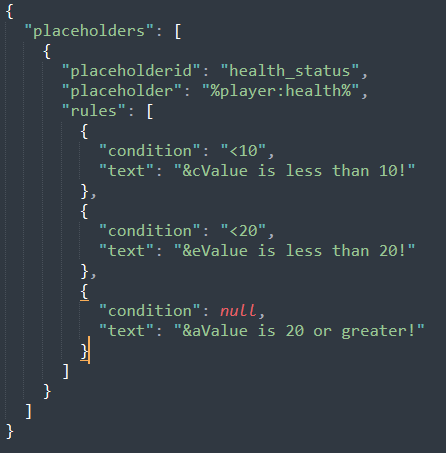
About this Mod
PlaceholderMaker
Overview
PlaceholderMaker is a Fabric mod that allows you to create placeholders that use conditions and rules to create unique and unlimited placeholders and even placeholders that are inside other placeholders that use detect to change during the game using conditions that detect changes from placeholders.
How It Works
- It works using conditions from rules in configure
jsonmade for placeholders, conditions detect changes from other placeholders that are used in configs from the placeholder! - Doing this using Placeholder API, and other placeholders from any type of mod!
- Placeholders can be created in a
jsonfile inpmaker/placeholdersand can be used in the game like this%pm:player_health%
Commands and Permissions
/pm reload- Permission:
pm.reload(or Operator Level ≥ 2) - Reloads all placeholder configuration files from
config/pmaker/placeholders/. - Use this after editing or adding new placeholder JSON files.
- Permission:
Conditions
| Operator | Meaning | Example |
|---|---|---|
< |
Less than | "<3" → if value < 3 |
> |
Greater than | ">12" → if value > 12 |
<= |
Less than or equal to | "<="5" → if value ≤ 5 |
>= |
Greater than or equal to | ">=10" → if value ≥ 10 |
= |
Equal to | "=3" → if value == 3 |
! |
Not equal to | "!3" → if value != 3 |
% |
Checks if value is divisible by | "%5" → if value % 5 == 0 |
null |
If it is null | Show the message directly |
Example: Creating a Placeholder
Below is a simple JSON file example you might place in config/pmaker/placeholders/health_status.json. This will create a placeholder health_status that references %player:health% and then decides which text to display based on the player’s health.
{
  "placeholders": [
    {
      "placeholderid": "health_status",
      "placeholder": "%player:health%",
      "rules": [
        {
          "condition": "<3",
          "text": "&cYou're about to die!"
        },
        {
          "condition": "<6",
          "text": "&eHang in there, warrior!"
        },
        {
          "condition": null,
          "text": "&aYou look perfectly healthy!"
        }
      ]
    }
  ]
}
Text Formats
Examples
Bold, Italic, Underline, Strikethrough, Obfuscated
<b>Bold text</b><i>Italic text</i><u>Underlined text</u><strike>Strikethrough text</strike><obf>Obfuscated text</obf>
Hex Colors
<#FF0000>This text is red</#><#00FF00>This text is green</#>
Gradient
<gradient:#FF0000:#FFFF00:#00FF00>Hello Gradient!</gradient>- You can use multiple hex colors separated by “:” (e.g.
#FF0000:#0000FF:#00FF00). - The parser will blend colors across the text.
Click Events
<click:run_command:'/say Hello'>Click to run a command</click><click:suggest_command:'/help'>Click to suggest a command in chat</click><click:open_url:'https://example.com'>Click to open a website</click><click:copy_to_clipboard:'Copied!'>Click to copy text</click>- Note:
run_commandis executed as if the player typed it in chat, so it requires permissions.
Hover Events
<hover:show_text:'Hover message here'>Hover over me</hover>
Links
<link:https://google.com>Click to open Google</link>- Equivalent to a
click:open_urlevent.
Reset
<reset>or<r>resets any formatting to default.
Vanilla Formatting Codes
- Use
&followed by a code (e.g.&a,&l,&r):&l= bold&o= italic&n= underline&m= strikethrough&k= obfuscated&r= reset&0-&f= color codes
- Use
Available Versions
How to Install PlaceholderMaker on Your Server
Order Server
Order a Minecraft Java server with at least 3 GB RAM (4 GB recommended).
Set fabric Loader
In the panel under "Egg", select the fabric loader and matching Minecraft version (1.21.4).
Install Mod
Open the mod browser in the dashboard and search for "PlaceholderMaker". Click "Install" – done! Alternatively, upload the .jar via SFTP to the /mods folder.
Compatibility
Mod Loaders
Minecraft Versions
1.21.4, 1.21.3, 1.21.2 (+2 more)
Server-side
✓ RequiredRecommended RAM
4 GB(min. 3 GB)Frequently Asked Questions
PlaceholderMaker server crashes on startup – what to do?
Most common cause: wrong fabric version or insufficient RAM. Check the server log (latest.log) for "OutOfMemoryError" or "Mixin" errors. With Mado Hosting: ensure at least 3 GB RAM is allocated and the loader matches the mod version (1.21.4). You can switch loaders with one click in the panel.
Is PlaceholderMaker compatible with fabric?
PlaceholderMaker officially supports fabric for Minecraft 1.21.4, 1.21.3, 1.21.2. The Mado dashboard automatically detects incompatible loader combinations.
Server lagging with PlaceholderMaker – how to optimize performance?
Recommended RAM: 4 GB (per 8 players). Use /spark profiler to check if PlaceholderMaker consumes the most tick time. Common fixes: reduce server view-distance to 8-10, install "performant" or "starlight" as supplementary mods on Forge. With Mado Hosting, your server runs on NVMe SSDs with dedicated CPU cores for minimal latency.
Similar Mods






Rent Modded Server
Install PlaceholderMaker with just one click on your server.