Placement Utilities
Utilities and gadgets to help you place blocks and make building far less painful
Screenshots
About this Mod
Are you one of the people using dirt as temporary blocks for building? Stop doing that! This mod adds instantly breakable temporary blocks as well as upgrades of them. The mod also adds a tool called Angel Wand, which lets you place many blocks in midair and rotate them to make your next build less painful.

This GIF is showing how the Angel Wand works
A list of things the mod adds (you can find these descriptions in-game while hovering over the item and pressing CTRL + SHIFT):
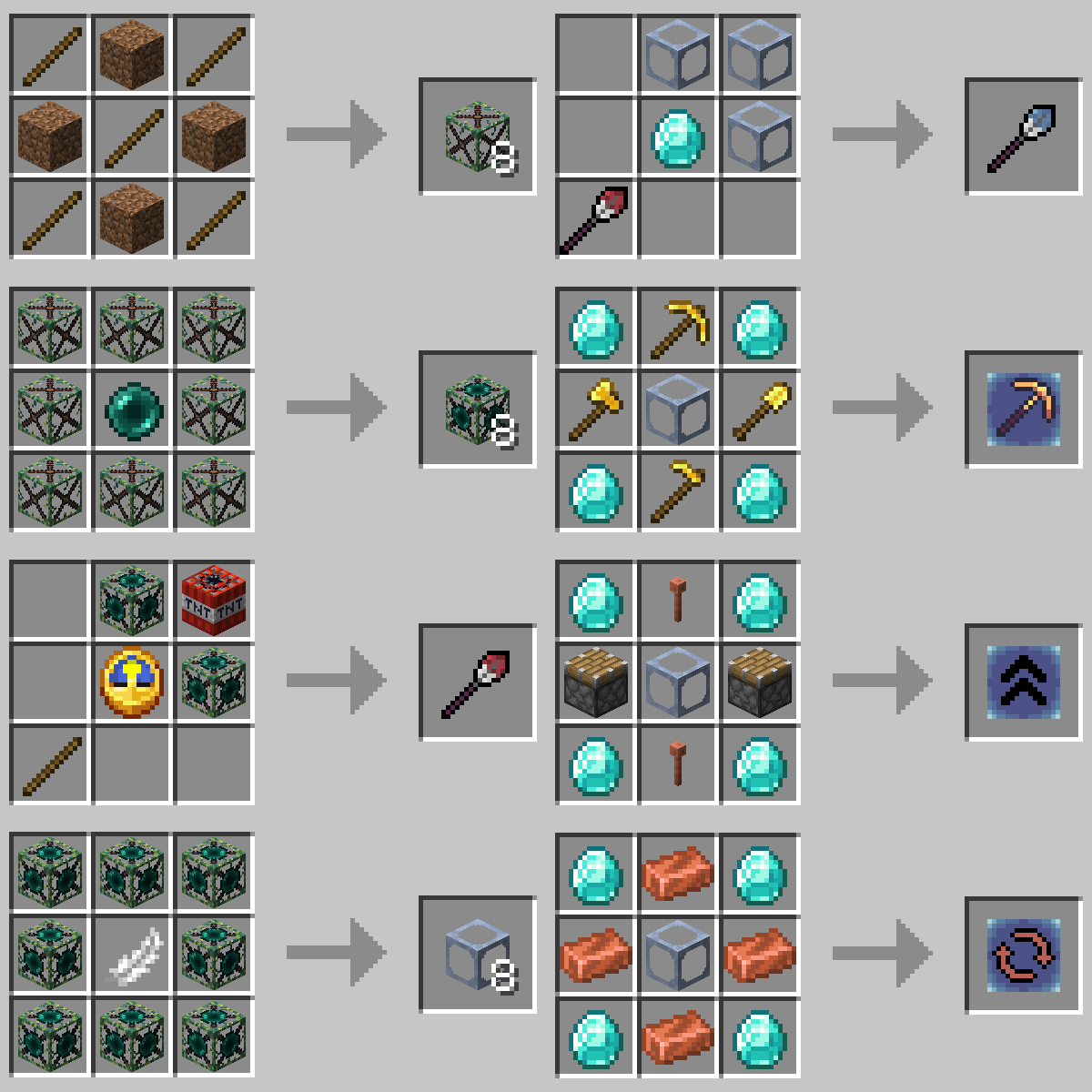
- Temporary Block (Default): A block that you can walk through and break instantly. It's used to place other blocks while building.
- Temporary Block (Returning): Just like a default Temporary Block, but it will go straight into your inventory after breaking.
- Temporary Block (Self Destructing): Just like a default Temporary Block, but it automatically disappears after 10 seconds (alternatively disappears on Random Tick if you configure it that way). Only used by the Temporary Wand.
- Temporary Wand: Right click to place a self-destructing Temporary Block. Unlimited uses
- Temporary Block (Angel): Just like a returning Temporary Block, but you can place it midair.
- Angel Wand: While holding in your offhand, you can place many blocks as if they were angel Temporary Blocks. The distance you place the block is changeable. Upgradeable
- Angel Add-on: Break: An add-on for the Angel Wand to remove the Mining Fatigue effect while holding an Angel Wand in your offhand.
- Angel Add-on: Range: An add-on for the Angel Wand to increase its max reach by 1 Block each (max amount is configurable).
- Angel Add-on: Rotate: An add-on for the Angel Wand to add a feature to rotate blocks you are looking at.
Recipes:
Available Versions
How to Install Placement Utilities on Your Server
Order Server
Order a Minecraft Java server with at least 3 GB RAM (4 GB recommended).
Set forge Loader
In the panel under "Egg", select the forge loader and matching Minecraft version (1.19.2).
Install Mod
Open the mod browser in the dashboard and search for "Placement Utilities". Click "Install" – done! Alternatively, upload the .jar via SFTP to the /mods folder.
Compatibility
Mod Loaders
Minecraft Versions
1.19.2, 1.19.1, 1.19 (+1 more)
Server-side
✓ RequiredRecommended RAM
4 GB(min. 3 GB)Frequently Asked Questions
Placement Utilities server crashes on startup – what to do?
Most common cause: wrong forge version or insufficient RAM. Check the server log (latest.log) for "OutOfMemoryError" or "Mixin" errors. With Mado Hosting: ensure at least 3 GB RAM is allocated and the loader matches the mod version (1.19.2). You can switch loaders with one click in the panel.
Is Placement Utilities compatible with forge?
Placement Utilities officially supports forge for Minecraft 1.19.2, 1.19.1, 1.19. The Mado dashboard automatically detects incompatible loader combinations.
Server lagging with Placement Utilities – how to optimize performance?
Recommended RAM: 4 GB (per 8 players). Use /spark profiler to check if Placement Utilities consumes the most tick time. Common fixes: reduce server view-distance to 8-10, install "performant" or "starlight" as supplementary mods on Forge. With Mado Hosting, your server runs on NVMe SSDs with dedicated CPU cores for minimal latency.
Similar Mods





Rent Modded Server
Install Placement Utilities with just one click on your server.