
PlayClock
A clean client-side Fabric playtime tracker for Minecraft, showing server and singleplayer time with HUD stats, menu markers, hover tooltips, hotkeys, and custom colors.
Screenshots

About this Mod

PlayClock
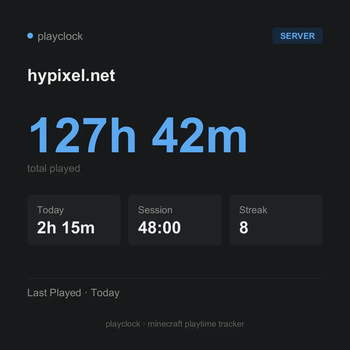
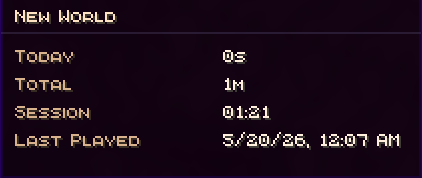
PlayClock is a client-side Fabric mod that tracks your Minecraft playtime directly inside the game. It shows how long you have played on each multiplayer server or singleplayer world, including today’s playtime, total time, current session time, and last played information.
Whether you play on SMP servers, local worlds, LAN worlds, or direct connect servers, PlayClock gives you a clean way to monitor your Minecraft activity without commands, external tools, or server-side plugins. It also includes shareable playtime cards, weekly/monthly recaps, an in-game HUD, menu markers, hover tooltips, and deep Mod Menu customization.
Features
- Tracks playtime for multiplayer servers and singleplayer worlds
- Shows today, total, session, and last played stats
- Reliable singleplayer saving when playing, leaving a world, or closing the client
- Clean in-game HUD with multiple layout styles
- Playtime markers in server and world lists
- Hover tooltips with detailed time information
- Header summary in list screens
- Shareable per-server and per-world playtime cards
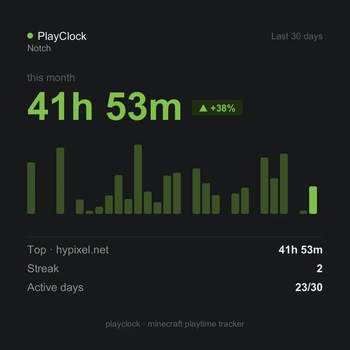
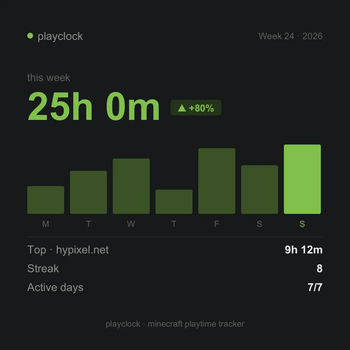
- Weekly and monthly recap cards with charts, streaks, active days, and top target stats
- Copy cards to clipboard or save them as PNG
- Hotkeys to quickly toggle HUD, menu markers, summary screen, and HUD editor
- Mod Menu settings screen
- Custom UI colors, presets, RGB and HEX editing
- Custom card accent colors with 10 presets
- Supports English, Russian, and Ukrainian
- Stores all data locally in JSON
- Fully client-side — no server installation required
Why Use PlayClock?
Minecraft does not clearly show how much time you spend on each server or world. PlayClock fixes that by adding a clean playtime tracker directly into the menus, HUD, and summary screens you already use.
It is useful for players who want to track SMP activity, compare time spent across worlds, monitor current sessions, review weekly or monthly play habits, share recap cards, or simply keep a better overview of their Minecraft playtime.
Supported Versions
- Minecraft 1.21.11
- Minecraft 26.1 / 26.1.1 / 26.1.2
Notes
PlayClock is client-side only. Your playtime data is stored locally on your device. Realms are not supported in the current release.
minecraft playtime tracker, fabric playtime mod, minecraft server time tracker, minecraft hud mod, client side fabric mod, minecraft session tracker, minecraft world playtime, minecraft playtime cards, minecraft weekly recap, minecraft monthly recap, mod menu minecraft
Available Versions
How to Install PlayClock on Your Server
Order Server
Order a Minecraft Java server with at least 3 GB RAM (4 GB recommended).
Set fabric Loader
In the panel under "Egg", select the fabric loader and matching Minecraft version (26.1.2).
Install Mod
Open the mod browser in the dashboard and search for "PlayClock". Click "Install" – done! Alternatively, upload the .jar via SFTP to the /mods folder.
Compatibility
Mod Loaders
Minecraft Versions
26.1.2, 26.1.1, 26.1 (+1 more)
Server-side
✗ UnsupportedRecommended RAM
4 GB(min. 3 GB)Frequently Asked Questions
PlayClock server crashes on startup – what to do?
Most common cause: wrong fabric version or insufficient RAM. Check the server log (latest.log) for "OutOfMemoryError" or "Mixin" errors. With Mado Hosting: ensure at least 3 GB RAM is allocated and the loader matches the mod version (26.1.2). You can switch loaders with one click in the panel.
Is PlayClock compatible with fabric?
PlayClock officially supports fabric for Minecraft 26.1.2, 26.1.1, 26.1. The Mado dashboard automatically detects incompatible loader combinations.
Server lagging with PlayClock – how to optimize performance?
Recommended RAM: 4 GB (per 8 players). Use /spark profiler to check if PlayClock consumes the most tick time. Common fixes: reduce server view-distance to 8-10, install "performant" or "starlight" as supplementary mods on Forge. With Mado Hosting, your server runs on NVMe SSDs with dedicated CPU cores for minimal latency.
Similar Mods






Rent Modded Server
Install PlayClock with just one click on your server.