
Player Corpse
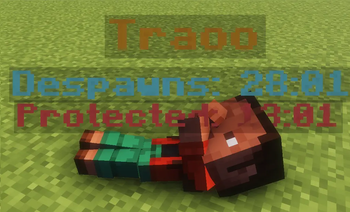
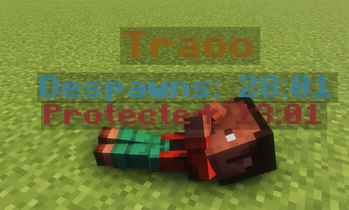
Never lose your loot! Spawns an owner-protected corpse with your player skin, floating hologram timers, and one-click quick retrieval.
Screenshots
About this Mod
🪦 Player Graves (Fabric)
Never lose your hard-earned loot again! When a player dies, their items are safely stored in a highly-detailed, protected corpse grave instead of despawning on the ground

✨ Key Features
👤 Player Skin Rendering: The grave isn't just a block; it accurately renders the fallen player's custom skin for true immersion.
🛡️ Advanced Owner Protection: Graves are protected for the owner by default. It includes a smart "Unlock Timer" that allows others to access the loot only after a configured amount of
time passes.🔮 Floating Hologram: A sleek, floating display above the grave shows crucial details at a glance: the player's name, the time left until it despawns, and the current protection status

- 🎒 Flexible Loot Retrieval: * GUI Mode: Right-click the grave to open a clean GUI and pick specific items.
- Quick Restore:
Shift + Right-clickto instantly restore all items to their original inventory slots.
- Quick Restore:
- ⏳ Smart Despawn System: No more rushing blindly. The grave intelligently stays in the world and won't despawn until the loot is fully handled.
⚙️ Configuration & Compatibility
- Platform: Exclusively built for Fabric (Requires Fabric API).
- Deeply Customizable: Almost everything can be tweaked! Timers, hologram colors, exact corpse poses, XP recovery rates, and void rescue toggles.
💬 Support & Feedback
If you encounter any issues, have suggestions, or need help with the configuration, feel free to contact me
⚙️ Configuration & Compatibility
- Platform: Exclusively built for Fabric (Requires Fabric API).
- Deeply Customizable: Almost everything can be tweaked! Timers, hologram colors, exact corpse poses, XP recovery rates, and void rescue toggles.
🛠️ Click here to view the full default config (graves.json)
{
  "configVersion": 7,
  "general": {
    "despawnTimerMinutes": 30
  },
  "protection": {
    "ownerOnlyAccess": true,
    "unlockWhenDespawnTimerExpires": true,
    "unlockAfterMinutes": 15
  },
  "visual": {
    "showNametag": true,
    "showNametagTimer": true,
    "showProtectionStatusInNametag": true,
    "ownerNameColorHex": "#F7B733",
    "timerColorHex": "#7EF9FF",
    "protectionLockedColorHex": "#FF6565",
    "protectionUnlockedColorHex": "#8CFFB0",
    "hologramVerticalOffset": 0.15,
    "hologramLineSpacing": 0.24,
    "hologramSecondaryScale": 0.92,
    "spawnSoulParticles": true,
    "playSpawnSound": true,
    "playRetrieveSound": true,
    "enableFallingAnimation": true
  },
  "corpse": {
    "scale": 1.38,
    "verticalOffset": 0.22,
    "fallLiftHeight": 1.05,
    "fallAnimationTicks": 16.0,
    "flatRotationDegrees": 98.0,
    "sideRollDegrees": -14.0,
    "yawOffsetDegrees": -18.0,
    "shadowRadius": 0.78,
    "randomPoseCount": 12,
    "forwardOffset": 0.0,
    "sideOffset": 0.0,
    "modelAnchorYOffset": -0.92,
    "headPitchDegrees": 28.0,
    "headYawDegrees": -42.0,
    "headRollDegrees": -18.0,
    "bodyPitchDegrees": 4.0,
    "bodyRollDegrees": -8.0,
    "leftArmPitchDegrees": -128.0,
    "leftArmYawDegrees": 42.0,
    "leftArmRollDegrees": -78.0,
    "rightArmPitchDegrees": -96.0,
    "rightArmYawDegrees": -22.0,
    "rightArmRollDegrees": 56.0,
    "leftLegPitchDegrees": 22.0,
    "leftLegYawDegrees": 8.0,
    "leftLegRollDegrees": 10.0,
    "rightLegPitchDegrees": -26.0,
    "rightLegYawDegrees": -8.0,
    "rightLegRollDegrees": -16.0
  },
  "retrieval": {
    "allowGuiOpen": true,
    "allowQuickShiftRightClick": true,
    "allowItemDeposit": false,
    "dropOverflowOnQuickRetrieve": false,
    "restoreExactInventoryLayout": true,
    "restoreSelectedHotbarSlot": true,
    "preserveRespawnLoot": true
  },
  "locator": {
    "rescueVoidDeaths": true,
    "sendChatMessage": true,
    "giveCompass": true,
    "removeCompassWhenResolved": true
  },
  "experience": {
    "preventDropOnDeath": true,
    "storeOnGrave": true,
    "restorePercent": 0.5,
    "awardWhenGraveEmptied": true,
    "onlyOwnerCanClaim": true
  },
  "despawn": {
    "smartDespawn": true,
    "waitForTimerWhenEmpty": false
  },
  "compatibility": {
    "respectKeepInventoryGameRule": false
  }
}
</details>

```json

### 💬 Support & Feedback
If you encounter any issues, have suggestions, or need help with the configuration, feel free to contact me
Available Versions
How to Install Player Corpse on Your Server
Order Server
Order a Minecraft Java server with at least 3 GB RAM (4 GB recommended).
Set fabric Loader
In the panel under "Egg", select the fabric loader and matching Minecraft version (26.1.2).
Install Mod
Open the mod browser in the dashboard and search for "Player Corpse". Click "Install" – done! Alternatively, upload the .jar via SFTP to the /mods folder.
Compatibility
Mod Loaders
Minecraft Versions
26.1.2, 26.1.1, 26.1 (+5 more)
Server-side
✓ RequiredRecommended RAM
4 GB(min. 3 GB)Frequently Asked Questions
Player Corpse server crashes on startup – what to do?
Most common cause: wrong fabric version or insufficient RAM. Check the server log (latest.log) for "OutOfMemoryError" or "Mixin" errors. With Mado Hosting: ensure at least 3 GB RAM is allocated and the loader matches the mod version (26.1.2). You can switch loaders with one click in the panel.
Is Player Corpse compatible with fabric?
Player Corpse officially supports fabric for Minecraft 26.1.2, 26.1.1, 26.1. The Mado dashboard automatically detects incompatible loader combinations.
Server lagging with Player Corpse – how to optimize performance?
Recommended RAM: 4 GB (per 8 players). Use /spark profiler to check if Player Corpse consumes the most tick time. Common fixes: reduce server view-distance to 8-10, install "performant" or "starlight" as supplementary mods on Forge. With Mado Hosting, your server runs on NVMe SSDs with dedicated CPU cores for minimal latency.
Similar Mods




Rent Modded Server
Install Player Corpse with just one click on your server.