
Graves
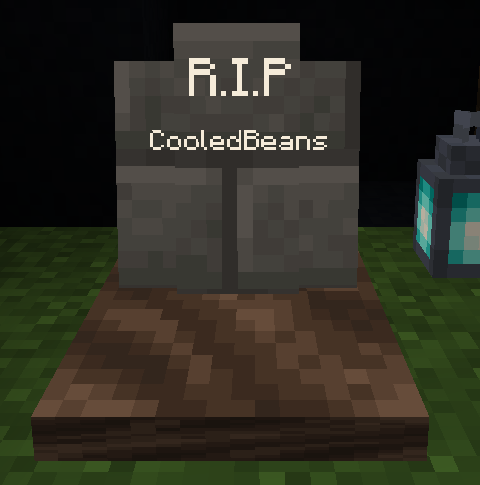
When a player dies they leave a grave which contain their items. Settings are highly configurable
Screenshots
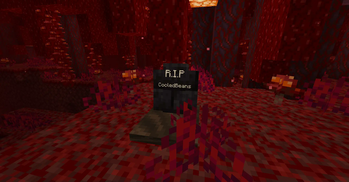
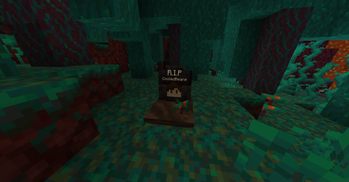
About this Mod
Graves
(Requires the game rule keep_inventory to be true and immediate_respawn to be false)
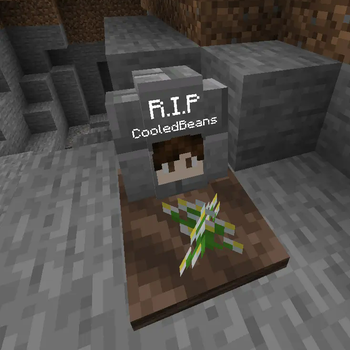
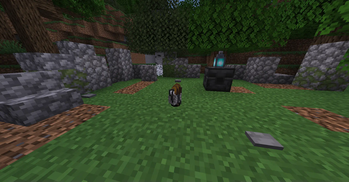
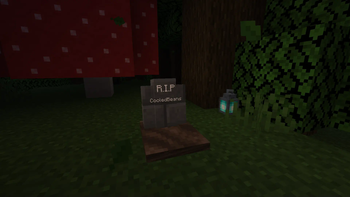
When a player dies they will leave a grave at the site of their death which will will keep their items and experience safe. Left or right click the grave to open it and drop its contents. This datapack is multiplayer-friendly and highly configurable, allowing you to make graves despawn, how long it takes for them to despawn, what items are dropped, and more!
The amount of experience dropped on death no longer has a maximum. E.g. players dying at level 30 will now drop 13 levels of experience rather than 7.
Config Settings
To open the settings menu, run the command /function m_graves:settings/open to open an interactive GUI.
General Settings
Despawn Despawn: Graves will automatically despawn after a specific amount of time, causing them to drop their contents. Note that unlike items, this timer will continue when the grave is not loaded. (Disabled by default with a default time of 10 minutes)
Void Recovery: Dying in or above the void will cause your grave to be placed on solid block within a specified horizontal radius.
Auto-Equip: When a grave is opened, the items will be placed into the slots they were originally in. If a slot is already filled, the item will instead be dropped.
Show Death Coordinates: After a player dies, the coordinates and dimension of their death are shown to them in chat. (Disabled by default)
Death Locator Compass: After a player dies, they will be given a compass which points to the location of their death. The compass also acts as a key if that toggle is enabled. (Disabled by default)
Locked Graves: Graves can only be opened by their owner. (Disabled by default)
Keys: After a player dies they will recieve a key that other players can use to open their grave. The key will disappear when used. (Disabled by default)
Auto Unlock: Locked graves will automatically unlock themselves after a specified amount of time. (Disabled by default with a default time of 5 minutes)
Visual Settings
Glowing Graves: Graves can be seen through walls. (disabled by default)
Display Player Name: Graves display the name of their owner. (enabled by default)
Display Player Head: Graves display the head of their owner. (enabled by default)
Grave Decorators: Graves have randomized vegetation. (enabled by default)
Inventory Settings
Keep Experience: Experience is kept on death. (disabled by default)
Keep Hotbar: Items in the hotbar are kept on death (disabled by default).
Keep armor: Equiped armor is kept on death (disabled by default).
Keep Some Items: Some items are not dropped on death (disabled by default). The list of items defaults to weapons, armor, tools, and other equipment but can be changed in m_graves/tags/items/kept_items.
Lose Some Items: Some items are permanently lost on death (disabled by default). The list of items is empty by default but can be changed in m_graves/tags/items/lost_items.
Some item tags have been made built-in for the convenience of editing the kept and lost items:
#m_graves:equipmentfor weapons, armor, tools, and other equipment#m_graves:mob_dropsfor mob drops#m_graves:rare_itemsfor items that have colored text when unenchanted (netherstars, dragon egg, etc)#m_graves:resourcesfor mined resources (coal, iron, diamond, netherite, etc)#m_graves:smithing_templatesfor all smithing templates
Grave Placement
When a grave is spawned it will move to the floor directly beneath it rather than float in the air. If the player dies in a solid block it will check adjacent empty blocks to spawn the grave. If the player dies in non-flowing lava, it will attempt to place the grave at the surface of the lava.
Available Versions
How to Install Graves on Your Server
Order Server
Order a Minecraft Java server with at least 3 GB RAM (4 GB recommended).
Set datapack Loader
In the panel under "Egg", select the datapack loader and matching Minecraft version (1.21.11).
Install Mod
Open the mod browser in the dashboard and search for "Graves". Click "Install" – done! Alternatively, upload the .jar via SFTP to the /mods folder.
Compatibility
Mod Loaders
Minecraft Versions
1.21.11, 1.21.10, 1.21.9 (+12 more)
Server-side
✓ RequiredRecommended RAM
4 GB(min. 3 GB)Frequently Asked Questions
Graves server crashes on startup – what to do?
Most common cause: wrong datapack version or insufficient RAM. Check the server log (latest.log) for "OutOfMemoryError" or "Mixin" errors. With Mado Hosting: ensure at least 3 GB RAM is allocated and the loader matches the mod version (1.21.11). You can switch loaders with one click in the panel.
Is Graves compatible with datapack and fabric and forge and neoforge and quilt?
Graves officially supports datapack, fabric, forge, neoforge, quilt for Minecraft 1.21.11, 1.21.10, 1.21.9. Note: Forge and Fabric mods are NOT cross-compatible – pick one loader and stick with it. The Mado dashboard automatically detects incompatible loader combinations.
Server lagging with Graves – how to optimize performance?
Recommended RAM: 4 GB (per 8 players). Use /spark profiler to check if Graves consumes the most tick time. Common fixes: reduce server view-distance to 8-10, install "performant" or "starlight" as supplementary mods on Forge. With Mado Hosting, your server runs on NVMe SSDs with dedicated CPU cores for minimal latency.
Similar Mods




Rent Modded Server
Install Graves with just one click on your server.
Details
- License
- Creative Commons Attribution Non Commercial 4.0 International
- Server-side
- Required