
Player Locator Bars
New and Improved Player Locator Bars for 1.21.4+!
Screenshots
About this Mod
Player Locator Bar for Minecraft 1.21.4 - 1.21.5
⚠️For 1.21.6+ players⚠️, check out: Locator Bar Options
No need to wait for a future update!
Elevate your multiplayer experience with the brand new Player Locator Bar, now available for Minecraft 1.21.4 - 1.21.5!
Mojang's preview (1.21.80.20) of this feature has some flaws - this datapack/mod addresses those issues, granting players precise control over tracking, visibility, and appearance.
KEY FEATURES
• Full Control Over Tracking 🧭
Choose whether to be tracked at any time! Opt in or opt out effortlessly.
• Customizable GUI 💻
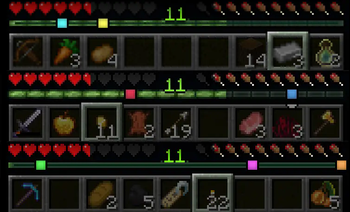
Toggle the Player Locator Bar on or off with a simple right-click, and select from multiple GUI types to suit your style.
• Icon Personalization 💛💜
Choose your favorite color for your tracking icon, instead of leaving it to RNG.
• Seamless In-Game Integration 📈
Intuitively control the Player Locator Feature via gameplay — no need for even more menu options or yet another gamerule!
• No Mods Needed ✅
Works on vanilla worlds! Friends can join hassle-free. Once the datapack/mod is installed by the host, no client installations are needed.
HOW IT WORKS
HUD and Tracking...
• Health
• Armor
• Hunger
• Experience
• Compasses
• Lodestones
• Maps
Every HUD element and tracking tool in Minecraft exists as a natural extension of gameplay and items.
The Player Locator Bar belongs in this ecosystem!
And so...
Meet the Player Locator:
A purpose-designed item that seamlessly integrates the Player Locator Bar into gameplay. No menus, no abstract mechanics!
• Recipe: 1 Compass + 1 Dye
• Right Click the Player Locator to toggle your Player Locator Bar on/off (can be put anywhere in the inventory).
• Place the Player Locator in your inventory to allow tracking. If you no longer want to be tracked, simply take it back out!
• Prefer being Pretty in Pink? Change your icon's color with the Pigment of your choice! You don't have to make a new Player Locator.
• Personalize your own HUD Bar appearance with this command:/trigger player_locator_gui_type
----
Specifications
• Two degree-of-freedom tracking, horizontal and vertical
• 500 block range, expressed via icon transparency
• 16 different colors
• Up to 10 icons displayable at once
Available Versions
How to Install Player Locator Bars on Your Server
Order Server
Order a Minecraft Java server with at least 3 GB RAM (4 GB recommended).
Set datapack Loader
In the panel under "Egg", select the datapack loader and matching Minecraft version (1.21.5).
Install Mod
Open the mod browser in the dashboard and search for "Player Locator Bars". Click "Install" – done! Alternatively, upload the .jar via SFTP to the /mods folder.
Compatibility
Mod Loaders
Minecraft Versions
1.21.5, 1.21.4
Server-side
✓ RequiredRecommended RAM
4 GB(min. 3 GB)Frequently Asked Questions
Player Locator Bars server crashes on startup – what to do?
Most common cause: wrong datapack version or insufficient RAM. Check the server log (latest.log) for "OutOfMemoryError" or "Mixin" errors. With Mado Hosting: ensure at least 3 GB RAM is allocated and the loader matches the mod version (1.21.5). You can switch loaders with one click in the panel.
Is Player Locator Bars compatible with datapack and fabric and forge and neoforge and quilt?
Player Locator Bars officially supports datapack, fabric, forge, neoforge, quilt for Minecraft 1.21.5, 1.21.4. Note: Forge and Fabric mods are NOT cross-compatible – pick one loader and stick with it. The Mado dashboard automatically detects incompatible loader combinations.
Server lagging with Player Locator Bars – how to optimize performance?
Recommended RAM: 4 GB (per 8 players). Use /spark profiler to check if Player Locator Bars consumes the most tick time. Common fixes: reduce server view-distance to 8-10, install "performant" or "starlight" as supplementary mods on Forge. With Mado Hosting, your server runs on NVMe SSDs with dedicated CPU cores for minimal latency.
Similar Mods




Rent Modded Server
Install Player Locator Bars with just one click on your server.