
PlayerPing
Port of the original Player-Ping plugin made by HoneyBerries.
Screenshots
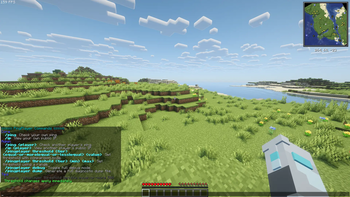

About this Mod
PlayerPing Mod
A server-side port of the original PlayerPing plugin by HoneyBerries, now available for Fabric and NeoForge modded servers.
For Fabric servers, Fabric API is required.
🆕 What's New in 1.1.1
- Fixed the critical admin-permission glitch from 1.1.0 that could block
/pingplayercommands in-game. - Fixed the critical glitch causing crashes on multiple versions of fabric servers (1.21.5 to 1.21.11).
- Added support for modern admin permission setups:
- Vanilla OP users
- Permission node:
playerping.admin - LuckPerms weight fallback (
minLuckPermsWeight, default:8)
- Added
/ip(self lookup) for all players. - Added
/pingplayer debugto toggle full server-side diagnostics. - Added
/pingplayer dumpto generate a full diagnostic report. - Improved in-game help UI with cleaner formatting and readability.
- Added config header warnings and safer config parsing.
✨ Features
- 🔍 Ping Check - Use
/pingfor self,/ping <player>for admin checks. - 🌐 IP Lookup - Use
/ipfor your own public IP,/ip <player>for admin lookup. - 📋 Tablist Ping Display - Ping values shown directly in the tab list with quality colors.
- 🎛️ Live Threshold Management - Edit ping tiers in-game with
/pingplayer threshold .... - 🚦 Quality Colors - Clear ping quality indicators (Excellent → Terrible).
- 🛠️ Debug + Dump Tools - Built-in diagnostics for troubleshooting and crash investigation.
Commands
| Command | Description | Permission |
|---|---|---|
/ping |
Get your own ping | All players |
/ping <player> |
Check another player's ping | Admins |
/ip |
Get your own public IP | All players |
/ip <player> |
Get another player's public IP | Admins |
/pingplayer help |
Show admin command help | Admins |
/pingplayer debug |
Toggle full debug mode on/off | Admins |
/pingplayer dump |
Generate a full diagnostic dump report | Admins |
/pingplayer threshold <excellent|good|fair|poor|terrible> |
Show current threshold for a tier | Admins |
/pingplayer threshold <tier> equal-or-more <value> |
Set tier to >= value | Admins |
/pingplayer threshold <tier> equal-or-less <value> |
Set tier to <= value | Admins |
/pingplayer threshold <tier> equal <value> |
Set tier to exact value | Admins |
/pingplayer threshold <tier> <min> <max> |
Set tier to a range interval | Admins |
Examples
/pingplayer threshold terrible equal-or-more 500/pingplayer threshold fair 101 250/pingplayer debug/pingplayer dump
🧪 Diagnostics
When you run /pingplayer dump, the mod creates a full diagnostic report at:
config/player-ping/crash_reports/
Fabric file naming format:pingplayer_crash_MMddyyyy_fabric.txt
🎨 Ping Quality Indicators
- 🟢 Green — Excellent
- 🟡 Yellow — Good
- 🟠 Gold — Fair
- 🔴 Red — Poor
- 🟥 Dark Red — Terrible
(Default ranges are configurable.)
💻 Installation
- Download the
.jarfor your loader. - Place it in your server
/modsfolder. - Restart the server.
🔖 Compatibility
- Minecraft: 1.21.x
- Loaders: Fabric, NeoForge
- Side: Server-side
- Java: 21
Available Versions
How to Install PlayerPing on Your Server
Order Server
Order a Minecraft Java server with at least 3 GB RAM (4 GB recommended).
Set fabric Loader
In the panel under "Egg", select the fabric loader and matching Minecraft version (1.21.11).
Install Mod
Open the mod browser in the dashboard and search for "PlayerPing". Click "Install" – done! Alternatively, upload the .jar via SFTP to the /mods folder.
Compatibility
Mod Loaders
Minecraft Versions
1.21.11, 1.21.10, 1.21.9 (+9 more)
Server-side
✓ RequiredRecommended RAM
4 GB(min. 3 GB)Frequently Asked Questions
PlayerPing server crashes on startup – what to do?
Most common cause: wrong fabric version or insufficient RAM. Check the server log (latest.log) for "OutOfMemoryError" or "Mixin" errors. With Mado Hosting: ensure at least 3 GB RAM is allocated and the loader matches the mod version (1.21.11). You can switch loaders with one click in the panel.
Is PlayerPing compatible with fabric and neoforge?
PlayerPing officially supports fabric, neoforge for Minecraft 1.21.11, 1.21.10, 1.21.9. The Mado dashboard automatically detects incompatible loader combinations.
Server lagging with PlayerPing – how to optimize performance?
Recommended RAM: 4 GB (per 8 players). Use /spark profiler to check if PlayerPing consumes the most tick time. Common fixes: reduce server view-distance to 8-10, install "performant" or "starlight" as supplementary mods on Forge. With Mado Hosting, your server runs on NVMe SSDs with dedicated CPU cores for minimal latency.
Similar Mods






Rent Modded Server
Install PlayerPing with just one click on your server.