
Player Sculk Sensor
This Minecraft mod introduces a new variant of the sculk sensor, specifically designed to detect only players. It also adds a recipe to craft the sensor
About this Mod
Minecraft Mod: Player-Specific Sculk Sensor
Overview
This mod introduces a specialized variant of the sculk sensor designed to exclusively detect player actions within Minecraft. Unlike the conventional sculk sensor, this version is tailored to sense only specific types of player interactions.
Crafting Recipe
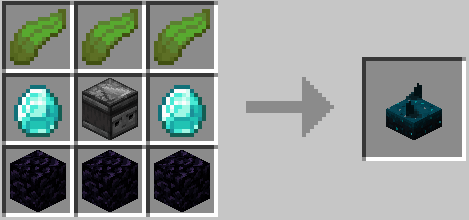
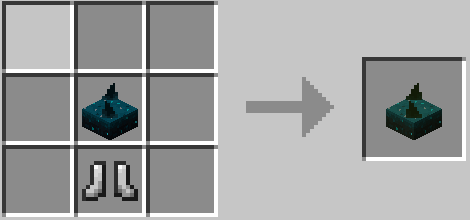
Functionality
- Range: The sensor's detection range is configurable from 1 to 15 blocks. By default, the range is set to 7 blocks.
- Player-Specific Detection: The sensor is engineered to react solely to player-generated actions.
- Event Sensitivity: The sensor is designed to detect specific player-related events, which can be configured. Each assigned a particular sensitivity level.
Config
Change the sensor range or trigger events in the config file:
%USERPROFILE%\AppData\Roaming\.minecraft\config\playersculksensormod-common.toml
Detection Capabilities
Below is a table outlining the possible events the sensor can detect, along with their default sensitivity levels. Note that these events and their sensitivity levels can be customized in the mod's configuration file:
| Event Type | Redstone Signal Strength | Description |
|---|---|---|
| STEP | 1 | Triggered when a player steps on a block. |
| SWIM | 3 | Triggered when a player swims in water or lava. |
| ELYTRA_FREE_FALL | 4 | Triggered when a player free falls with an Elytra. |
| HIT_GROUND | 6 | Triggered when a player hits the ground hard. |
| SPLASH | 6 | Triggered when a player splashes in water. |
| MINECART_MOVING | 6 | Triggered when a player moves a minecart. |
| RING_BELL | 6 | Triggered when a player rings a bell. |
| PROJECTILE_SHOOT | 7 | Triggered when a player shoots a projectile. |
| DRINKING_FINISH | 7 | Triggered when a player finishes drinking a potion. |
| PRIME_FUSE | 7 | Triggered when a player primes TNT. |
| PROJECTILE_LAND | 8 | Triggered when a player's thrown projectile lands. |
| EAT | 8 | Triggered when a player eats something. |
| MOB_INTERACT | 8 | Triggered when a player interacts with a mob. |
| ENTITY_DAMAGED | 8 | Triggered when a player damages an entity. |
| EQUIP | 9 | Triggered when a player equips an item. |
| SHEAR | 9 | Triggered when a player shears a sheep or similar. |
| BLOCK_CLOSE | 10 | Triggered when a player closes a block like a door or trapdoor. |
| BLOCK_UNSWITCH | 10 | Triggered when a player unpresses a button. |
| BLOCK_UNPRESS | 10 | Triggered when a player releases a pressure plate. |
| BLOCK_DETACH | 10 | Triggered when a player detaches a tripwire. |
| BLOCK_OPEN | 11 | Triggered when a player opens a block like a door or trapdoor. |
| BLOCK_SWITCH | 11 | Triggered when a player presses a button. |
| BLOCK_PRESS | 11 | Triggered when a player steps on a pressure plate. |
| BLOCK_ATTACH | 11 | Triggered when a player attaches a tripwire. |
| ENTITY_PLACE | 12 | Triggered when a player places an entity like a boat or minecart. |
| BLOCK_PLACE | 12 | Triggered when a player places a block. |
| FLUID_PLACE | 12 | Triggered when a player places a fluid. |
| BLOCK_DESTROY | 13 | Triggered when a player destroys a block. |
| ENTITY_KILLED | 13 | Triggered when a player kills any entity. |
| FLUID_PICKUP | 13 | Triggered when a player picks up fluid with a bucket. |
| FISHING_ROD_REEL_IN | 14 | Triggered when a player reels in a fishing rod. |
| CONTAINER_CLOSE | 14 | Triggered when a player closes a container. |
| CONTAINER_OPEN | 15 | Triggered when a player opens a container. |
| FISHING_ROD_CAST | 15 | Triggered when a player casts a fishing rod. |
| EXPLODE | 15 | Triggered when an explosion occurs near a player. |
| LIGHTNING_STRIKE | 15 | Triggered when lightning strikes near a player. |
| SHULKER_OPEN | 15 | Triggered when a player opens a Shulker Box. |
Available Versions
How to Install Player Sculk Sensor on Your Server
Order Server
Order a Minecraft Java server with at least 3 GB RAM (4 GB recommended).
Set forge Loader
In the panel under "Egg", select the forge loader and matching Minecraft version (1.18.2).
Install Mod
Open the mod browser in the dashboard and search for "Player Sculk Sensor". Click "Install" – done! Alternatively, upload the .jar via SFTP to the /mods folder.
Compatibility
Mod Loaders
Minecraft Versions
1.18.2
Server-side
✓ RequiredRecommended RAM
4 GB(min. 3 GB)Frequently Asked Questions
Player Sculk Sensor server crashes on startup – what to do?
Most common cause: wrong forge version or insufficient RAM. Check the server log (latest.log) for "OutOfMemoryError" or "Mixin" errors. With Mado Hosting: ensure at least 3 GB RAM is allocated and the loader matches the mod version (1.18.2). You can switch loaders with one click in the panel.
Is Player Sculk Sensor compatible with forge?
Player Sculk Sensor officially supports forge for Minecraft 1.18.2. The Mado dashboard automatically detects incompatible loader combinations.
Server lagging with Player Sculk Sensor – how to optimize performance?
Recommended RAM: 4 GB (per 8 players). Use /spark profiler to check if Player Sculk Sensor consumes the most tick time. Common fixes: reduce server view-distance to 8-10, install "performant" or "starlight" as supplementary mods on Forge. With Mado Hosting, your server runs on NVMe SSDs with dedicated CPU cores for minimal latency.
Rent Modded Server
Install Player Sculk Sensor with just one click on your server.