
Player Statistics Utils
Mod that add multiple player statistique like game play or last connection.
Screenshots
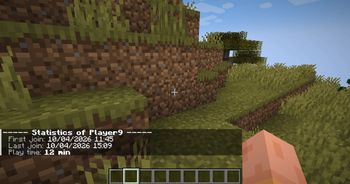
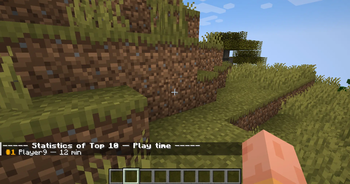
About this Mod
Player Statistics



A Minecraft 1.20.6 Fabric mod that tracks per-player statistics and provides a
lightweight in-game economy. All persistence is delegated to the
Custom Player Data framework.
Requirements
The custom-player-data-1.0.3 mod must be installed.
Currently available features
Tracking
- First join — recorded once on the player's very first connection.
- Last join — refreshed on every connection.
- Play time — accumulated in seconds. The session start time is held
in memory and added to the persisted total on disconnect (or onSERVER_STOPPINGas a safety net)./playerinfoand/leaderboard play_timeadd
the in-progress session to the displayed value so the number is always
current.
Commands
| Command | Permission | Description |
|---|---|---|
/playerinfo |
everyone | Show your own statistics. Play time is formatted as X jours, Y heures, Z min. |
/playerinfo <player> |
op (lvl 2) | Show another player's statistics. |
/leaderboard <stat> |
everyone | Top 10 leaderboard. Built from currently connected players (the framework does not expose offline data). |
Connection counter — join_count
- Increments
join_counton every successful login. - Adds a line to
/playerinfo.
Death tracking — death_count
- Listens to
ServerLivingEntityEvents.AFTER_DEATHand incrementsdeath_countwhenever aServerPlayerEntitydies. - Exposes a
death_countleaderboard via/leaderboard death_count. - Adds a line to
/playerinfo.
Player kill tracking — player_kills
- Increments
player_killson the attacker when one player kills another.
Self-kills are filtered out. - Exposes a
player_killsleaderboard via/leaderboard player_kills. - Adds a line to
/playerinfo.
Hostile mob kill tracking — mob_kills_hostile
- Increments
mob_kills_hostilewhenever a player kills an hostile entity. - Exposes a
mob_kills_hostileleaderboard via/leaderboard mob_kills_hostile. - Adds a line to
/playerinfo.
Passive mob kill tracking — mob_kills_passive
- Increments
mob_kills_passivewhenever a player kills an passive entity. - Adds a "Mobs passifs tues" line to
/playerinfo.
Economy — balance
The whole economy module is gated behind the BALANCE stat. Activating it
unlocks the following commands:
| Command | Permission | Description |
|---|---|---|
/balance |
everyone | Show your own balance. |
/balance <player> |
op (lvl 2) | Show another player's balance. |
/pay <player> <amount> |
everyone | Transfer money. Refused if the source balance is insufficient or the target is yourself. |
/money <player> give <amount> |
op (lvl 2) | Add money to a player's balance. |
/money <player> take <amount> |
op (lvl 2) | Remove money — clamped at zero, never negative. |
/money <player> set <amount> |
op (lvl 2) | Set a player's balance to a specific value. |
Activating balance also adds a styled "Solde" line to /playerinfo and abalance entry to /leaderboard.
Language support
- English
- French
Installation
- Install Fabric Loader for Minecraft 1.20.6: https://fabricmc.net/use/installer/
- Download Fabric API for 1.20.6 and drop the
.jarinto yourmods/folder. - Drop
player-statistics.jarinto the samemods/folder. - Launch the game!
Available Versions
How to Install Player Statistics Utils on Your Server
Order Server
Order a Minecraft Java server with at least 3 GB RAM (4 GB recommended).
Set fabric Loader
In the panel under "Egg", select the fabric loader and matching Minecraft version (1.20.6).
Install Mod
Open the mod browser in the dashboard and search for "Player Statistics Utils". Click "Install" – done! Alternatively, upload the .jar via SFTP to the /mods folder.
Compatibility
Mod Loaders
Minecraft Versions
1.20.6
Server-side
✓ RequiredRecommended RAM
4 GB(min. 3 GB)Frequently Asked Questions
Player Statistics Utils server crashes on startup – what to do?
Most common cause: wrong fabric version or insufficient RAM. Check the server log (latest.log) for "OutOfMemoryError" or "Mixin" errors. With Mado Hosting: ensure at least 3 GB RAM is allocated and the loader matches the mod version (1.20.6). You can switch loaders with one click in the panel.
Is Player Statistics Utils compatible with fabric and quilt?
Player Statistics Utils officially supports fabric, quilt for Minecraft 1.20.6. The Mado dashboard automatically detects incompatible loader combinations.
Server lagging with Player Statistics Utils – how to optimize performance?
Recommended RAM: 4 GB (per 8 players). Use /spark profiler to check if Player Statistics Utils consumes the most tick time. Common fixes: reduce server view-distance to 8-10, install "performant" or "starlight" as supplementary mods on Forge. With Mado Hosting, your server runs on NVMe SSDs with dedicated CPU cores for minimal latency.
Similar Mods






Rent Modded Server
Install Player Statistics Utils with just one click on your server.